Accessing Preceding or Succeeding Processes
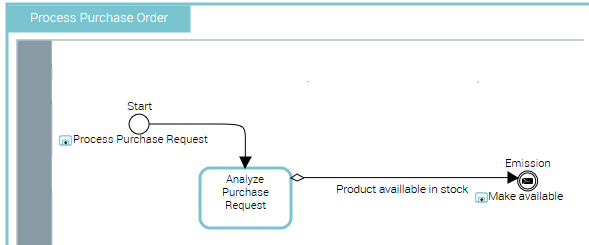
In the following example, the "Process Purchase Order" organizational process is activated after processing of the purchase request, and itself activates the "Make Available" process.
To show, at events level, the processes preceding and succeeding the described process, you must:
• Specify the sequence flows in which the events are involved. For more details, see Connecting Events to Sequence Flows.
• Activate the views enabling access to context-sensitive information.
To activate the context-sensitive view:
1. Click the Views and Details button in the diagram toolbar.
button in the diagram toolbar.2. Select the View External Processes check box.
3. Click OK.