The Touchpoints of a Customer Journey
 A touchpoint describes an interaction between a persona and an enterprise.
A touchpoint is used to identify the organizational elements, used during the customer journey, that could have an impact on customer satisfaction. A touchpoint is connected on the one hand to a step and its channels and painpoints, and on the other hand to business improvement opportunities.
In the diagram, the touchpoints, the channels and the painpoints and the business opportunities are in the same swimlane as the customer journey step.
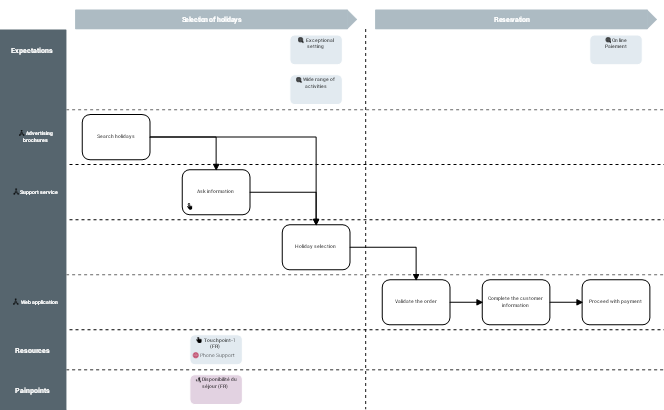
 The list of touchpoints of a customer journey is accessed from the Characteristics property page of the customer journey, in the Touchpoint section.The list of painpoints of a customer journey is accessed from the Characteristics property page of the customer journey, in the Painpoint section.For more details on painpoints, see Defining customer painpoints.
Creating an involved resource in a customer journey
A resource is a means used to perform certain actions.An involved resource may be an actor, an application or an organizational process.
To create an involved resource in a customer journey:
1. Click the Steps tab to access the list of steps in the customer journey.
2. Select the step that you wish to connect to an involved resource and click in the Involved Resource column.
The list of involved resources connected to the mapping of the customer journey is displayed.
3. Select the involved resources that you want to connect to the step.
The selected involved resources appear in the swimlane of the step inside the touchpoint shape.
To create a new involved resource, enter its name. A wizard opens prompting you to specify its type. The new involved resource appears in the list.The touchpoint shape is modified.
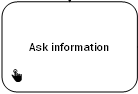
Step connected to a touchpoint
Defining the business capabilities of a customer journey
.A business capability is a set of features that can be made available by a system (an enterprise or an automated system).To specify that a new business capability connected to customer journey step.
1. Click the Steps tab to access the list of steps in the customer journey.
2. Select the step that you wish to connect to a business capability and click in the Involved business capability column.
The list of business capabilities connected to the mapping of the customer journey is displayed.
3. Select the business capability that you want to connect to the step.
The selected business capabilities appear in the swimlane of the step.
To create an business capability, enter its name. The new business capability appears in the list.The selected business capabilities appear inside the paintpoint of the step and their are automatically connected to the step.
The list of business capabilities connected to a paintpoint can be accessed from the Characteristics property page of the painpoint, in the Customer journey section.Defining the business opportunities of a customer journey
An opportunity characterizes an improvement action for one of the composite elements of the customer journey (steps, touchpoint).To specify that a new business opportunity is connected to a customer journey:
1. Click the Steps tab to access the list of steps in the customer journey.
2. Select the step that you wish to connect to a business opportunity and click in the Opportunity column.
The list of opportunities connected to the mapping of the customer journey is displayed.
3. Select the opportunity that you want to connect to the step.
The opportunities selected appear in the swimlane of the step.
To create an opportunity, enter its name. The new opportunity appears in the list.The business opportunities selected appear in the swimlane of the step directly under the touchpoints of the step and are automatically connected.
The list of opportunities connected to a touchpoint is accessed from the Characteristics property page of the touchpoint, in the Opportunities section.