External Environment
This is the external environment in which the organization operates as well as its relationships with this environment. For example, this can include:
• The business, social, regulatory, cultural, competitive, financial and political environments of the organization
• The list of regulations that impact the organization and the associated requirements
• The strengths, weaknesses, opportunities and threats of the organization
• External stakeholders and their requirements
• Key performance indicators
Establishing the external context ensures that external org-units and their objectives and requirements are considered for the development of risk management policies.
To describe the external environment in which the organization operates, HOPEX Risk Mapper enables you to define:
• The list of regulations that impact the organization and the associated requirements, see Regulation Frameworks,.
• The list of external stakeholders of the organization and their objectives and requirements, see External org-units: objectives and requirements.
Regulation Frameworks
 A regulation framework is a set of directives, compulsory or not, defined by a government in a law, by standard bodies as "best practices" or as an internal policy in an organization.
 To activate the option that allows you to view regulation frameworks: in the left pane of the Options, window, select on the letf Compatibility > HOPEX Solution and check the box “Regulation Frameworks” activation (Hopex V4 and lower).
 Accessing the regulation frameworks of the organization
To access the list of regulation frameworks from the Processes pane:
1. Select Control & Risks.
2. Click the Regulation Frameworks tile.
The list of regulation frameworks for the organization is displayed.
 You can import into your repository libraries containing description of a regulation framework with its associated requirements, risk types, risk factors and control types.There can also be regulation frameworks internal to the organization serving as a guide to governance. In this documentation, the terms "Regulation" or "regulation framework" are used to refer to both internal and external regulations.
Create a regulatory framework
To create a regulation framework from the Processes pane:
1. Select Control & Risks > Regulation Frameworks.
2. Click the New button.
3. Enter the regulation framework name and click OK.
The new regulation framework appears in the navigator menu tree.
Regulation framework characteristics
To access the general characteristics of a regulation framework:
 Open the Characteristics property page of the regulation framework.
The characteristics are as follows:
• The Regulation Code , which is internal,
• Application Begin Date of the regulation,
• Application End Date of the regulation
Regulation framework classifications
To access the classifications of a regulation framework:
Open the Classification property page of the regulation framework that interests you.• Risk types, see Risk types;
A risk type defines a risk typology standardized within the context of an organization.If you select Risk Types, the list of risk types associated with the regulation framework appears.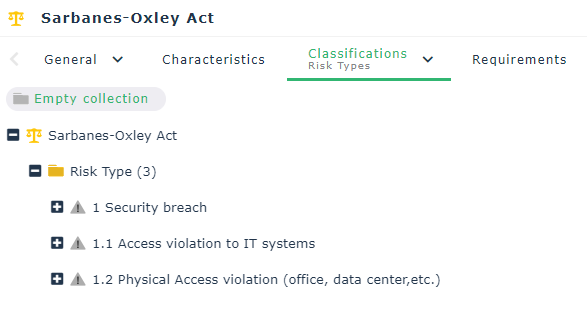
• Risk factors, see Risk factors;
A risk factor is an element which contributes to the occurrence of a risk or which triggers a risk. Several Risks can originate from a same Risk Factor Examples: the use of a hazardous chemical product, the complexity of an application, the size of a project, the number of involved parties, the use of a new technology, the lack of quality assurance, the lack of rigor in requirements definition…• Control types, see Control Types.
A control type allows the classification of controls implemented in a company in accordance with regulatory or domain specific standards (Cobit, etc.).Regulation framework requirements
To access the requirements of a regulation framework:
Open the Requirements property page of the regulation framework that interests you.A requirement is a need or expectation explicitly expressed, imposed as a constraint to be respected within the context of a project. This project can be a certification project, or an enterprise information system organization or modification project.Control systems of a regulation framework
To activate the option that allows you to view control systems: in the left pane of the Options window, select Compatibility > HOPEX Solution on the left and check Activate ‘Control Systems' box.To access the control systems of a regulation framework:
Open Control systems property page of the regulation framework that interests you.A risk and control system is a set of controls that enables the assurance of risk prevention and management, application of internal operating rules, respect of a law or regulation, or achievement of an objective as defined by company strategy.For more details on control systems, see Control Systems. Risk types
By grouping similar potential events, managers can improve their procedure for identifying opportunities and risks.
Enterprises can also classify potential events to ensure that the efforts deployed for identification are exhaustive. This classification can also contribute to subsequent development of an overview of risks.
A risk type defines a risk typology standardized within the context of an organization.A risk type enables risk characterization. For example, a risk type can be regulatory, legal, technical, etc.
Breakdown of risk types will be specific to activities and will depend on the particular business line or activity. Generic risk types can be broken down to a greater or lesser extent into specific risk type levels.
It is important to have a risk type definition framework that is identifiable, measurable and manageable, and to limit the number of levels to assure usable nomenclature.
Validation of nomenclature should ensure that a risk defined in two different entities or activities will have the same definition and the same sense, therefore ensuring system consistency.
In that the system installed should also meet regulatory requirements, it will also be necessary to define a second nomenclature to meet declaration aspects and to enable exchanges with control authorities.
For example, in the banking sector, risk types have been defined in the context of Basel II recommendations. For more details, see http://www.bis.org/bcbs/ HOPEX enables handling of these risk types.
To create a risk types from the Processes pane:
1. Select Control & Risks > Hierarchy View.
2. Expand the regulation framework folder that interests you.
3. Click on the title bar of the Risk Types folder, select New > Risk Type..
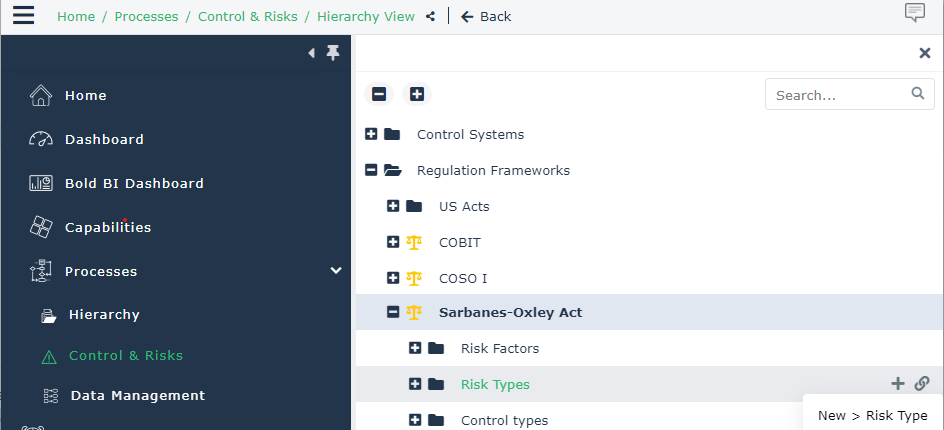
4. Enter the name of the risk type and click OK.
The new risk type appears in the navigator menu tree.
Similarly, you can create a sub-risk type from a risk type.Risk factors
Many risk factors are defined within the framework of international, national or inter-professional regulations, or within the enterprise itself.
A risk factor is an element which contributes to the occurrence of a risk or which triggers a risk. Several Risks can originate from a same Risk Factor Examples: the use of a hazardous chemical product, the complexity of an application, the size of a project, the number of involved parties, the use of a new technology, the lack of quality assurance, the lack of rigor in requirements definition…To access the list of risk factors from the Processes pane:
1. Select Control & Risks > Regulation Frameworks.
The list of regulation frameworks is displayed.
2. Expand the regulation framework folder that interests you.
The Risk factors folder appears.
With each risk, you can associate one or more risk factors, sources of risks that have intrinsic potential to endanger organization operation. For example, dangerous chemical products, competitors, governments, etc.
Control Types
Controls can be defined by referencing the control types defined in the risk and control system concerned.
A control nomenclature frequently used is that defined by the COBIT.
COBITS stands for "Control Objectives for Information and related Technologies".
COBIT is a framework of best practices that now integrates numerous other frameworks and has the support of a large number of world experts. Of the 34 processes defined in COBIT there are 318 corresponding control objectives for which detailed control practices have been identified. The proposed verification guide describes elements necessary for correct understanding of each process, specifies controls to be carried out, provides elements for assessment of conformity to best practices and assessment of risk of non-achievement of objectives.
A control type allows the classification of controls implemented in a company in accordance with regulatory or domain specific standards (Cobit, etc.).To access the list of control types from the Processes pane:
1. Select Control & Risks > Hierarchy View.
2. Expand the Regulation Frameworks folder.
The list of regulation frameworks is displayed.
3. Expand the regulation framework folder that interests you.
The control types folder appears.
External org-units: objectives and requirements
An external org-unit is an external entity that exchanges flows with the enterprise. Example: customer, supplier, government office.Defining the various parties concerned by risks faced by the enterprise is important in the majority of activities. This analysis is generally necessary from the first steps of a risk management project.
External org-units to be considered can be:
• Legislators
• Government agencies, ministries and local administrations
• Interest groups such as ecological lobbies
• Emergency services
• Financial institutions and other private sector fund suppliers
• Customers of the organization, including their managers, executives and personnel
• Suppliers and sub-contractors
• Persons who may be affected by enterprise activities due to their geographical location
• The media
To access all the org-units of the organization, see Organization of internal org-units.
To specify that an org-unit is external to the organization:
1. Open the Characteristics property page of the Org-Unit.
2. In the Internal / External field, select External Org-Unit.
The External Org-Units appear with a green icon in the diagrams and in the navigation trees.