7. SQL Server Databases
All connections to the database are done with ODBC Driver for SQL Server x64.
7.1. How many databases
For any installation there is a minimum of 3 databases for each HAS instance:
• one database to store the technical configuration of HAS
Default naming convention: HAS_”Port Number” or “HAS Cluster name”
• one database to store the business configuration and customization (SystemDb)
Default naming convention: “Database environment name”_”SystemDb”
• At least one database to store repository information
Default naming convention: “Database environment name”_”Repository name”
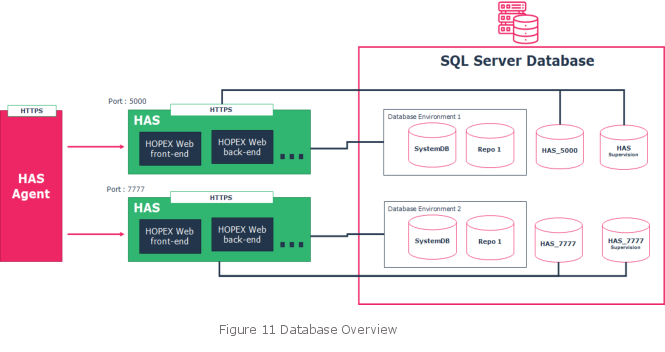
An additional Database might exist to store the data in case of the utilization of the Datamart feature.
7.2. Database size
For HAS main configuration database count 1Gb.
For each SystemDb count 5Gb to start, increase by 5Gb.
For each repository count 5Gb to start, increase by 5Gb.
Commonly seen size:
• After 5 years of usage the SystemDb repository cap up to 15Gb.
• After 5 years of usage, with 15 concurrent users, the repository goes up to 30Gb.
7.3. Database options
The two following settings are required to ensure the usage of the platform.
• Ensure that the database Collation is set to SQL_Latin1_General_CP1_CI_AS
• We recommend the database is created with auto extend property
7.4. User account and privileges
You can either set the connection string to the database with:
• a Native SQL account (preferred choice)
• a Windows account: all users that will connect to the database must be authorized.
HAS and HOPEX will manage:
• database creation
• tables, columns, index, stored procedure
• data insertion and modification.
It is possible to limit database creation access rights with advanced settings.
7.4.1. Native Account
• Standard security policy (preferred choice): the user account is enabled to manage databases.
User type | Comment | Server roles | Database roles | Server permissions |
User with maximum privileges | • Create/delete database • Create/update/delete tables • Create/update/delete columns • Create/update/delete index • Create/update/delete stored procedures • Data read/write access | dbcreator | Db_owner (default role) | View server state Sys.dm_exec_sessions |
• Constrained security policy: the user is not allowed to create the database and thus the database must be created by the DBA.
User type | Comment | Server roles | Database roles | Server permissions |
User with limited privileges | • Create/delete database • Create/update/delete tables • Create/update/delete columns • Create/update/delete index • Create/update/delete stored procedures • Data read/write access | public | Db_owner (assigned manually by DBA) | View server state Sys.dm_exec_sessions |
7.4.2. Windows Account
• Constrained security policy: the user is not allowed to create the database and thus the database must be created by the DBA.
User type | Comment | Server roles | Database roles | Server permissions |
User with limited privileges | • Create/delete database • Create/update/delete tables • Create/update/delete columns • Create/update/delete index • Create/update/delete stored procedures • Data read/write access | public | Db_ddladmin Db_datawriter Db_datareader (assigned manually by DBA) | View server state Sys.dm_exec_sessions |
For more information on this Windows Account, refer to the detailed documentation.
7.5. Physical backup
We recommend you perform physical backups of the databases. Cold or Warm back-ups are supported.
• Frequency: Daily
• Retention: 30 days
You should also back-up all files located in the file server at the same time of the databases backup.
7.6. Administrative tasks
To ensure database optimal performance, of HOPEX Core, you should run (monthly or weekly) batches of the following stored procedures:
• Conservation of repository performance
• Deletion of historical data
• Deletion of private workspace temporary data
• Database de-fragmentation and statistics
• SQL Server storage maintenance plan (service need to be stopped)