Evaluating Application Criticality
Criticality of an application is assessed related to criteria linked with the business, to functionalities covered and to technologies used. The evaluation of an application therefore involves different user types. For more details on users, see HOPEX IT Portfolio Management Profiles.
Assessment can be done:
• in the properties of the applications in question. See Direct Assessment.
• through an evaluation questionnaire sent to the appropriate recipients: see Assessment By Campaign.
The evaluation is supplemented by result analysis tools.
Application Evaluation Criteria
Evaluation of an application relates to:
• its Business Value enabling evaluation of the nesting level of the application in enterprise production.
• Level 1: applications are those which have a limited impact on the company's business objectives. Their absence or malfunction generally does not significantly affect essential business processes. This may include administrative support applications or individual productivity tools.
• Level 2: applications are those which have a moderate impact on the company's business objectives. Their absence or malfunction may lead to disruptions or slowdowns in certain important business processes. This may include applications such as human resources management systems, customer relationship management (CRM) systems or project management applications.
• Level 3: applications are those which have a significant impact on the company's business objectives. Their absence or malfunction can lead to significant financial loss or impact on customer satisfaction. This may include applications such as order management systems, enterprise resource planning (ERP) systems or operations management systems.
• Level 4: applications are those which have an extremely high impact on the company's business objectives. Their absence or malfunction can have major consequences, such as massive revenue losses, serious security problems or regulatory non-compliance risks. This can include central, strategic applications that support essential business operations.
• its Functional Support enabling evaluation of the support level of the application in enterprise process.
• Level 1: the application provides basic support features and resources to help users use the application and perform basic business process tasks. This may include user guides, integrated tutorials, basic documentation and self-service support.
• Level 2: the application offers specific support for functionalities and processes linked to the application itself. This may include context-sensitive help features, task-specific guides, demonstration videos, user discussion forums or e-mail support to answer application-related questions.
• Level 3: the application provides more in-depth assistance by integrating support functionalities directly into business processes. This may include integrated virtual assistants, chatbots or virtual agents that offer real-time assistance while users perform specific tasks.
• Level 4: the application offers individualized assistance to meet the specific needs of users and business processes. This can include consulting services, customized training, tailor-made integrations with other systems, or direct assistance from a dedicated support team.
 For more details on businesses addressed and functionalities covered, see Defining Application Functional Scope.
• its Technological efficiency enabling assessment of evolution possibilities of the application from the techniques that support it.
• Level 1: the application uses technologies that are still under development or are relatively new to the market. These technologies may have promising potential, but they may also involve risks and uncertainties. At this stage, the application can be considered a "proof of concept" or an experimental prototype.
• Level 2: the application incorporates technologies that have been widely accepted and adopted by the industry. These technologies are proven and considered more stable and mature. The application can leverage these technologies to improve functionality and deliver a better user experience.
• Level 3: the application is based on well-established technologies widely used in the industry. These technologies are stable, mature and have widespread adoption. They provide a solid, reliable foundation for the application, enabling optimal performance and easy integration with other systems.
• Level 4: the application explores and adopts the latest technological advances to stay at the forefront of innovation. This may include the use of emerging technologies, advanced concepts such as artificial intelligence, blockchain, machine learning or virtual reality, as well as modern approaches to development and deployment.
For more details on technologies, see Specifying the Technologies of an Application.Direct Assessment
You can evaluate an application at precise moments, by creating a new assessment measure each time.
To create an assessment measure:
1. Click the icon of the application to evaluate and select Properties.
2. In the properties drop-down list, click the Assessment page.
3. Click the Evaluate button.
The assessment creation window opens.
4. Indicate the value of each criterion as well as the evaluation end date.
From evaluation data, a report allows you to classify applications of the installation in a matrix and to rapidly identify the applications to be upgraded. See Reports Embedded in a Portfolio.
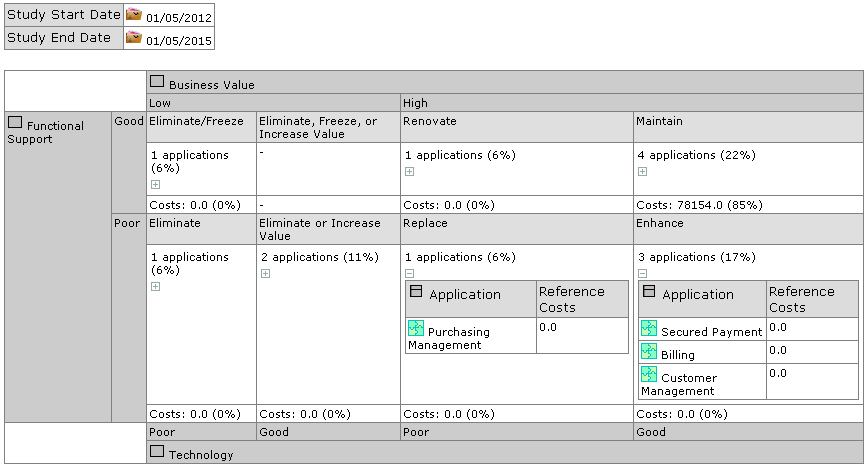
“Application positioning” report on an application portfolio
It is also possible to evaluate a set of applications at the portfolio level. This evaluation is performed by the application portfolio manager. See Evaluating Application Assets.
Assessment By Campaign
The functional administrator can create evaluation campaigns or sessions for data.
On creation of a campaign, questionnaires are sent to designated respondents to obtain qualitative estimations on the objects for which they are responsible.
For more details on campaigns and sessions, see Managing Assessment Campaigns .
Prerequisites for data assessment
Before starting a data assessment campaign, you must first prepare the work environment. Ensure that you have defined respondents for the data, and specify for each one the entity to which he/she is attached as well as an email.
Creating assessment campaigns
To create an assessment campaign:
 Click the navigation menu then Tools > Campaign List.
1. In the edit area, click New.
A new assessment appears.
2. If necessary modify the name of the campaign.
3. In the Assessment template column, select an assessment template.
4. Specify the Begin Date and the End Date.
5. Click Next.
6. In the Scope Selection window, select the objects that define the evaluation context.
The context encompasses the elements of the branch that extends from the object in question up to the root.
If you deselect a node of a branch, only the child elements of this branch are deselected.Next step: Creating an Assessment Session.