Defining the Data Used by an Application
Within the framework of personal data protection, the application owner and data manager have the possibility to document the data used by the applications and the way in which this data is accessed.
The information you can enter on an application is:
• the personal data processed by the application, with access rights (CRUD).
• the rights of the persons concerned.
• the management of information to the persons concerned and their consent.
Connecting Data to an Application
To connect data to an application:
1. Open the properties pages of the application.
 See also Accessing Application Properties.
2. Click the drop-down list then Characteristics.
3. Expand the Data section.
4. Click New.
5. In the wizard that appears, select the object type that comprises the data item (Class) and the object in question.
6. Click Next.
Once the data has been defined, you can specify:
• the access to the data: in create mode (Create), read mode (Read), update mode (Update), or delete mode (Delete).
The content of the Data access column is calculated automatically according to the selected actions ("CRUD" is the default value).• the category of data: biometric, financial, medical, etc. See Defining Data Categories.
• if the application is “Golden Source” or “Golden Copy” of this data.
Analyzing the Impact of an Application on the Data Used
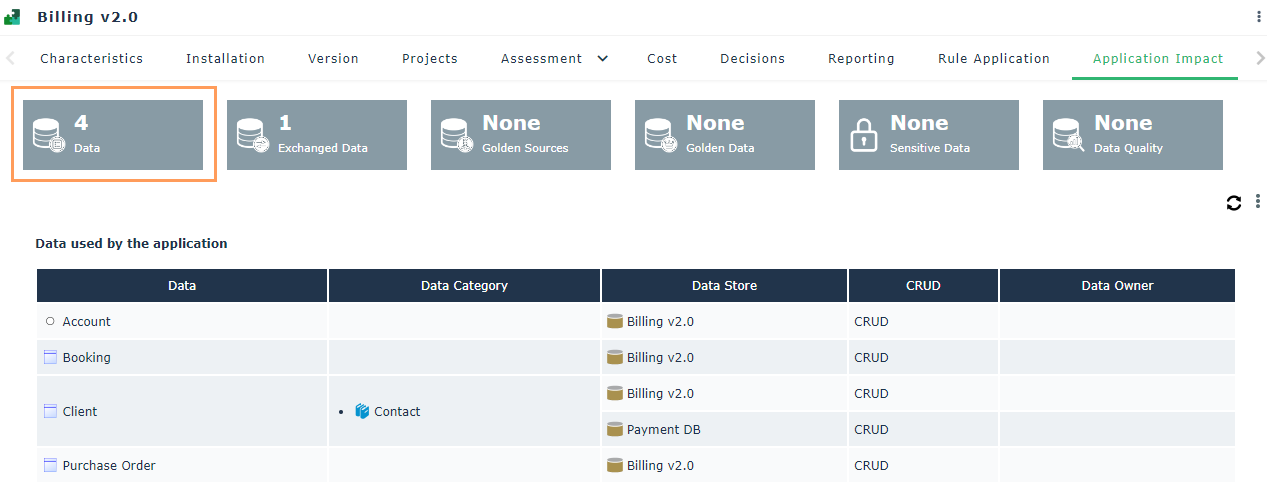
The Application Impact property page allows you to visualize the scope of data used by an application and to measure the impact of its deletion on the data it uses.
To view the data on which an application has an impact:
1. Open the application properties.
2. Click the Application Impact page.
The page displays the following labels:
• Data: data used by the application
• Exchanged Data: data contained in the flows exchanged by the application
• Golden Sources: data for which the application is declared "Golden Source".
• Golden Data: application data classified under the category “Golden data”.
• Sensitive Data: application data classified as "Sensitive Data".
• Quality: quality level of the data used by the application. The report provides an average of the data quality of the latest evaluations performed on all data used by the application, at the level of the application's store or through flow exchanges with other applications.
3. Click a label to view the details.
See in which Applications a Data is Used
Reports allow you to see where data is used in your application assets.
To access these reports in ITBM:
1. Click the navigation menu then Reports > Data Reports.
Data usage report templates appear in the edit area.
For more details on their use, see Data Usage Reports.