Accessing your IT architectures elements with HOPEX Digital Transformation Desktop
To access your enterprise architecture objects:
1. Click the Applications navigation pane.
2. In the navigation pane, click Inventory.
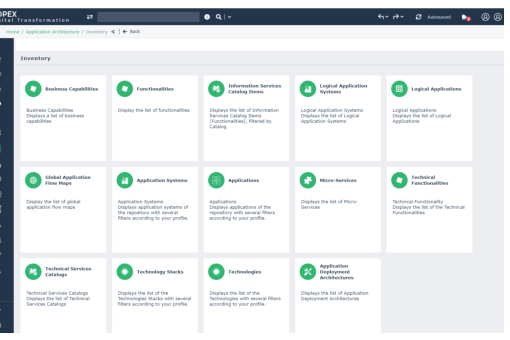
A list of tiles is proposed to help you to manage your IT Architecture elements:
• Business Capabilities and Functionalities enable you to manage IT transformation projects with the HOPEX IT Architecture option.
 .A business capability is a set of features that can be made available by a system (an enterprise or an automated system).A technical functionality is a capability expected from an equipment item (hardware or software) to ensure the operation of a technical element or an application.
• Logical Applications and Logical Application systems enable you to manage your logical architecture elements.
A logical application is a set of application functionalities that is independent of a particular implementation. For example, the classification of all purchase request processing applications implemented in an enterprise.A logical application system is an assembly of other application architectures, logical applications and end users, interacting with application components to implement one or several functions.• Applications;
An application is a software component that can be deployed and provides users with a set of functionalities.• Application Systems;
An application system is an assembly of other application systems, applications and end users interacting with application components to implement one or several functions.• Micro-services;
A micro-service is a software component that can be deployed autonomously, but which does not directly provide an end user service. It can interact with other application services, applications or application systems. This is a deployable software component that uses software technologies. For example: an authentication service, a PDF file printing service.• Technologies;
A technology is a definition or format that has been approved by a standards organization, or is accepted as a standard by the industry.• Application Deployment Architecture;
An application deployment architecture describes one possible deployment configuration of an application. It contains the deployment architectures to be hosted, recommends hosting architectures and identifies required communication techniques (communication protocols and port numbers) they use to communicate with each other. . An application may have several deployment architectures (E.g.: autonomous installation, horizontal or vertical deployment, etc.)• Technical Service Catalogs and Technical Service Catalogs Items describe the list of functionalities covered by a service as well as the technical or functional elements that implement these functionalities.