Before Getting Started
Versions and Prerequisites
In HOPEX
The minimum version of HOPEX required to run HOPEX for SAP Solution Manager 7.2 is HOPEX V1R2 Update 3. A dedicated package must be imported to make this product available.
A dedicated license key SM72 must be provided by MEGA Sales Administration to make this product available in the User Interface.
In SAP Solution Manager
Solution Manager must have at least Version 7.2 with Service Pack 5 (minimum level).
On top of this, the following SAP Notes must be applied, to avoid API or SolMan issues that would impact this connector:
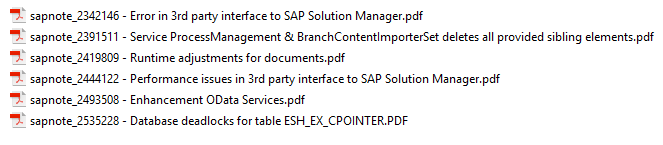
Some preparation and settings are needed before product use.
Configuration Prerequisites
In Solution Manager
In Solution Manager, you can have several Solutions. A Solution represents a global SAP System. With HOPEX synchronization, you can choose the solution for your business objects. Several solutions can be used, but it is recommended you use single solution as the target for all processes.
One key concept in SolMan 7.2 is a branch, which is a component within a solution. In SolMan 7.1, a project was a root object where all information relating to processes and technical information was stored. There is now a new branch concept which will be used by HOPEX for SAP Solution Manager 7.2.
Branch management in Solution Manager is highly dependent on the SAP project scope, rollout and configuration. SAP consulting or third-party integrators should define the best branch strategy for your organization.
Defined branches each contain a Business Processes folder. In this folder, you should create a "HOPEX processes" folder where all objects coming from HOPEX will be stored. Your SolMan administrator should define this folder as read-only for all SAP users, leaving them access to content only to enable transaction mapping. This will prevent creation or modification of process objects by SAP users, which are owned by HOPEX. Of course, the SolMan administrator can have write authorizations to perform manual adjustments for day-to-day operations.
Please refer to your SolMan administrator to define these rights.
In HOPEX
Mapping a HOPEX process structure with a SolMan structure requires analysis to define which HOPEX concept will be mapped with which SolMan concept.
Once performed, this analysis is used to implement this mapping and configure HOPEX for SAP Solution Manager 7.2 tooling.
Configuring SolMan Mapping
Two HOPEX artifacts are used when generating a SolMan hierarchy:
• An extraction operator, which collects all objects related to a root object structure. For example, when mapping a business process, this operator can collect all value streams attached to it, followed by the organizational processes of these value streams and the activities of these organizational processes. You must define your own operator to meet your business processes modeling rules. See "Technical Notes", page 18 for more details.
• A mapping macro, which is called for each object collected by the operator. This macro calculates which SolMan object type will be generated for each HOPEX object. See "Automatic Mapping", page 19 for more details about this mapping macro. A standard macro source code interpreting a one-to-one correspondence between meta-classes (e.g.: business process <-> SolMan Scenario, etc.) is provided as a sample with the product.
Importing a Solution Manager structure
Before performing a mapping or synchronization procedure, a SolMan structure must be imported. A menu option imports basic information from SolMan:
• Branch list
• Document types
• Org units
Another option is used to edit branch information. For each branch, users can select which default document type will be associated with diagram images when these images are pushed into SolMan.
Roles and profiles
The default user profile that has access to SolMan features is the "Process Functional Administrator". As rights and profiles are highly dependent on your organization, no other standard profile has access to HOPEX for SAP Solution Manager 7.2 functions.
However, using standard HOPEX desktop customization, it is quite simple to provide menu options to other roles or profiles in your organization. For example, business process designers can prepare SolMan synchronization, by generating the mapping objects in HOPEX.
However, as interaction with SolMan requires a SAP account, it is recommended that a single user only should have rights to correctly synchronize HOPEX with SolMan.
rights to correctly synchronize HOPEX with SolMan.