Displaying Updates Made in the Repository
To display private workspaces dispatched and the content of their updates:
 To access the content of the Repository Management pane, you must have Expert metamodel access (see Configuring the Metamodel Access).
1. Connect to the Administration desktop.
2. In the Repository Management pane, click the Repository Activity sub-folder.
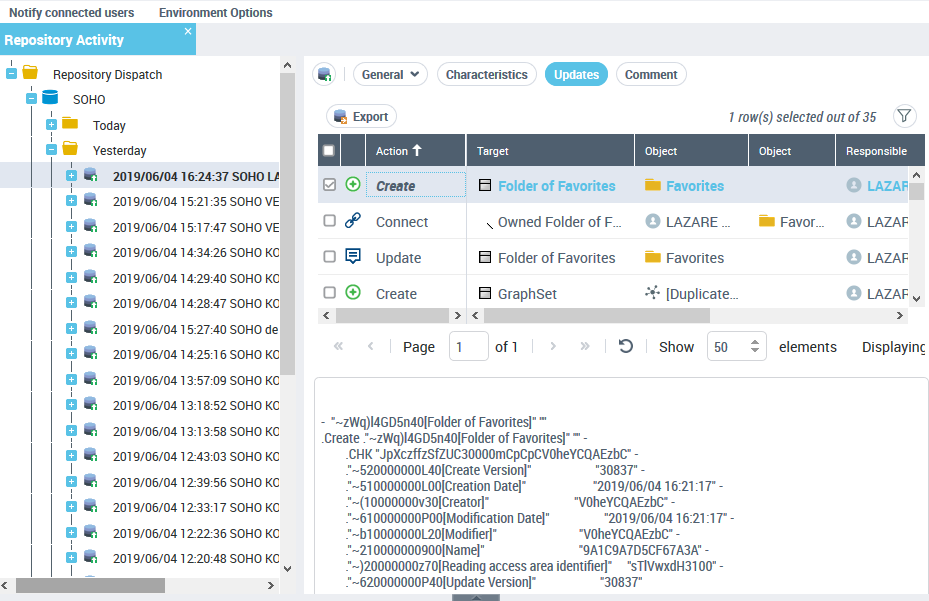
All dispatches performed on the current repository and the system repository are detailed in the edit area.
Dispatches are listed by day, week and month.
3. Expand the folders to access the dispatch you are interested in.
4. Click the dispatch.
The dispatch property pages are displayed in the edit area.
5. Click Updates.
The Updates page details the content of the dispatch in the form of a list of actions displayed in chronological order.
6. Select a line to display the details of the action in the lower frame.