Identity Provider Template
Installing the HOPEX IdentityProvider template
To install the HOPEX IdentityProvider template:
Use the VSIX file provided: Mega.UAS.IdentityProvider.Extension.vsix.
This Visual Studio extension adds a new C# template in Hopex sub-section.
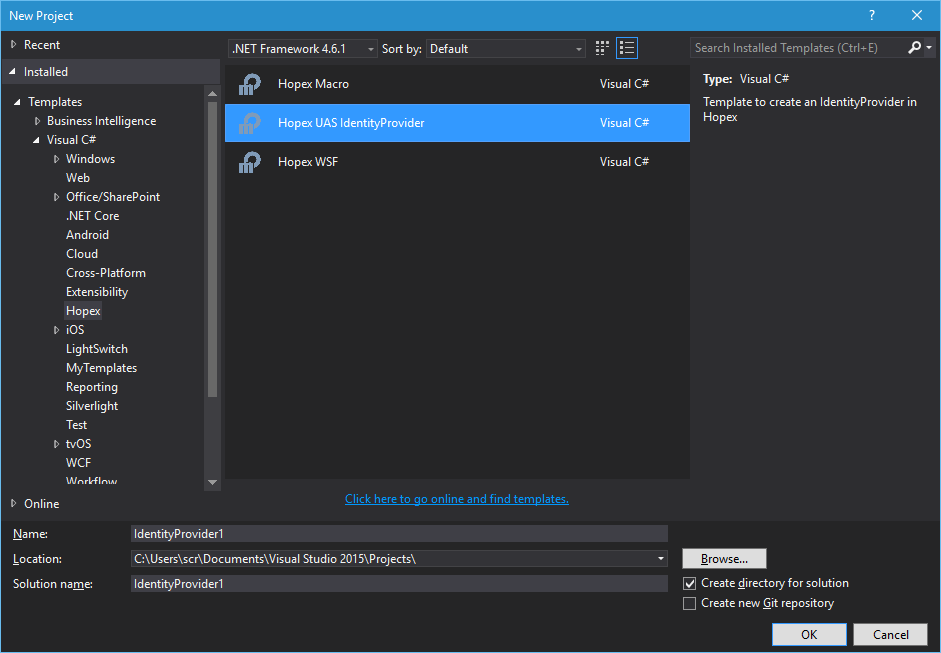
Creating a new identity provider
To create a new provider:
3) Create a new project in Visual Studio.
4) Expand Templates/Visual C#
5) Select Hopex folder
6) Select Hopex UAS IdentityProvider type project.
7) Select .NET Framework 4.6.1
8) Change the project's default name
9) Click OK.
To implement a new provider:
1) Modify the Startup class that contains your identity provider implementation
2) Call your project: MEGA.UAS.IdentityProvider.{ProviderName} .
3) Add all your code in the Configure method. This class use Owin middleware system. Your new identity provider will be integrated into the HOPEX Owin pipeline.
4) Your class must inherit from IIdentityProvider to be recognized by HOPEX as an identity provider.
Example of identity provider implementation: https://github.com/TerribleDev/OwinOAuthProviders

Deploying an identity provider
To deploy the new identity provider:
1) Compile your DLL.
2) Copy the DLL and paste it in the UAS folder bin.