Introduction to Repositories
An environment includes:
• a system repository
• one or several HOPEX repositories
Repository management is carried out in the HOPEX Administration application (not available in the Web Administration Desktop).
System Repository (SystemDb)
The system repository (SystemDb) contains the configuration required to run HOPEX:
• the metamodel, constituting the structure of repositories
• programmed queries and macros
• users and their rights.
A system repository exists for each environment, automatically created in the Sysdb folder at creation of the environment.
HOPEX Repository
A HOPEX repository constitutes the workspace in which modeling data is stored. Several users can connect to it and work simultaneously on the same project.
A repository depends on an environment. Different policies of data distribution can be implemented. You can, for example, work on two repositories:
• a Development repository, which groups all projects
• a Production repository, which groups stable states of each project.
Any user of an environment can access a single repository or all of the repositories of the environment according to his/her profile assignment definition.
Storage type
The HOPEX repository is stored in the RDBMS format (Relational Database Management System): SQL Server.
 For more details on structure of RDBMS storage, see RDBMS Repository Installation deployment guide.
Repository Structure
The files enabling use of a repository are all in the same folder, the location of which is stored in the system repository (SystDb).
A repository comprises "RepositoryName".XXX files of which XXX format depends on the information type:
• .EMV : repository evolution logfile (creation, update, etc.)
• .EMQ : pointer to data stored in the SQL Server
For each repository, folders are created dynamically while the user is working:
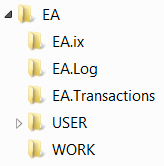
• Data: contains all business documents created in HOPEX.
• Document: contains all reports (MS Word) generated from HOPEX.
• <RepositoryName>.ix: contains the result of indexing for full-text search.
• <RepositoryName>.Log (repository backup logfile): contains repository backup logfiles (enabled by default).
Each private workspace is saved in logfile, .MGL format.
See Backup logfile.• <RepositoryName>.Transactions (private workspace backup logfile: contains files linked to active private workspaces of repository users.
The presence of these files depends both on the server type used and on the options enabled for this repository. These files are:
"CCC.MGL"
where CCC is the code associated with the user (the repository Backup logfile option is enabled).
See Backup logfile.• USER: contains a folder for each user, in which all work files generated by the user are stored. It groups the files created by backup and extraction procedures, as well as control files.
Each folder is named "CCC", where CCC is the code associated with the user.• WORK: contains work files created by administration operations carried out using the administration application.
Accessing Repositories
To access a repository:
1. Connect to HOPEX Administration and select the environment concerned.
2. Expand the Repositories folder.
The list of the repositories in the environment appears.
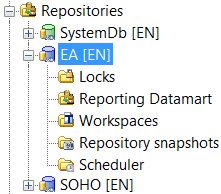
Each repository is represented by:
• an icon
•  system repository
system repository•  data repositories
data repositories• its installation language.