Managing Data Access Dynamically
Writing and reading access diagrams define data access statically. A person sees objects belonging to his/her reading access area, and can modify objects belonging to his/her writing access area.
You can define dynamic access rules for reading or writing data.
A dynamic rule:
• applies to an object for given profiles
• is defined by a macro
Attention regarding confidentiality management
An object is associated with a confidentiality level and you must be careful while setting up dynamic data access rules.
• Static mode:
Confidentiality management is taken into account through reading and writing access diagrams, as they both manage data access statically.
• Dynamic mode:
Confidentiality management might not be always taken into account through data access rules, as they manage data access dynamically.
When a user generates certain types of documentation (e.g.: Web site, report), this documentation is generated with the data access rules of the person who generates it. Once cached, this documentation might not take into account the confidentiality of the user who will read this documentation (e.g.: Web site, report), which might not follows the same data access rules.
Implementing a dynamic data access rule
A dynamic data access rule:
• defines for a person, his/her reading or writing access rights on a given object
 The rule can be applied to several objects.
• can be based on characteristics of an object, a person, or an object and a person
• can be called at object creation
• can be associated with one or several profiles
By default the rule is associated with all the profiles.To manage dynamic data access on an object, you must implement a permission rule:
1. Create the macro for the permission rule.
 For information on the macro writing, see HOPEX Power Studio > Using APIs: Optimizing the macro of a dynamic data access rule.
2. Create the permission rule.
3. (If needed) Define the profile to which the rule applies.
By default the rule applies to all profiles.
4. Associate the permission rule with the object concerned by the rule.
The rule may apply to several objects.
Creating a permission rule (data access rule)
A permission rule is defined by a macro. A permission rule can define reading or writing access rights on an object.
To create a permission rule:
1. In HOPEX (Windows Front-End), from the HOPEX explorer, click Create  .
.
.2. Select Data Access Rule and click OK.
3. In the Creation of Data Access Rule dialog box, enter a Name for the rule and click OK.
4. Access the properties of the rule.
5. In the Characteristics tab, in the Macro field, click the arrow and connect the macro that manages the rule.
6. In the Data Access Type field, select the data access type (Reading or Writing).
In the User Profile frame, if no profile is connected to the rule, the rule applies to all profiles.
7. (To call the data access rule at object creation) In the Texts > _Settings tab enter:
[General]
RelaxCreationTime=0
Associating a permission rule with a profile
To associate a dynamic permission rule with a profile provided by MEGA, you must have the rights to modify HOPEX data, see Managing HOPEX Data Customization.To associate a permission rule with a profile:
1. Open the permission rule properties.
Example: "Action Plan - Writing"
2. Click the Characteristics tab.
3. In the User Profile frame, click Connect  and select the profile with which you want to associate the permission rule.
and select the profile with which you want to associate the permission rule.You can connect several profiles.Associating a permission rule with an object
To associate a dynamic permission rule to an object, you must have rights to modify HOPEX data, see Managing HOPEX Data Customization.To associate a permission rule with an object:
1. Open the object properties.
Example: "Risk" MetaClass.
2. Select the Data Access tab.
3. In the Data Access Rule frame, click Connect and select the rule you want to associate with the object.
and select the rule you want to associate with the object.Use case: data access rule set up
The same permission rules have been set up for both MetaClasses:
• Data Transfer
• Processing Activity
The visibility (access rights) of these MetaClasses is customized according to the user profile:
• Data Protection Officer (DPO)
The Data Protection Officer (DPO) works independently to ensure that an entity is adhering to the policies and procedures set forth in the GDPR. He edits processing activities, carries out pre-assessments as well as DPIAs.
• DPO Correspondent
The DPO Correspondent (Privacy) plays the same role as the DPO but his tasks are restricted to a sub-set of the organization.
• Privacy Team
The Privacy Team is made of operational people who carry out the instructions of the DPO or the Chief Privacy Officer.
The visibility (access rights) of these MetaClasses is managed through three data access rules.
E.g.: the "GDRP - DPO Delegate - Purpose - Reading" data access rule applies to both Data Transfer and Processing Activity MetaClasses for Data Protection Officer (DPO), DPO Correspondent and Privacy Team profiles.
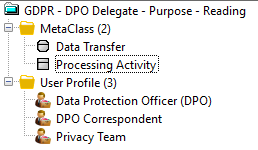
Principle of a permission rule setup on Data Transfer and Processing Activity MetaClasses:
1. Creation of the macros that manage the rules:
• GDPR -Activity Owner PrAct - Readig.Implementation
• GDPR - Purposes -App Owner - ReadingImplementation
• GDPR - DPO Deputy - Processing Reading.Impl
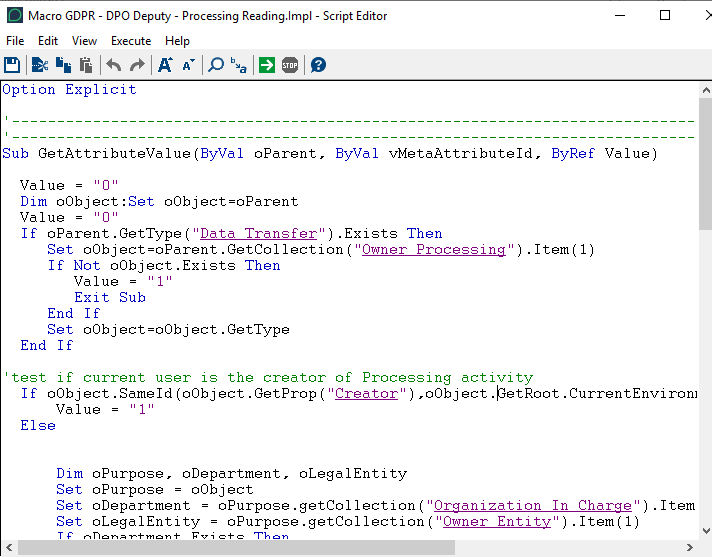
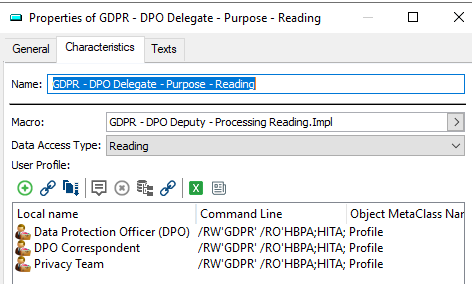
2. Creation of the data access rules associated with each macro:
• Data Access Type: "Reading"
• Profiles associated with the rule: Data Protection Officer (DPO), DPO Correspondent, Privacy Team.
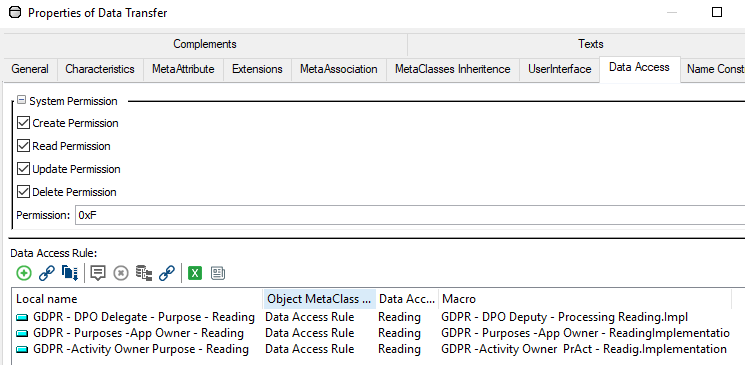
3. Connecting the data access rules with the Data Transfer and Processing Activity MetaClasses.
E.g.: in the Data Transfer MetaClass properties, Data Access tab, the three rules are connected to the MetaClass.