About HOPEX Administration
HOPEX products can be used on a stand-alone workstation or in a configuration including dozens of users.
HOPEX administration is managed from the HOPEX Administration application (Windows Front-End) "Administration.exe" or from the HOPEX Administration desktop (Web Front-End). Some actions can also be performed from the main HOPEX application (Windows Front-End) "Hopex.exe" or from certain HOPEX desktops (Web Front-End).
The HOPEX administration applications (Windows Front-End and Web Front-End) are designed for administrators HOPEX: they are used to manage environments, repositories, users, etc.
A HOPEX installation can contain a large number of environments, repositories and users. To facilitate their management, HOPEX Administration provides all the key concepts and tools required for their administration in a unified hierarchical structure.
This documentation concerns HOPEX administration from the HOPEX Administration application (Windows Front-End).
 To perform HOPEX administration tasks from the Administration HOPEX desktop (Web Front-End), see About HOPEX Administration.
See:
• Managing Users: to create and define users, and user profiles.
• The HOPEX Power Supervisor technical module is necessary to manage profiles.
• The HOPEX Power Studio technical module is necessary to create profiles.
• Managing Repositories: to create, save, restore, check, reorganize, copy and move repositories.
• Managing workspaces: principle of private workspaces, dispatch and refresh private workspaces, and lock management.
• Managing Environments: to create, back up, restore, check, copy and move an environment.
• Managing objects: Advanced administration functions available with:
• the HOPEX Power Studio technical module to extract objects
• the HOPEX Power Supervisor technical module to manage user interface (UI) access, compare objects in two repositories.
• Managing Data Writing Access: to set up management of organized projects in the form of data writing access, from the HOPEX Power Supervisor technical module.
• Managing Data Reading Access: to install a confidentiality strategy using a reading access diagram and access areas.
• Command File Syntax: description of the syntax used in command files.
• Frequently Asked Questions: answers to frequently asked questions and some administration tips.
• Glossary: definition of the main terms used in this guide.
HOPEX structure:
Some basic knowledge is required to understand the architecture and operation of HOPEX.
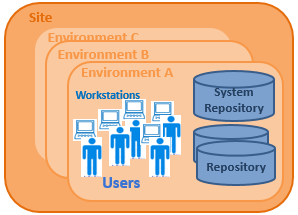
HOPEX is organized in four tiers:
• site
A site groups together everything that is shared by all HOPEX users on the same local network: the programs, standard configuration files, online help files, standard shapes, workstation installation programs, and version upgrade programs.
• environment
An environment groups a set of users, the repositories on which they can work, and the system repository. It is where user private workspaces, users, system data, etc. are managed.
• workstation
A workstation is defined for each computer connected to the environment. A workstation contains programs and a configuration file that allow you to use HOPEX on that machine.
• user
A user is a person (or person group) with a login. A user:
• has a specific workspace in each repository.
• can connect to a repository from all workstations connected to the environment in which this repository is referenced.
• has a specific configuration and is authorized to access specific product functions and repositories in the environment.