Technical Notes
Configuring Access to the SolMan System
All parameters for connecting HOPEX to your SolMan System are in the options available in Windows client:
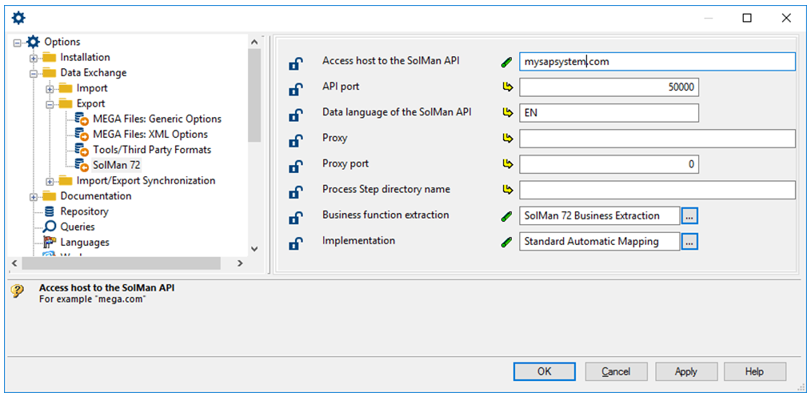
You must enter the URL of your SolMan system, the API Port (50000 is SAP default value) and EN as the data language for the SolMan API.
Please check with your SolMan administrator to obtain the appropriate values for your local installation.
Automatic Mapping
Strategy
First of all, a mapping strategy must be chosen: you must decide how business objects will be mapped with SolMan objects:
• Business objects that must be mapped with "SolMan Folder 72" must be a subclass of "SolMan Folder Mapped Element 72".
• Business objects that must be mapped with "SolMan Scenario 72" must be a subclass of "SolMan Scenario Mapped Element 72".
• Business objects that must be mapped with "SolMan Process 72" must be a subclass of "SolMan Process Mapped Element 72".
• Business objects that must be mapped with "SolMan ProcessStep 72" must be a subclass of "SolMan ProcessStep Mapped Element 72".
• Business objects that must be mapped with "SolMan Organizational Unit 72" must be a subclass of "SolMan Organizational Unit Mapped Element 72".
• Business objects that must be mapped with "SolMan Master Data 72" must be a subclass of "SolMan Master Data Mapped Element 72".
Configuration
Automatic mapping of business objects with SolMan objects require an operator and a mapping macro. Both must be configured in HOPEX options:
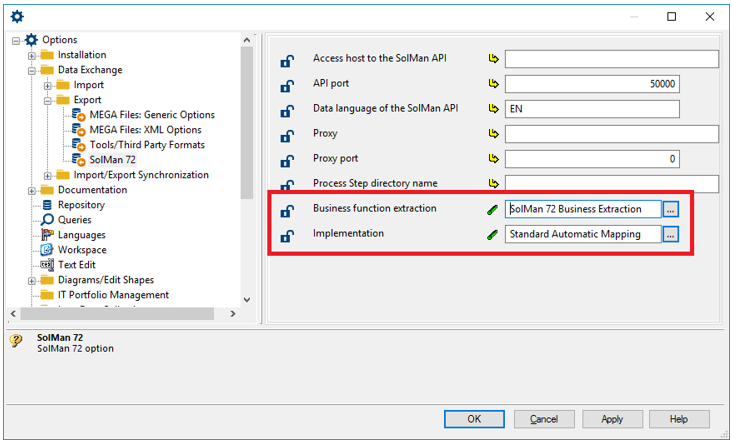
The operator is responsible for the entire business hierarchy. It must be configured to extract all business objects to be mapped to SolMan objects. Only the business objects included in the mapping strategy must be extracted by this operator. In other words, only business objects that are also subclasses of "SolMan Mapping Element 72" should be extracted.
The automatic mapping macro
This macro is responsible for creating the SolMan object (see "Configuring SolMan Mapping", page 5).
The macro ~CN9tyqDFQzO7[Standard Automatic Mapping] can be used to solve simple mapping strategies where each occurrence of a given business MetaClass is always mapped with the same SolMan MetaClass.
The behavior of this macro is configured with an .ini file. This file must be called "sm72mapping.ini" and stored in the user directory.
This .ini file contains a single section: "MappingBToS". Each line must match the following syntax:
<Field of the business MetaClass>=<Field of the SolMan MetaClass (the mapping)>;<Field of the MetaClass that owns the mapping>;<Field of the MetaAssociationEnd of the owner to the mapping>
For instance, here is a sample configuration that maps:
• Business Process with SolMan Scenario 72
• Organizational Process with SolMan Process 72
• Operations with SolMan ProcessStep 72
[MappingBToS]
~pj)grmQ9pG90[Business Process]=~GP1eK3g9Qju6[SolMan Scenario 72];~1R1eUDg9QrM7[SolMan Folder 72];~aWMjeSx9Qj3R[Owned SolMan Scenario]
~gsUiU9B5iiR0[Organizational Process]=~vR1el4g9QXz6[SolMan Process 72];~GP1eK3g9Qju6[SolMan Scenario 72];~xWMjxZx9QrNR[Owned SolMan Process]
~OsUiS9B5iiQ0[Operation]=~dR1eT9g9QP97[SolMan ProcessStep 72];~vR1el4g9QXz6[SolMan Process 72];~cZMjObx9QfSR[Owned SolMan ProcessStep]
If the mapping strategy is too elaborate to be handled by the standard macro, a custom implementation must be provided.
This macro must implement a single method:
public void DoMapping(final Object oContext)
This macro must create or select the right SolMan Object to be mapped with the given business object. The mapping link itself is not defined by this macro and will be automatically defined according to the information provided in this method through the context object.
The context object implements the following interface:
public interface IAutomaticMappingContext {
public MegaObject Element();
public MegaObject MappingGet();
public void MappingSet(final MegaObject mgobjMapping);
public boolean MappingCreatedGet();
public void MappingCreatedSet(final boolean blnMappingCreated);
public MegaObject MappingBranch();
public MegaObject MetaAssociationEnd();
public IAutomaticMappingContext ParentContext();
public MegaObject RootSource();
public MegaObject RootTarget();
}
• Element: returns the business object to be mapped
• MappingGet: returns the SolMan objects that have been mapped in this method.
• MappingSet: returns the SolMan Object that has been created or updated for the given business object.
• MappingCreatedGet: returns true if the mapping has been created, false if the mapping has been updated.
• MappingCreatedSet: specifies if the SolMan Object (returned by the MappingSet method) has been created or updated.
• MappingBranch: returns the current "SolMan Branch 72".
• MetaAssociationEnd: returns the MetaAssociationEnd used to extract the current business object.
• ParentContext: returns the context mapping of the current business object parent.
• RootSource: returns the root business object extracted.
• RootTarget: returns the root business object mapping.