CIO Dashboard
Main dashboard
Portfolio filter
All the widgets shown on this page are filtered by Portfolio. This options list shows the following values:
• _All Applications
• _All Applications without Portfolio
• Each Portfolio
On load, the page will consider the “All Applications” as default.
Drill down
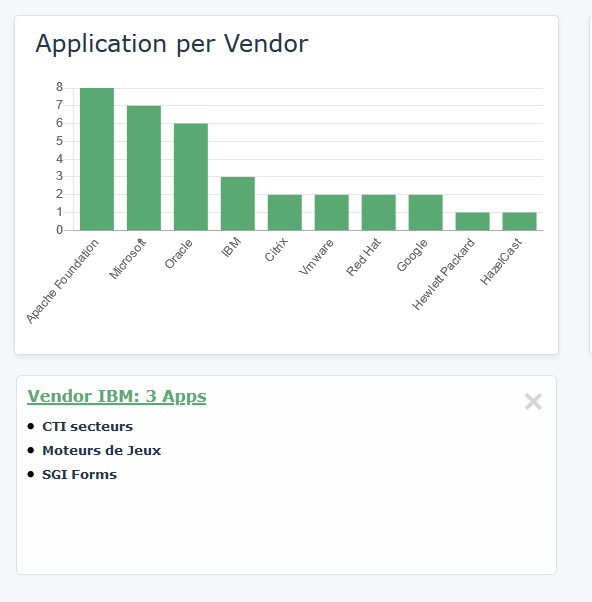
On click, all the widgets but the Application Evolution can be drilled down. A detailed list will be shown at the bottom of the page, as shown below.
Indicators
• Applications
|
|
Key information
|
|
Purpose
|
This widget shows the number of Applications in the selected Portfolio
|
|
Source JSON file
|
DatasArrayPortfolioTechnology.js
|
|
Data structure
|
- (optional) Portfolio
- Application
|
|
Example
|
 |
• Obsolete Applications
|
|
Key information
|
|
Purpose
|
This widget shows the number of Obsolete Applications. This is the list of Applications linked to a Prohibited Technology (linked Software Technology with a ‘Prohibited' Company Standard)
|
|
Source JSON file
|
DatasArrayPortfolioTechnology.js
|
|
Data structure
|
- (optional) Portfolio
- Application
- Technology – Company Standard = Prohibited
|
|
Example
|
 |
• Capabilities
|
|
Key information
|
|
Purpose
|
This widget shows the number of Capabilities supported by the Applications of the selected Portfolio. This is the list of Capabilities linked to at least one Application of the Portfolio.
|
|
Source JSON file
|
DatasArrayPortfolioBusinessCapability.js
|
|
Data structure
|
- (Optional) Portfolio
- Application
- Business Capability
|
|
Example
|
 |
• Vendors
|
|
Key information
|
|
Purpose
|
This widget shows the number of Vendors providing Technologies supporting the Applications of the selected Portfolio. This is the list of Org Units typed as Vendor linked to at least one Technology supporting at an Application of the Portfolio.
|
|
Source JSON file
|
DatasArrayPortfolioTechnology.js
|
|
Data structure
|
- (Optional) Portfolio
- Application
- Technology
- Vendor
|
|
Example
|
 |
Application Evolution
This widget cannot be drilled down.
|
|
Key information
|
|
Purpose
|
This shows the number of Applications by state over time for the selected perimeter(s)
|
|
Source JSON file
|
DatasArrayPortfolioTimePeriod.js
|
|
Data structure
|
- (optional) Portfolio
- Application
- Object Life
- Time Periods
|
|
Example
|
 |
Technology Compliance
|
|
Key information
|
|
Purpose
|
This shows the number of Technologies supporting Applications of the selected perimeter(s) broken down by Company Standard
|
|
Source JSON file
|
DatasArrayPortfolioTechnology.js
|
|
Data structure
|
- (optional) Portfolio
- Application
- Technology – Company Standard
|
|
Example
|
 |
Privacy management
|
|
Key information
|
||||||||||||||||||||||||||||
|
Purpose
|
This shows the number of Application within the selected perimeter(s) that are compliant to the privacy management
|
||||||||||||||||||||||||||||
|
Source JSON file
|
DatasArrayPortfolioTechnology.js
|
||||||||||||||||||||||||||||
|
Data structure
|
- (Optional) Portfolio
- Application
o GDPR Content of Notice
o GDPR Content
Logic
|
||||||||||||||||||||||||||||
|
Example
|
 |
Applications per Capability
|
|
Key information
|
|
Purpose
|
Shows the number of Applications by Capability. The output is a bar chart filtered on the top 10 Capabilities sorted by descending number of supporting Applications
|
|
Source JSON file
|
DatasArrayPortfolioBusinessCapability.js
|
|
Data structure
|
- Application
- Business Capability
|
|
Example
|
 |
Applications per Vendors
|
|
Key information
|
|
Purpose
|
Shows the number of Applications by Vendor. The output is a bar chart filtered on the top 10 Vendors sorted by descending number of supported Applications
|
|
Source JSON file
|
DatasArrayPortfolioTechnology.js
|
|
Data structure
|
- Application
- Technology
- Vendor
|
|
Example
|
 |
Hosting model
|
|
Key information
|
|
Purpose
|
Shows the number of Applications by Hosting model
|
|
Source JSON file
|
DatasArrayPortfolioTechnology.js
|
|
Data structure
|
- Application – Hosting Model
|
|
Example
|
 |
Technology Obsolescence
|
|
Key information
|
|
Purpose
|
Shows the number of Applications by Technology Obsolescence, which
|
|
Filter
|
Lifecycle status
|
|
Source JSON file
|
None. The data is generated within the Hopex Descriptor
|
|
Data structure
|
- Application – Application Type
- Object Lifecyle - Time Period
- Technology – End of Support / End of Extended Support
Logic: At a given point in time, if a Technology linked to a given Application is no longer supported, then this Application is obsolete
|
|
Example
|
 |
Strategic Planning
|
|
Key information
|
|
Purpose
|
The report shows an automatic box in box report. This is a graphical view of the Business Capability Map hierarchy.
This is a standard Hopex Report
|
|
Filter
|
A list of existing Business Capability Map allows to switch from one to another
|
|
Source JSON file
|
None
|
|
Data structure
|
- Business Capability Map
- Business Capability and their Components to the 4th level
|
|
Example
|
 |
Rationalization
Rationalization Map
|
|
Key information
|
|
Purpose
|
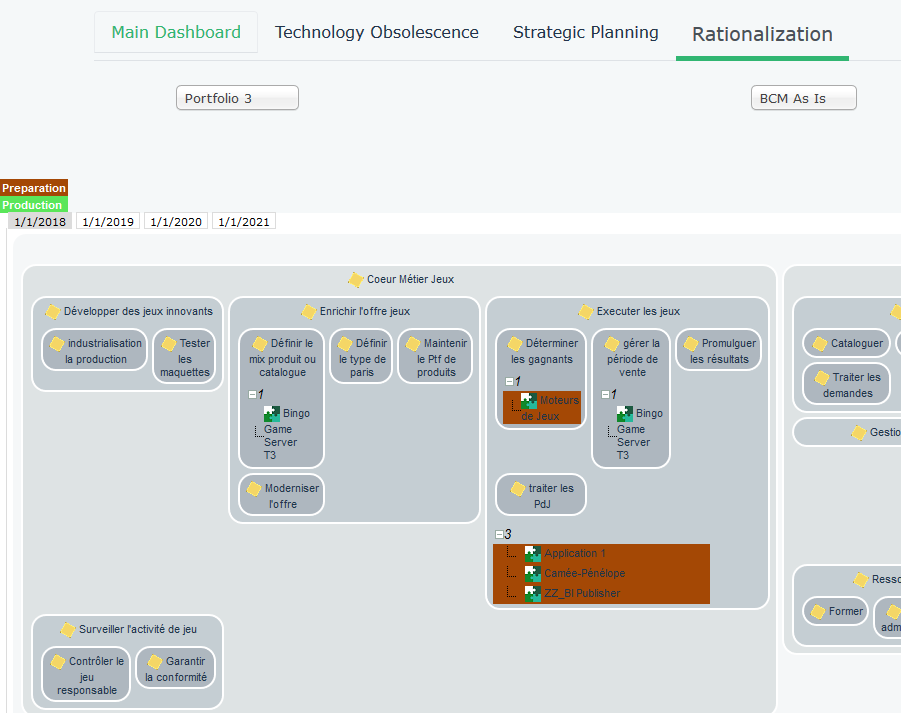
The report shows an automatic Timed box in box report. This is a graphical view of the Business Capability Map hierarchy, overlayed with the supporting Applications.
This is a standard Hopex Report
|
|
Filter
|
- A list of existing Business Capability Map allows to switch from one to another
- Portfolio to narrow down the overlayed Applications
- Time spots to assess the evolution over time
|
|
Source JSON file
|
None
|
|
Data structure
|
- Business Capability Map
- Business Capability and their Components to the 4th level
- For each Business Capability, the supporting Applications within the selected Portfolio, colour coded with their lifecycle status at the selected Time sport
|
|
Example
|
 |
Rationalization Table
|
|
Key information
|
|
Purpose
|
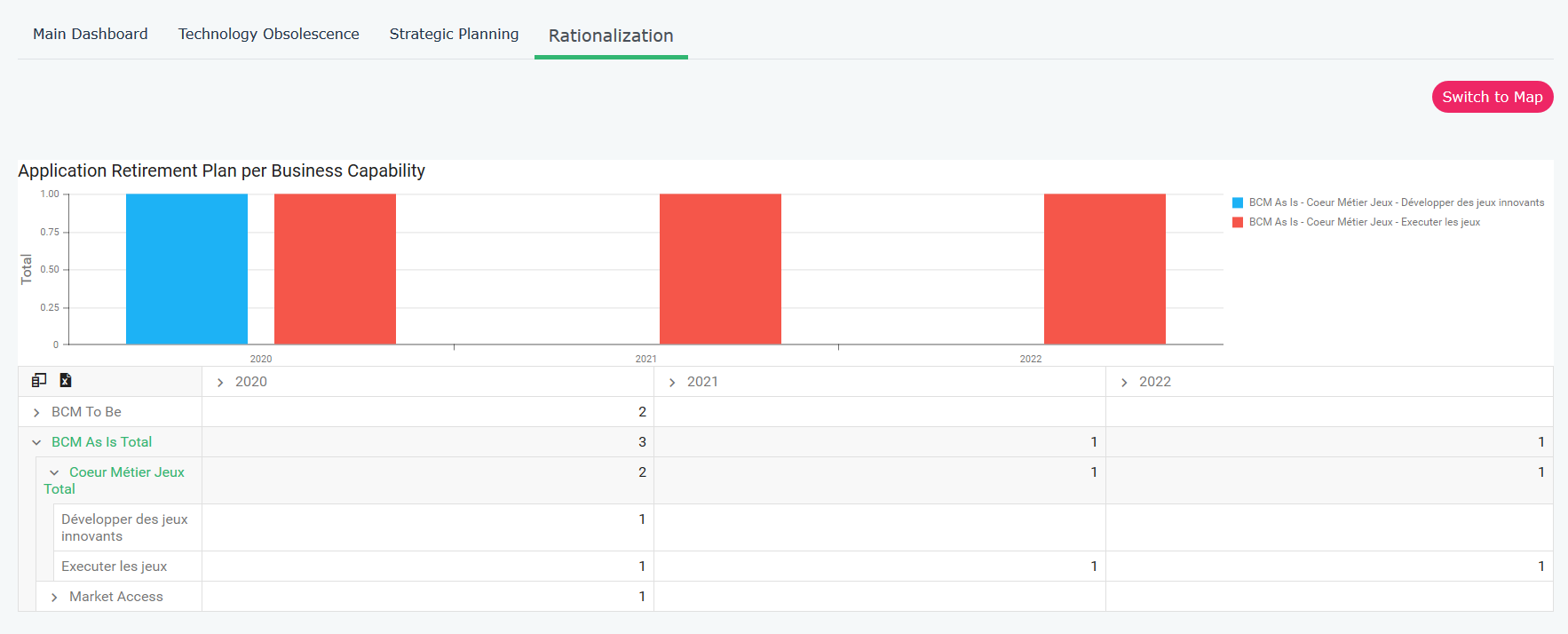
This shows the Application Retirement Plan per Capability
|
|
Filter
|
None
|
|
Source JSON file
|
DatasArrayBCMRationalization.js
|
|
Data structure
|
- Business Capability Map
- Business Capability level 1
- Business Capability level 2
- Application – Decommission Date
|
|
Example
|
 |