Import file
You can call the Import file service in one of the following ways:
 Call asynchronously in rest approachCall synchronously in rest approachCall with SignalR/WebSocket approach
Asynchronous method
URL
To start the import asynchronously in rest approach, you should use the URL:
http://<serverUrlWithPort>/restapi/v1/environments/<id_env>/repositories/<id_repo>/profiles/<id_proifle>/import
Header parameters
You should set the header variables.
|
Header
|
Description
|
|
Accept
|
Format of your return form (application/json or application/xml)
|
|
Authorization
|
See previous section
|
Format Post
You should submit your request in Post as multiple part.
Body Parameters
You should set the body parameters.
|
Input
|
Description
|
Format
|
|
Parameter
|
validate
Indicates when the import changes are flushed (for more information, see HOPEX Administration (Web) - Importing a command file in HOPEX)
type: string
values: Never, Standard, AtEnd, AtEndOnSuccess
|
Json format :
{
"validate":"{value}"
}
|
|
File
|
File to import. Its size should be less than 30Mb
|
File attached in multiple part
|
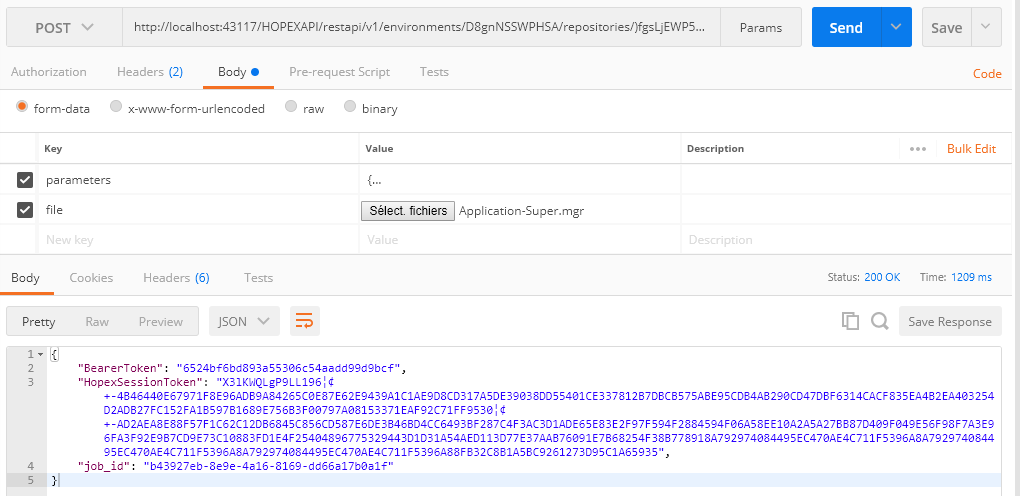
Result
The result can be in XML or Json.
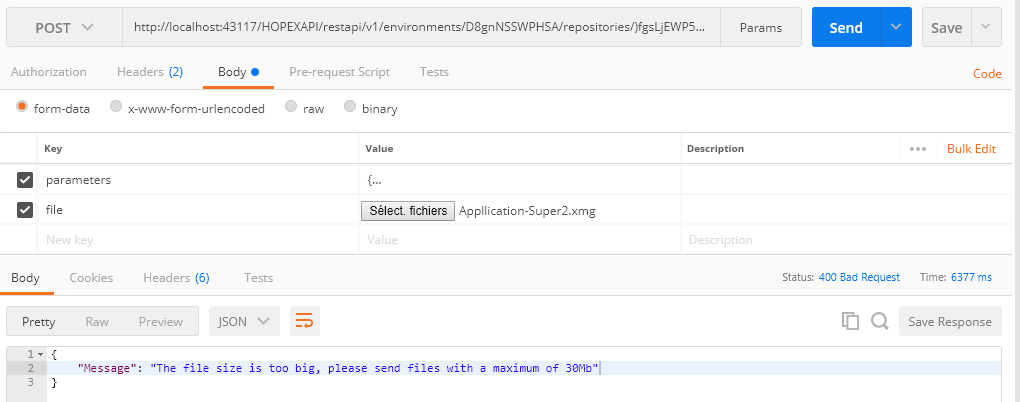
If the file size is more than 30Mb a message should be displayed.
Pooling your process
URL
To check the import progression status, in rest approach, use the URL:
http://<serverUrlWithPort>/restapi/v1/environments/<id_env>/repositories/<id_repo>/profiles/<id_proifle>/import/job/<job_id>
Note: The job_id is returned by the start method call previously.
Header parameters
You should set the header variables.
|
Header
|
Description
|
|
Accept
|
Format of your return form (application/json or application/xml)
|
|
Authorization
|
See previous section
|
Result
The following responses are possible:
Response 1 (in progress){ "job_status": "RUNNING", "job_info": null}
Response 2 (done without rejects){"job_status": "TERMINATED", "job_info": { "reason": "DONE", "rejects": false }}
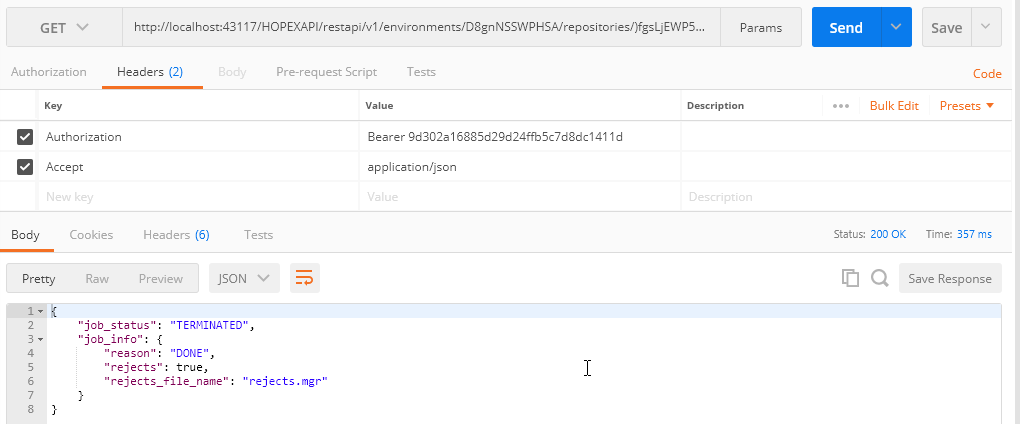
Response 3 (done with rejects){"job_status": "TERMINATED", "job_info": { "reason": "DONE", "rejects": true, "rejects_file_name": "<rejects_filename>" }}
Example, if the Process is terminated with rejects:
Get the Reject files
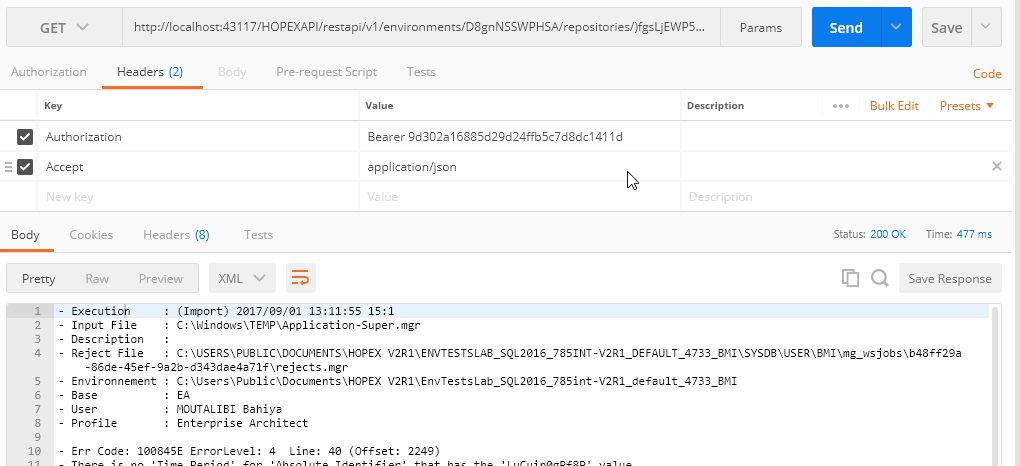
If your import has rejected some data, you can get it by querying the reject endpoints.
URL
To get the rejects lines, in rest approach, you should use the URL:
http://<serverUrlWithPort>/restapi/v1/environments/<id_env>/repositories/<id_repo>/profiles/<id_proifle>/import/job/<job_id>/rejects
Note: The job_id is returned by the start method called previously or the check status.
Header parameters
You should set the header variables.
|
Header
|
Description
|
|
Accept
|
Format of your return form (application/json or application/xml)
|
|
Authorization
|
See previous section
|
Result
Call synchronous method
This workflow can be simplified for simple method by a simple synchronous method which upload the file, check the macro status and return the rejected result if it is needed.
Note: this method is not advised if you upload a large file (more than 4Mb).
URL
To call the import in rest approach, you should use the URL:
http://<serverUrlWithPort>/restapi/v1/environments/<id_env>/repositories/<id_repo>/profiles/<id_proifle>/syncimport
Header parameters
You should set the header variables.
|
Header
|
Description
|
|
Accept
|
Format of your return form (application/json or application/xml)
|
|
Authorization
|
See previous section
|
Format Post
You should submit your request in Post as multiple part
Body Parameters
You should set the body parameters.
|
Input
|
Description
|
Format
|
|
Parameter
|
validate
Indicates when the import changes are flushed (for more information, see HOPEX Administration (Web) - Importing a command file in HOPEX)
type: string
values: Never, Standard, AtEnd, AtEndOnSuccess
|
Json format :
{
"validate":"{value}"
}
|
|
File
|
File to import. Its size should be less than 30Mb
|
File attached in multiple part
|
Result
These results are the same results as the asynchronous method.
Call with SignalR
SignalR is a modern approach shipped by Microsoft to enable real time communication. A SDK Library has provided by Mega to allows you to import, export or get dataset from this way.
To use this SDK, you need a HOPEX 785 fully installed and worked correctly.
To Call from SignalR:
1. Get the SDK Mega.WebServices.ImportClient.Core.
2. Create a c# project like a console, a web site or a WPF.
3. Instanciate your Client process.
static ImportProcessClient ImportProcessClient = new ImportProcessClient();
4. Set your client settings:
ImportProcessClient.Settings = new ImportSetting
{
ImportSettingsUas = new ImportSettingsUas
{
UasUrl = $uasUrl,
UasInfo = $uasInfo,
EnvironmentId = $environmentId,
RepositoryId = $repositoryId,
ClientId = $clientId,
ClientSecret = $clientSecret,
ClientScope = $scopes,
Password = $password,
UserName = $userName,
ProfileId = $profileId,
Scopes = $scopes
},
ImportServiceUrl = $ImportServiceUrl,
ImportHubSignalrUrl = ConfigurationManager.AppSettings["ImportHubSignalrUrl"],
RejectedFilePath = ConfigurationManager.AppSettings["RejectFileName"]
};
5. Request a Token from UAS
var token = ImportProcessClient.GetToken().Result;
6. Post your file to be imported
var uploadResult = ImportProcessClient.PostFile(token, filePath);
7. Instanciate your SignalR Channel
ImportProcessClient.GetRejectFileFailed = $GetRejectFileFailed;
ImportProcessClient.GetRejectFileFinished = $GetRejectFileFinished;
ImportProcessClient.CheckStatusFailed = $CheckStatusFailed;
ImportProcessClient.CheckStatusFinished = $CheckStatusFinished;
ImportProcessClient.StartWaitProcessImport(uploadResult);
Where:
|
$uasUrl,
|
The url to access to UAS it should be in format http(s)://<yourserver>/<uasWebSite>/ connect/token see the UAS End points
|
|
$uasInfo,
|
The url to access to UAS it should be in format http(s)://<yourserver>/<uasWebSite>/ connect/userinfo see the UAS End points
|
|
$environmentId,
|
The environment id gotten from your environment list
|
|
$repositoryId,
|
The id of your repository it can be gotten from your repository list
|
|
$clientId,
|
The UAS Client ID
|
|
$clientSecret,
|
The UAS client secret
|
|
$scopes,
|
The UAS Scopes to use
|
|
$userName,
|
Your User name in Hopex
|
|
$password,
|
Your User Password
|
|
$profileId,
|
Your Profile Id
|
Events invoked
|
$GetRejectFileFailed
|
Event called when the reject file cannot be retrieved from the server
|
|
$GetRejectFileFinished
|
Event called when the reject file is finished to be retrieved from the server
|
|
$CheckStatusFailed
|
Event called when the check status failed
|
|
$CheckStatusFinished
|
Event called when the check status is finished
|