Toolkit
Metamodel
Accessing an attribute translation using APIs
To access an attribute translation using APIs, you need to use the MegaAttribute component.
To get the “Att” MegaAttribute component, enter:
|
VB Script
|
Either:
set myMAtt = myObject.GetProp("Att", "Object")
or:
set myMAtt = myObject.GetAttribute("Att")
MegaAttribute mgattMA = (MegaAttribute) myObject.getProp("Att", "Object");
|
|
Java
|
MegaAttribute mgattMA = myObject.getAttribute("Att");
|
After, you can refer to the MegaAttribute interface.
Example:
|
VB Script
|
'MegaContext(Fields)
set myConcept = GetObjectfromID("~ezHXsMuE3fG0[Analisi]")
set myAtt = GetObjectfromID("~ezHXsMuE3fG0[Analisi]").GetAttribute("Name")
print "Current language: " & myAtt.DescriptionObject.GuiName & " : '" & myAtt & "' or: " & myAtt.Value
print "In Spanish: " & myAtt.~n97OO26RrO00[Espanol].DescriptionObject.GuiName & " : '" & myAtt.~n97OO26RrO00[Espanol] & "' or: " & myAtt.Translate("~n97OO26RrO00[Espanol]").Value
print "In GUI Language: " & myAtt.GuiLanguage.DescriptionObject.GuiName & " : '" & myAtt.GuiLanguage & "' or: " & myAtt.Translate("GuiLanguage").Value
' in 2007 SP1:
for each transl in myAtt.DescriptionObject.Translations
set myTranslation = myAtt.Translate(transl.LanguageID)
print "Traduction in " & myTranslation.DescriptionObject.GuiName & " : " & myTranslation.Value
next
|
|
Java
|
MegaObject mgobjConcept = mgRoot.getObjectFromID("~ezHXsMuE3fG0[Report]");
MegaAttribute mgattAtt = mgobjConcept.getAttribute("Name");
mgRoot.callFunction("~U7afnoxbAPw0[MessageBox]", " Current language: " + mgattAtt.getDescriptionObject().invokePropertyGet("GuiName") + " : " + mgattAtt.getValue());
mgRoot.callFunction("~U7afnoxbAPw0[MessageBox]", "In Spanish: " + ((MegaAttribute) mgattAtt.invokePropertyGet("~n97OO26RrO00[Espanol]")).getDescriptionObject().invokePropertyGet("GuiName") + " : " + mgattAtt.translate("~n97OO26RrO00[Espanol]").getValue());
mgRoot.callFunction("~U7afnoxbAPw0[MessageBox]", "In GUI Language: " + ((MegaAttribute) mgattAtt.invokePropertyGet("GuiLanguage")).getDescriptionObject().invokePropertyGet("GuiName") + " : " + mgattAtt.translate("GuiLanguage").getValue());
//in 2007 SP1:
for (MegaObject mgobjTransl : (MegaCollection) mgattAtt.getDescriptionObject().invokeFunction("Translations")) {
MegaAttribute mgAttMyTranslation = mgattAtt.translate(mgobjTransl.invokeFunction("LanguageID"));
mgRoot.callFunction("~U7afnoxbAPw0[MessageBox]", "Translation in " + mgAttMyTranslation.getDescriptionObject().invokePropertyGet("GuiName") + " : " + mgAttMyTranslation.getValue());
}
|
Accessing the metamodel description using APIs
Do not consult metamodel elements the same way you would do for any MEGA concept, i.e. by directly working with "MetaClass", "MetaAssociation", "MetaAttribute", "MetaAssociationEnd" MetaClasses and related MetaAssociations.
The code written that way is hardly ever efficient, and too dependent on the MEGA metamodel modeling style.
The modeling style is changing over time and takes on some of the implicit data – particularly the fact that conventional MetaAttributes are not necessarily associated with MetaClasses.
Note that the arrival of abstract MetaModel (with MEGA 2007 and even more with its evolutions in MEGA 2009) makes the use of MetaModel native data more and more complex.
To do this, a virtual abstraction layer has been developed, which uses in particular the compiled Metamodel, in this way enabling optimized and precise access to Metamodel concepts.
This layer does not exactly correspond to Metamodel concept implementations, and has been designed to simplify access to data – possibly calculated – which a developer may require to dynamically discover the Metamodel.
Technically, this abstraction layer can be used by APIs by means of MegaObjects and MegaCollections, therefore in exactly the same way as the native objects they represent.
So as to avoid confusion, we try to use a vocabulary for concepts handled in this abstraction layer different from that used in the native Metamodel. In addition, this vocabulary can reference that of APIs as required.
We shall first explain the model object of this abstraction layer. This model has two main entry points, which we shall name ClassDescription and CollectionDescription.
Objects of ClassDescription type enable object MetaClass discovery. Each MegaObject used in APIs makes available its class description by means of the GetClassObject function. A quick method of making contact with such a description and exploring it:
|
VB Script
|
myMegaObject.GetClassObject.Explore
|
|
Java
|
mgobjMegaObject.getClassObject().invokeMethod("Explore");
|
Objects of CollectionDescription type enable description of the interface of a MegaCollection. Each MegaCollection used in APIs makes available this description by means of the GetTypeObject function; we can explore such a description with the following script line:
|
VB Script
|
myMegaCollection.GetTypeObject.Explore
|
|
Java
|
mgcolMegaCollection.getTypeObject().invokeMethod("Explore");
|
Or:
|
VB Script
|
Set oRoot = object.GetRoot
oRoot.GetCollection("~KekPBSs3iS10[Diagram]").GetTypeObject.Explore
|
|
Java
|
mgRoot.getCollection("~KekPBSs3iS10[Diagram]").getTypeObject().invokeMethod("Explore");
|
Note that GetTypeObject function is also available on a MegaObject. In that case, the returned CollectionDescription usually corresponds to the description of the collection from which we got the MegaObject (it is not necessary true for collections built from heterogeneous objects).
From version 2007 SP1, we can directly access these descriptions without passing via an already existing MegaObject or MegaCollection, by means of the following functions available on the MegaRoot object:
|
VB Script
|
myObject.getRoot.GetClassDescription(ClassID)
myObject.getRoot.GetCollectionDescription(CollectionID)
|
|
Java
|
mgobjMegaObject.getRoot().getClassDescription(ClassID)
mgobjMegaObject.getRoot().getCollectionDescription(CollectionID)
|
ClassID represents here the absolute identifier of a MetaClass or MetaAssociation – this can be supplied in the form of a field. Regarding CollectionID, this can be the identifier of a MetaClass, MetaAssociation, MetaAssociationEnd or Selection.
In earlier versions, or in more generic code, you access the collection of ClassDescriptions of MetaClasses via collection:
|
VB Script
|
myObject.getRoot.GetCollection("~Ffs9P58kg1fC[ClassDescriptions]")
|
|
Java
|
mgobjMegaObject.getRoot().getCollection("~Ffs9P58kg1fC[ClassDescriptions]")
|
The following introduces the object Model corresponding to ClassDescriptions and CollectionsDescriptions.
Concept availability start dates are indicated in brackets.
ClassDescription:
Main properties:
• Name: name in current language
• GUIName: name in the user interface language
• Rpbid: absolute identifier in base64 (you can use GetID to get the identifier in internal format)
• Level: concept technical level, corresponding to MetaAttribute Technical Level
• Visibility: bit field defining the object visibility (0x20000:Extension)
• (2007) Abstraction: abstraction level (1 for abstract class, 0 for concrete class)
• (2009) Location: MetaClass location (S:System D:Data L:External)
Main collections:
• Description:
List that includes only one item: the CollectionDescription corresponding to the ClassDescription
• Pages:
Property page list defined on the object, including implicit pages (see PageDescription)
• Groups:
Property group list defined on the object, including implicit groups (see GroupDescription)
• UpperClasses:
UpperClass list, seen as ClassDescription
• LowerClasses:
LowerClass list, seen as ClassDescription
• (2007) CommandAccessor:
MetaCommand list explicitly defined on the class (see CommandDescription)
CollectionDescription:
Main properties:
• Name: name in current language
• GUIName: name in the user interface language
• Rpbid: absolute identifier in base64 (you can use GetID to get the identifier in internal format)
• Level: concept technical level, corresponding to MetaAttribute Technical Level
• Visibility: bit field defining the object visibility (0x20000:Extension)
• Order: order number
• Major: indicates that the collection corresponds to a major MetaAssociationEnd
• Cardinal: indicates the collection maximum multiplicity (1, U, or N)
• LType: absolute identifier of the link type of the collection
• Permission: update permission via the user interface for this collection objects
• Mandatory: indicates the collection minimum multiplicity (0 or 1)
• (2007) PhysicalClassID: collection native MetaClass identifier; this can be a MetaAssociationEnd, a MetaAssociation, a MetaClass or a Request, or can be not defined
• (2007) Opposite: opposite MetaAssociationEnd identifier
• (2007) Association: MetaAssociation identifier
• (2007) TargetClassID: source MetaClass identifier (of the collection)
• (2007) SourceClassID: target MetaClass identifier
• (2007) Abstraction: abstraction level (1 for abstract class, 0 for concrete class)
• (2009) Location: Association location (S:System D:Data L:External)
• (2009) SourceTypeID: source MetaClass identifier, abstract in the case of a generic association
• (2009) TargetTypeID: target MetaClassidentifier, abstract in the case of a generic association
• (2009) AliasID: collection alias identifier, if this exists
• (2009) RootID: generic association identifier if we are on an alias.
Main collections:
• Properties: list of the properties (see PropertyDescription)
• Collections: list of the collections, seen as CollectionDescription
• ExternalRefs: list containing, if it exists, the CollectionDescription corresponding to the standard link to external reference
• Characters: list containing, if it exists, the CollectionDescription corresponding to the standard link to keyword
• ImageFormats: list of image formats defined for this collection (see ImageFormatDescription)
• (2009) Concretes: list of collections corresponding to concrete classes accessible from a generic association
• (2009) MainProperties: list of the main properties (i.e. those that are not translations)
From MEGA 2007, functions are available on CollectionDescriptions:
|
VB Script
|
Function CollectionDescription.GetOperatorBehavior(OperatorId) As String
|
|
Java
|
Function CollectionDescription.callFunction("GetOperatorBehavior", OperatorId) As Integer
|
This function enables to know the operator behavior given as a parameter according to the MetaAssociationEnd matching the collection.
The returned value corresponds to the Behavior: (65:Abort 83:Standard 76:Link 68:Deep)
|
VB Script
|
Function CollectionDescription.IsSuperClassOf(ClassId) As Boolean
|
|
Java
|
Function CollectionDescription.callFunction("IsSuperClassOf", ClassId) As Boolean
|
|
VB Script
|
Function CollectionDescription.IsSubClassOf(ClassId) As Boolean
|
|
Java
|
Function CollectionDescription.callFunction("IsSubClassOf", ClassId) As Boolean
|
|
VB Script
|
Function CollectionDescription.IsClassAvailable(ClassId) As Boolean
|
|
Java
|
Function CollectionDescription.callFunction("IsSubClassOf", ClassId) As Boolean
|
These functions enable management of correspondence between concrete classes and abstract classes.
IsClassAvailable enables testing whether a corresponding class object can be inserted in the collection
|
VB Script
|
Function CollectionDescription.Specializations As MegaCollection
|
|
Java
|
Function CollectionDescription.callFunction("Specializations") As MegaCollection
|
In MEGA 2007, enables listing of collections corresponding to concrete classes accessible from a generic association. Replaced in 2009 by the collection:
|
VB Script
|
CollectionDescription.Concretes
|
|
Java
|
Function CollectionDescription.invokePropertyGet("Concretes") As MegaCollection
|
|
VB Script
|
Function CollectionDescription.SameFamily(CollectionId) As Boolean
|
|
Java
|
Function CollectionDescription.callFunction("SameFamily") As Boolean
|
True if both collections correspond to the same generic MetaAssociation.
Collections accessible from these two types of description lead us to define the following sub-descriptions:
PropertyDescription: description of a property: a property can be a MetaAttribute, TaggedValue or 'LegAttribute (MetaAssociationEnd seen as property)
Main properties:
• Name: name in the current language
• GUIName: name in the user interface language
• Rpbid: absolute identifier in base64 (use GetID to get the identifier in internal format)
• Level: concept technical level, which corresponds with the MetaAttribute Technical Level
• Order: order number
• Abbreviation: property abbreviation (short name)
• Type: basic type of the property
• Format: property format, corresponding to MetaAttribute Type attribute(X:String 9:Numerical 1:Boolean S:Short L:Long D:Date A:Text B:BinaryText Q:Binary H:64bits F:DoubleFloat)
• Tabulated: External format of the property, corresponding to the MetaAttribute Format attribute (S:Standard F:Enumeration T:EnumerationOpened D:Duration P:Percent E:Double O:Object Z:Signed)
• Length: property internal length
• ASCIILength: Length of property in its ASCII representation
• ExternalLength: Length of property in its external representation
• Occurrence: indicates that the property (in H Format) represents a MEGA object
• TextFormat: identifier of text format managing the property
• Translatibility: indicates that the property is translatable (0 or 1)
• LCID: identifier of language in which the property is restored
• Index: indicates that the property is an index (U:Unique S:UniqueCaseSensitive N:NonUnique)
• FromLink: indicates that the property comes from the MetaAssociationEnd (0 or 1)
• Permission: bit field characterizing the property UIPermission
• Mandatory: indicates that the property is mandatory (0 or 1)
• Visibility: bit field characterizing the object visibility (0x20000:Extension 0x1:OutOfList 0x4:Administration 0x40000:Localization 0x10000:NamePart 0x200000:HasDefault 0x400000:DefaultButton)
• UpdateToolID: binary attribute containing the identifier of the component managing update of the property. Indicates that the property is not updated by standard method
• Substitution: identifier of the attribute substituting the property for this MetaClass
• OnCreation: bit field indicating behavior of the property at object creation.
This field is restored in the form of a character and we should test asc(value) (0x1:DetailedBehavior 0x2:UpdatedOnCreation 0x10:Mandatory 0x20:UpdatableOnlyDuringCration)
• (2007) PhysicalClassID: identifier of the native MetaClass motivating the property; this can be a MetaAttribute, TaggedValue, MetaAssociationEnd… or can be unspecified
• (2007) LanguageID: identifier of the language (when the property is a translation) (2007) Heritability: indicates that the property is heritable
• (2007) DefaultValue: property default value
• (2007) RootID: identifier of the root property, in the case of a translation
Main collections:
Values: lists defined tabulated values (see AttributeValueDescription)
AttributeClasses: when the property is an Occurrence, lists the potential MetaClasses of this occurrence (when defined) in the form of a ClassDescription
(2009) Translations: property translation list
AttributeValueDescription:
Describes a tabular value defined for a property
Main properties:
• Name: name in the current language
• GUIName: name in the user interface language
• Rpbid: absolute identifier in base64 (use GetID to get the identifier in internal format)
• Level: concept technical level, which corresponds with the MetaAttribute Technical Level
• Order: order number
• Value: ANSI value of the tabular value
Main collections:
• ImageFormats lists defined image formats for this tabulated value (see ImageFormatDescription)
• PageDescription: describes the property page; This page can be implicite, i.e. it does not correspond to a MEGA object (example: Administration page).
Main properties:
• Name: name in the current language
• GUIName: name in the user interface language
• Rpbid: absolute identifier in base64 (use GetID to get the identifier in internal format)
• Level: concept technical level, which corresponds with the MetaAttribute Technical Level
• Order: order number
• LType: identifier of the page type (defines the tab in which it is supposed to appear)
• Group: identifier of the group that motivates the page
• Guid: identifier of the macro that implements the page
• (2007) Heritability: indicates the page heritability (0 or 1)
GroupDescription
Description of a property group. If the group is implicit, it does not correspond to a MEGA object.
Main properties:
• Name: name in the current language
• GUIName: name in the user interface language
• Rpbid: absolute identifier in base64 (use GetID to get the identifier in internal format)
• Level: concept technical level, which corresponds with the MetaAttribute Technical Level
• Order: order number
• LType: identifier of the group type (defines the tab in which it is supposed to appear)
• (2007) Heritability: indicates the group heritability (0 or 1)
Main collections:
• Properties: group property list (see PropertyDescription)
• Pages: group associated page (see PageDescription)
ImageFormatDescription
Main properties:
• Name: name in the current language
• GUIName: name in the user interface language
• Rpbid: absolute identifier in base64 (use GetID to get the identifier in internal format)
• Level: concept technical level, which corresponds with the MetaAttribute Technical Level
• Abbreviation: standard file extension
• DefaultUsed: indicates that ImageFormat is not explicitly defined and that the file used is the default file.
(2007) CommandDescription
Main properties:
• Name: name in the current language
• GUIName: name in the user interface language
• Rpbid: absolute identifier in base64 (use GetID to get the identifier in internal format)
• Level: concept technical level, which corresponds with the MetaAttribute Technical Level
• Order: order number
• Heritability: indicates the commandaccessor heritability (0 or 1)
Comments regarding ClassDescription, XXXDescription, "Name" and other properties
 |
XXXDescriptions are MegaObjects and not MetaClasses.
|
|
|
You cannot use usual MetaAttribute identifiers with these objects.
|
For example, a search on a MetaClass name returns an error:
|
VB Script
|
Print mgobjMyObject.getRoot.getclassdescription("~gsUiU9B5iiR0[Organizational Process]").getprop("~210000000900[Name]")
|
|
Java
|
mgRoot.callFunction("~U7afnoxbAPw0[MessageBox]", mgobjMegaObject.getRoot().getClassDescription("~gsUiU9B5iiR0[Organizational Process]").getProp("~210000000900[Name]"));
|
How to do this?
Find the identifier of the "Name" property (different from the "Name" MetaAttribute) of MegaObject ClassDescription.
To do this, examine the ClassDescription object type:
|
VB Script
|
mgobjMyObject.getRoot.GetClassDescription("~gsUiU9B5iiR0[Organizational Process]").GetTypeObject().Explore
|
|
Java
|
mgobjMegaObject.getRoot().getClassDescription("~gsUiU9B5iiR0[Organizational Process]").getTypeObject().invokeMethod("Explore");
|
You can therefore find the "Name" property and copy/paste in the form of a MegaField.
In this way you can use the ClassDescription:
|
VB Script
|
print mgobjMyObject.getRoot.getclassdescription("~gsUiU9B5iiR0[Organizational Process]").getprop("~oKdcP5epmcfC[Name]")
|
|
Java
|
mgRoot.callFunction("~U7afnoxbAPw0[MessageBox]", mgobjMegaObject.getRoot().getClassDescription("~gsUiU9B5iiR0[Organizational Process]").getProp("~oKdcP5epmcfC[Name]"));
|
Note above that the « Name » property identifier is different from the « Name » MetaAttribute one.
Property Pages
Accessing the description of an object Property Pages
Availability: from 2005 release
This component obtains a description by code of properties pages of an object.
Retrieving the list of pages and tabs of an object
The propertiesdialog method of a MegaObject can now be used as a function and returns a properties page description component.
Set PageDescription = mgObject.PropertiesDialog("Description")
This component is a page enumerator, and for this purpose it includes Count and Item standard methods. It returns MegaPropertyPage objects.
These objects are identified by the CLSID of the page, enabling their query in the enumerator.
All visible object pages are accessible via this enumerator.
The script below enables simple test of component on the first MetaClass:
|
VB Script
|
set ppcol = MetaClass.item(1).propertiesdialog("Description")
print ppcol.count
for each ppi in ppcol
print ppi.getID & ppi.parentID & ppi.level & " : " & ppi.name
if ppi.level > 1 then print " Parent Is " & ppcol.item(ppi.parentID).name
set cnt = ppi.Component
if not cnt is nothing then
cnt.Content.Explore
end if
next
|
||
|
Java
|
ComObjectProxy mgcomPpcol = (ComObjectProxy) mgRoot.getCollection("~P20000000c10[MetaClass]").get(1).invokeFunction("propertiesdialog", "Description");
int iSize = (Integer) mgcomPpcol.invokeFunction("count");
mgRoot.callFunction("~U7afnoxbAPw0[MessageBox]", iSize);
for (int j = 1; j <= iSize; j++) {
MegaPropertyPage mgobjPpi = new MegaPropertyPage((MegaCOMObject) mgcomPpcol.invokeFunction("item", j));
mgRoot.callFunction("~U7afnoxbAPw0[MessageBox]", mgobjPpi.getID() + " " + mgobjPpi.parentID() + " " + mgobjPpi.level() + " : " + mgobjPpi.name());
if (mgobjPpi.level() > 1) {
ComObjectProxy mgC = (ComObjectProxy) mgcomPpcol.invokeFunction("item", mgobjPpi.parentID());
String strA = (String) mgC.invokeFunction("name");
mgRoot.callFunction("~U7afnoxbAPw0[MessageBox]", "Parent Is " + strA);
}
MegaPropertyPageComponent cnt = mgobjPpi.component();
if (cnt != null) {
cnt.content().invokeMethod("Explore");
}
}
|
||
Interface de l'objet
MegaPropertyPage.GetID as String
CLSID of the page, in form {00000000-0000-0000-0000-000000000000}
MegaPropertyPage.Name as String
Page name
MegaPropertyPage.Order as Long
Page order number
MegaPropertyPage.Default as Boolean
Indicates if the page is the default page (visible at first activation)
MegaPropertyPage.ParentID as String
CLSID of the parent page if current page is a subtab
MegaPropertyPage.Level as Long
Page subtab level: 1 indicates main page, 2 page presented in subtab, …
MegaPropertyPage.IsTab as Boolean
Indicate if page is itself a tabbed box. In this case it is the parent of all pages it contains
MegaPropertyPage.Component as MegaObject
Page description, if supported by the component implementing the page. If not, is Nothing
Mega 2009:
MegaPropertyPage.TypeID
Identifier of the page type
MegaPropertyPage.SourceID
Identifier of the page source that can be:
• Identifier of underlying MetaPropertyPage when this exists
• Identifier of MetaAttributeGroup when this is not associated with a page – if the page comes from a MetaAttributeGroup
• Identifier of page type (for Tabs containing pages, and for generic pages)
• Another identifier in other cases
Page component
Pages implementing it (currently only standard pages) make available a auto-description accessible by the method. Component of the MetaPropertyPage object.
This object is an explorable standard MegaObject (as the script example shows).
It has the following attributes:
Name as String ~oKdcP5epmcfC[Name]: element title
Nature as String ~VxJRO58xtMuC[Nature]: Control nature, conforming to configuration syntax:
"Static"
"Edit";
"Text"
"MegaEditCheck"
"ComboBox"
"DropDownList"
"CheckBox"
"3StateCheckBox”
"ComboBoxMenu"
"DropDownListMenu"
"ComboLinks"
"StaticMenu"
"EditMenu"
"RemotingDropDownListMenu"
"ListView"
"TreeView"
"ActiveX"
"HelpComment"
"Schedule"
"Button"
Order as Long ~5gs9P58ye1fC[Order]
SourceID as Variant ~Dgs9P58(e1fC[SourceID]: characterizes the property displayed by the control. Usually, the absolute identifier of a MetaAttribute.
Style as Long ~)0nfa1WYhchD[Style]: bit field characterizing the control
#define ACWISTYLE_NOTITLE 0x0010000
#define ACWISTYLE_TITLEUP 0x0020000
#define ACWISTYLE_DEFAULTED 0x0040000
#define ACWISTYLE_BOTTOMALL 0x0080000
#define ACWISTYLE_BORDERED 0x0100000
#define ACWISTYLE_EXCLUDED 0x0200000
#define ACWISTYLE_DISABLED 0x0400000
#define ACWISTYLE_HIDDEN 0x0800000
#define ACWISTYLE_DYNAMIC 0x1000000
#define ACWISTYLE_REMOTING 0x2000000
#define ACWISTYLE_CLIPLEFT 0x002
#define ACWISTYLE_CLIPRIGHT 0x004
#define ACWISTYLE_CLIPTOP 0x008
#define ACWISTYLE_CLIPBOTTOM 0x010
#define ACWISTYLE_CLIPMLEFT 0x020
#define ACWISTYLE_CLIPMRIGHT 0x040
#define ACWISTYLE_CLIPMBOTTOM 0x080
#define ACWISTYLE_CLIPMTOP 0x100
#define ACWISTYLE_NOVCLIP 0x1000
#define ACWISTYLE_NOHCLIP 0x2000
Group as String ~0es9P5eQf1fC[Group]: name of the Group in which the control has been placed
Options as String ~T2zVa10))bZD[Options]: options defined for the control in configuration
Read Only as Boolean ~3es9P5ORf1fC[Read Only]
Width as Long ~ths9P5OOf1fC[Width]: control width (in dialog Units)
Height as Long ~uhs9P5eOf1fC[Height]: control height (in dialog units)
Left as Long ~whs9P58Pf1fC[Left]: if specified, control left margin (in dialog units)
Top as Long ~)hs9P5OQf1fC[Top]: if specified, position of top of control relative to group (in dialog units)
Kind as Short ~a2zVa1W00cZD[Kind]: precise nature of control
ControlID as Binary ~v0nfa10XhchD[ControlID]: CLSID of component implementing the control
MapID as Variant ~PDfkighQx400[MapID]: absolute identifier of MAP of control (see Parameterization)
LinkID as 64Bits ~V20000000z50[LinkID]: if the control is obtained from a link, absolute identifier of the MetaAssociationEnd.
ObjectID as 64Bits ~qM44Q5OUd4xC[ObjectID]: absolute identifier of the object of which the control displays a property
ID as Variant ~jKdcP5OomcfC[ID]: Control internal identifier
Child controls of a control are accessible by the Child Collection (« AttributeControl ») ~7fs9P58ig1fC[AttributeControl]
Accessing MegaObject menus using APIs
The menu of a MegaObject or object collection is accessible via the MegaCommandManager component.
The CommandManager operator enables access to this component, from a MegaObject or MegaCollection (therefore from a MegaItem).
This component describes the standard menu of the object or collection, as it appears for example in the explorer (the collection menu appears when you click a folder)
Methods of this component are:
MegaCommandManager.Object As MegaItem
Returns the MegaObject or MegaCollection on which the CommandManager has been invoked
Sub MegaCommandManger.TrackPopup(Optional Line As Integer,Optional Column As Integer,Optional Options As String)
Function MegaCommandManger.TrackPopup(Optional Line As Integer,Optional Column As Integer,Optional Options As String) as Long
Displays the object pop-up menu. This method can therefore be called only in interactive mode.
Line and Column indicate the absolute position on the screen of the top left-hand corner of the menu. If they are not specified, the position of the mouse cursor at the time of call is used.
Two options can appear in Option (any separator):
"NoProperties": the “Properties” command is not added to the menu
"ShowOnly": the menu is displayed but the possibly selected command is not called
When the function is called, the index of selected command is returned, or 0 if no command was selected, or -1 if the "Properties" command was selected.
Sub MegaCommandManager.Invoke(CommandID As Variant)
Execute the command.
CommandID can be the name of the command or its index. If several commands have the same name, the first one is invoked.
Sub MegaCommandManager.InvokeStandard(CommandID As Variant)
From 2007 release
This method allows invocation of a standard menu command. Managed commands are:
• "Copy": "Copy" command
• "Destroy": "Destroy" command
• "Unlink": "Unlink" command
• "Explore": "Explore" command
You can invoke the following generic commands on objects:
• "Open": default command (open a menu if there are several commands)
• "AddToFavorites": "add to favorites" command
You can invoke the following commands on collections:
• "Paste": "Paste" command
• "Create": "Create" command in in-place mode
• "QueryCreate": "Create" command in interactive mode
• "Link": "Link" command
• "ReOrder": "Reorder" command
This method can be used with or without a return parameter.
If there is a return parameter (here myResult), it is 'True' if the command exists for the CommandManager and has therefore been launched. Otherwise, the command does not exist in this context.
If there is no return parameter and the command does not exist, the method triggers an error.
You can explicitly access to the list of commands that are defined in the Menu:
MegaCommandManager.Commands As MegaCollection
Returns the exhaustive list of object commands, including deactivated and invisible commands, and explicit sub-menus.
MegaObjects contained in the resulting collection include the commands – These are not MEGA occurrences.
Their properties are as follows:
CommandItem.Name As String:
Command name (in the language of the current environment or site)
CommandItem.Index As Long:
Command internal number. This number is not stable and should not be used with an instance of CommandManager other than that with which the CommandItem was obtained.
CommandItem.Style As Long:
Bit field characterizing the command style and visibility. Significant bits are:
o for the styles:
POPUP 0x001 (1) Indicates that the command is a pop-up menu
CHECKBOX 0x002 (2) Indicates that the command is a check box: the corresponding menu element can appear with a check mark
RADIOBUTTON 0x08 (8) Indicates that the command is a radio button: the corresponding menu element can appear with an exclusive check mark: a single element can be marked among the RadioButtons of the same group (see CommandItem.Group below)
CHECKBOX 0x002 (2) Indicates that the command is a check box: the corresponding menu element can appear with a check mark
RADIOBUTTON 0x08 (8) Indicates that the command is a radio button: the corresponding menu element can appear with an exclusive check mark: a single element can be marked among the RadioButtons of the same group (see CommandItem.Group below)
o for the status:
CHECKED 0x100 (256) Indicates that the element (CheckBox or RadioButton style) is marked in the context of the occurrence.
DISABLED 0x400 (1024) Indicates that the element is grayed and cannot be active in the context of the occurrence.
CommandItem.Category As Long:
Bit field specifying category of the element as defined in the corresponding CommandAccessor. Significant bits are:
DESCRIPTION 0x0010 Object description data entry commands (Open, Zoom, Flowchart,...)
ENTRY 0x0020 Object characteristics data entry commands (Attributes, Operations, Navigability->, Cardinality->)
ACTION 0x0004 Object action/activation commands (Generate, Derive, Prototype, Quantify...)
DOCUMENTATION 0x0040 Object Publication/Documentation commands (Document, Reference,...)
DISPLAY 0x0002 Object presentation commands (View, Format, Drawing)
CONTAINER 0x0080 Object commands in container (Cut, Copy, Disconnect)
ADMIN 0x0008 Object administration commands (Explore, Delete, Compare,...)
ADMINEX 0x0400 Commands Manage >
LINK 0x0200 Commands Connect >
NEW 0x0100 Commands New >
ENTRY 0x0020 Object characteristics data entry commands (Attributes, Operations, Navigability->, Cardinality->)
ACTION 0x0004 Object action/activation commands (Generate, Derive, Prototype, Quantify...)
DOCUMENTATION 0x0040 Object Publication/Documentation commands (Document, Reference,...)
DISPLAY 0x0002 Object presentation commands (View, Format, Drawing)
CONTAINER 0x0080 Object commands in container (Cut, Copy, Disconnect)
ADMIN 0x0008 Object administration commands (Explore, Delete, Compare,...)
ADMINEX 0x0400 Commands Manage >
LINK 0x0200 Commands Connect >
NEW 0x0100 Commands New >
EXPORT 0x0800 Tool/Export menus in desktop
INPUT 0x0001 Enumerator commands
REVERSE 0x1000 Tool/Reverse menu commands in desktop
LOCALISATION 0x2000 Menu commands relating to languages – managed in desktop and diagram
LOCALISATION 0x2000 Menu commands relating to languages – managed in desktop and diagram
STANDARDCMD 0x10000 Standard commands
STANDARDOPEN 0x20000 Opening command
NOENUMLISTVIEW 0x100000 Filtre: Commands not available outside ListViews
ENUMLISTVIEW 0x200000 Filtre: Commands specific to ListViews
ENUMLISTVIEW 0x200000 Filtre: Commands specific to ListViews
CommandItem.Order As Long: Command order number. This number is used to sort commands of the same category when displaying the menu.
CommandItem.Group As Long: Indicates command group. The value returned is 0, except for elements of RadioButton type and elements included in an explicit sub-menu (that is not derived from a category). In this case the Group value corresponds to the index of the pop-up element under which the commands appear.
CommandItem.Group As Long: Indicates command group. The value returned is 0, except for elements of RadioButton type and elements included in an explicit sub-menu (that is not derived from a category). In this case the Group value corresponds to the index of the pop-up element under which the commands appear.
Managing scanners
Using or not using the scanner library
Scanner library enables optimized metamodel browsing, using cache.
The system repository access number is lower: the first information request feeds the cache while for the second same information request the cache is only read.
|
Very important:
This cache library enables only to browse system repository data and system repository metamodel.
|
Metamodel browsing principle:
We consider that we start from an idabs (absolute identifier) of a concrete object.
Scanner functions enable recovery of information of the object itself. (Current availability of these functions depends on language)
The library enables recovery of objects (and their attribute values) located at the other end of a link.
Link attributes can also be recovered.
Browsing can continue from the context received (MegaCollectionScannerContext).
To keep benefit of the cache
When scanners are used, we want to benefit from use of the cache. During browsing, we do not need to access the system repository. System repository access is very costly.
During browsing we should avoid accessing the system repository, calling only functions not contained in the scanner library so as to avoid losing the benefit of the cache.
When to use scanner functions:
The three following points are mandatory:
• we want to read system repository data
• this data does not change frequently. If it changes every day, it is of no use.
• check that MetaClasses and links are eligible for browsing. Not all system repository MetaClasses are eligible. In case of doubt, ask.
We must be able to position the "Extended Properties" attribute of MetaClasses on "compiledTechnicalData" or "compiledMetaData"
(Properties / Characteristics / Advanced / Extended properties: "compiledTechnicalData" )
|
Attention: Ask before modifying.
|
What can influence the choice to use or not use:
• quantity of data to recover
The more you want to recover, the greater the interest.
• frequency of use
• The more frequent the use, the greater the interest.
Limitations
Today, (February 2012) scanner library functions are not yet complete:
• varchars cannot be recovered by this library (the function has been requested and should arrive)
• there are limitations in recovery of texts (sizes, languages, efficiency). Check for required use.
o Translatable names are not in cache.
o Parameterization texts are not in cache.
o Comments are not in cache.
• The calculated attribute should not be read.
When is the cache active?
It is active when the metamodel is compiled, and only on data carried by MetaClasses that have the Extended Properties attribute: "compiledTechnicalData" or "CompiledMetaData"
It is also preferable that links browsed have this same property.
|
Attention:
• If the MetaClass does not have the "compiledTechnicalData" attribute, the scanner library returns information on objects, but the cache is not used.
• If the MetaClass belongs to the "data" repository and not to the "system" repository, the scanner library does not return information on objects.
• If the metamodel is not compiled, the scanner library returns data, but this will not be in cache.
|
|
Forbidden:
Do not use scanners to read calculated attributes. This information cannot be stored in a cache as it has to be calculated each time.
|
Theoretical operating principles (without language dependence)
Starting point
The starting point is the idabs (absolute identifier) of a concrete object.
It is the starting point of the MetaModel browsing.
Create a reception class
Create a new class that includes an OnItem function.
This OnItem function will be invoked each time an object at the other end of a link is found.
Configuring browsing path
Use a browsing scanner function, with the following parameters:
• starting idabs: [IDOBJ_DEPART]
• the idabs of the link you want to browse [IDLINK]
• the class you just created and that includes the OnItem function
• the idabs of the properties you want to read in the objects on the other end of the link
• the idabs of the properties you want to read on the link
Starting browsing
Call the browsing scanner function
The library searches for objects at the other end of the link [IDLINK] from the indicated start object [IDOBJ_START].
The OnItem function is called for each object found.
In this OnItem function, we can recover information on the received object. This information will however be limited to attributes declared at the time of configuration.
Continuing browsing
In an OnItem function, we can restart a browsing scanner function to continue from the found object, indicating a browsing link from this object.
Implementing a scanner
Using scanners in Java
Using scanners to browse the metamodel and data of the system repository.
Introduction
The scanner library enables metamodel browsing, optimized by use of caches.
The number of accesses to the system repository is consequently reduced.
Metamodel browsing principle:
• We consider that we start from an idabs (absolute identifier) of a concrete object.
• The library enables to retrieve objects (and their attribute values) located at the other end of a link.
• Link attributes can also be retrieved.
• Browsing can continue from the context received (MegaCollectionScannerContext).
Prerequisites:
Read the following sections:
API:
Location: api.jar
Classes:
com.mega.modeling.api.util
- MegaResources
- MegaCollectionScannerContext
MegaResources:
NameFormat GUIName
To obtain the GUIName to display it, you can use NameFormat.guiShortName.
|
|
NameFormat.guiName contains a path, with a path separator. An inheritance phenomenon exists. |
For example, if you request a guiName and this is empty, this returns the name.
To deactivate inheritance, use keyword direct.
Example: to obtain the guiname without inheritance, request NameFormat.directGuiShortName
CollectionScanMode
Methods used by scanCollection.
We should indicate a search method: synchronous/asynchronous/...
Using synchronous is simpler.
So that objects will be returned sorted, use CollectionScanMode.ordered.
Objects will be sorted according to the "Order" attribute of the object.
Since it is a bit field, you can add options.
Example: scanMode= CollectionScanMode.ordered + CollectionScanMode.synchrone
scanCollection
You can indicate a search for information in parallel using CollectionScanMode.parallel. This will run multiThreads. However, before using the multithread, always ask if it is really justified, since it will require additional tests.
Use the CollectionScanner interface as parameter => create functions that have this interface.
The attList parameter contains a parameter list, that is a megaField separated by the required separator (comma, semi-colon,..)
The function recognizes megafields.
Megafields
Searches are always executed with MegaPath ids (MegaObject.megaField)
Reminder: megaField format: ~string1[string2]
Parallelism:
When the multithread is used, use synchronize in java to obtain the information.
CollectionScanner
The Object endId parameter signifies the ID of the MetaAssociationEnd (MAE)
Abort in onIntem function
If you know you will receive only a single object, you can call abort or cancel when the object has been received.
Instancing a MegaResources
MegaResources mr = megaRoot.currentEnvironment().resources();
scanCollection parameters
• 1st parameter:
o either the identifier of the MegaObject from which you start ( myMegaObject.getID() )
o or an idabs
o or a moniker
A moniker is a string including a reference to an object or an address of an object, or a path to a file, or possibly information on the object. The moniker format depends on where it is used in the code. Information included in the moniker varies.
This can be, for example: a tilde character (~) followed by an identifier that allows retrieving an object. This identifier can be, for example, an idabs in Base64, or a path, or any identifier type.
o or a megafield
o or use the Context when we execute onItems in cascade: onitem called from a path which already exists in an onitem. This context is received as parameter of OnItem.
• 2nd parameter:
o identifier of the link (MAE) to which you want to go.
• Last parameter:
o attlist
List of attributes you want to place in the cache.
Take care, you should not indicate titles (name/guiname) in this list, since it should not hide the language. A second language cache will be called, but not here. Here it is a browser cache.
To indicate that an attribute is on target, we should add ':T' after the attribute.
An attribute without ':T' signifies that it is a link attribute.
Search for a title (name, guiname, etc...) should be done in onitem.
OnItem:
Called for each object located at the other end of the MAE link
On the Context object ( MegaCollectionScannerContext) received as parameter of OnITem, we can call the following functions:
- property provides information on the link property
- targetProperty provides information on the property of the object at the other end of the MAE.
This finds the value of attributes previously indicated in attList.
The MegaCollectionScannerContext received enables restart of scancollection from the current object to continue browsing in the OnItem function.
To retrieve a title in onItem:
1. Declare MegaResources in the scanner.
2. The scanner builder receives MegaResources.
3. In onItem; use name of MegaResources + context and NameFormat to obtain a title
We therefore have:
public class MyScanner implements CollectionScanner {
//Declaration of MegaResources in the scanner
private MegaResources m_megaResources;
public MyScanner(final MegaResources megaResources) {
this.m_megaResources = megaResources;
}
}
/** receipt of an object at each call on OnItem and of its properties */
public void OnItem(final MegaCollectionScannerContext context, final Object endId) {
public void OnItem(final MegaCollectionScannerContext context, final Object endId) {
String strResult = this.m_megaResources.name(context, NameFormat.guiName);
}
See NameFormat at the end of this section.
To retrieve a comment on OnItem
Proceed as in the previous example, to access megaResources in OnItem.
Then use the comment function, indicating a CommentFormat
String strResult = this.m_megaResources.comment(context, CommentFormat.standard);
To retrieve the MetaCLassIdAbs in OnItem
To determine which object type OnItem will return, you can request its MetaClass.
Note: there is no point in declaring this attribute in attList. It is an attribute that can always be requested.
public void OnItem(final MegaCollectionScannerContext context, final Object endId) {
String strIdabsMetaClass = context.targetProperty(VocGenericObjectSystem.MA_ObjectMetaClassIdAbs);
}
VocGenericObjectSystem is the class of vocabulary of GenericObjectSystem. It is generated from HOPEX.
public static final String MA_ObjectMetaClassIdAbs = "~d20000000T60[X]";
To retrieve a varchar type field for link attributes
If you want to retrieve an attribute declared in HOPEX as a varchar, you should use the specialized function text.
Declare the attribute in attlist.
String monVarChar = context.text(megaField, field content type);
|
• this only function for link attributes.
• field content type is not used
|
To retrieve attribute of an object knowing only its idabs
This is particularly useful for the browsing start object, for which we have not yet browsed a link.
String a1 = ObjectIdabs // idabs of the object belonging to the system repository
String a2 = MA_AttributeIdabs; // required attribute idabs
StringBuffer s = new StringBuffer(); // Request result
MegaRoot().currentEnvironment().resources().basedObj.invokeMethod("GetSystemObjectProp", a1, a2, s);
if ((s != null)) {
...
}
MegaCollectionScannerContext
Retrieving objects linked by MAE with functions of MegaCollectionScannerContext:
- targetProperty: property of the object on the opposite side of the link
- property: property of the link
Issues resolved by this:
- system repository queries in cache
- requested fields (not values) in cache
- browsed links in cache
- speed of execution
- enables dynamic recalculation of information, according to system language, authorizations, metamodel modifications.
Warnings
When the subject of browsing is small or there is minimum processing, parallelism should not be used as it executes too rapidly.
|
No result will be returned.
|
NameFormat
public interface NameFormat {
public static final String name = null;
public static final String localName = "LocalName";
public static final String shortName = "ShortName";
public static final String abbreviation = "Abbreviation";
public static final String guiName = "GuiName";
public static final String guiLocalName = "GuiLocalName";
public static final String guiShortName = "GuiShortName";
public static final String guiAbbreviation = "GuiAbbreviation";
public static final String directName = "DirectName";
public static final String directLocalName = "DirectLocalName";
public static final String directShortName = "DirectShortName";
public static final String directAbbreviation = "DirectAbbreviation";
public static final String directGuiName = "DirectGuiName";
public static final String directGuiLocalName = "DirectGuiLocalName";
public static final String directGuiShortName = "DirectGuiShortName";
public static final String directGuiAbbreviation = "DirectGuiAbbreviation";
}
VB Script examples
The following is a vbscript scanner example browsing the link "Desktop" to "Desktop Scope"
Prerequisite
Read the following sections:
Description
The function GetScopes() returns a table of Scopes
This example illustrates a method of retrieving information found by the scan.
• When browsing in OnItem, information is placed in a Scope (Class Scope) object
• Each Scope object is placed in a table attribute of the scanner class (ScannerScopes.mgScopes()
)
)
• The GetScopes function starts the scanner and retrieves the table.
• The main starts GetScopes, retrieves the table then displays the retrieved information.
Warning
The following code is suitable for small lists.
For large lists, do not use a table but a collection.
Code
'MegaContext(Fields,Types)
Option Explicit
Option Explicit
Class Scope
public metaclassidabs
public idabs
public guiname
public scopeType
End Class
public metaclassidabs
public idabs
public guiname
public scopeType
End Class
Class ScannerScopes
Public mgResource
Public mgToolkit
Public mgbTrouve
Public mgIdAttribute
Public mgScopes()
public nbscopes
Public Sub OnItem(Context, Id)
mgbTrouve =true
nbscopes = nbscopes +1
redim preserve mgScopes(nbscopes)
Public mgResource
Public mgToolkit
Public mgbTrouve
Public mgIdAttribute
Public mgScopes()
public nbscopes
Public Sub OnItem(Context, Id)
mgbTrouve =true
nbscopes = nbscopes +1
redim preserve mgScopes(nbscopes)
dim unScope
Set unScope = new Scope
Set unScope = new Scope
unScope.idabs = mgToolkit.getString64FromID(Id)
unScope.metaclassidabs = Context.targetProperty("~d20000000T60[IdAbs of the object metaclass]" )
unScope.scopeType = Context.targetProperty("~FYWVgKOgEHmN[Scope Type]" )
unScope.guiname = mgResource.name(Context, "GuiName")
set mgScopes(nbscopes)=unScope
unScope.metaclassidabs = Context.targetProperty("~d20000000T60[IdAbs of the object metaclass]" )
unScope.scopeType = Context.targetProperty("~FYWVgKOgEHmN[Scope Type]" )
unScope.guiname = mgResource.name(Context, "GuiName")
set mgScopes(nbscopes)=unScope
'Context.Abort
End Sub
End Class
End Sub
End Class
Function GetScopes(mgRoot As MegaRoot)
Dim mgScanner
Set mgScanner = New ScannerScopes
Set mgScanner.mgResource = mgRoot.CurrentEnvironment.Resources
Set mgScanner.mgToolkit = mgRoot.currentEnvironment().toolkit()
Set mgScanner = New ScannerScopes
Set mgScanner.mgResource = mgRoot.CurrentEnvironment.Resources
Set mgScanner.mgToolkit = mgRoot.currentEnvironment().toolkit()
dim idDepart
dim idLink
dim listAttributes
dim idLink
dim listAttributes
idDepart = "~)wIimDhiEftG"
idLink = "~wBYIJ8NgEfDE[Desktop Scope]"
listAttributes ="~FYWVgKOgEHmN[Scope Type]" & ":T"
idLink = "~wBYIJ8NgEfDE[Desktop Scope]"
listAttributes ="~FYWVgKOgEHmN[Scope Type]" & ":T"
mgScanner.mgbTrouve = false
mgScanner.nbscopes=0
mgScanner.mgResource.ScanCollection idDepart ,idLink , mgScanner ,1 , listAttributes
mgScanner.nbscopes=0
mgScanner.mgResource.ScanCollection idDepart ,idLink , mgScanner ,1 , listAttributes
if(mgScanner.mgbTrouve ) then
GetScopes= mgScanner.mgScopes
else
GetScopes= null
end if
GetScopes= mgScanner.mgScopes
else
GetScopes= null
end if
end function
Sub Main()
mgobjMyObject.getRoot.print "GetScopes"
dim mgScopes 'tableau de scopes
mgScopes= GetScopes(GetRoot())
dim i
mgobjMyObject.getRoot.print "GetScopes"
dim mgScopes 'tableau de scopes
mgScopes= GetScopes(GetRoot())
dim i
mgobjMyObject.getRoot.print ""
if(not isnull(mgScopes )) then
for i=1 to ubound (mgScopes)
mgobjMyObject.getRoot.print mgScopes(i).guiname
mgobjMyObject.getRoot.print mgScopes(i).metaclassidabs
mgobjMyObject.getRoot.print mgScopes(i).idabs
mgobjMyObject.getRoot.print mgScopes(i).scopeType
mgobjMyObject.getRoot.print ""
next
end if
End Sub
for i=1 to ubound (mgScopes)
mgobjMyObject.getRoot.print mgScopes(i).guiname
mgobjMyObject.getRoot.print mgScopes(i).metaclassidabs
mgobjMyObject.getRoot.print mgScopes(i).idabs
mgobjMyObject.getRoot.print mgScopes(i).scopeType
mgobjMyObject.getRoot.print ""
next
end if
End Sub
Others
Getting the person or person group used for current session
To retrieve the person name and/or person group name connected to the current session, you can use:
• GetCurrentLoginHolder
• GetCurrentUserId
A login holder can be a person or a person group. You can use the GetCurrentLoginHolder API on currentEnvironment object to retrieve the person or person group used for the current session.
Example:
|
VB Script
|
dim oLoginHolder
set oLoginHolder = currentEnvironment.GetCurrentLoginHolder
print oLoginHolder.getClassObject().name
print oLoginHolder.name
|
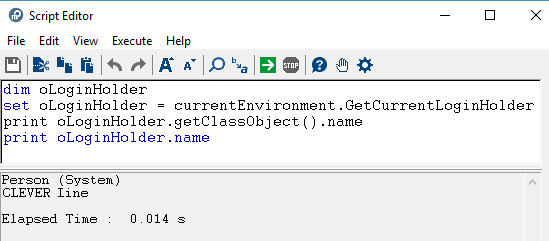
When the person is connected to HOPEX via a person group, the GetCurrentLoginHolder API returns the person group name. To retrieve the person connected, use the GetCurrentUserId API, which returns the IdAbs of the person connected via the person group.
Example:
|
VB Script
|
dim userId
userId = currentEnvironment.GetCurrentUserId
print getRoot.getObjectFromId(userId).name
|
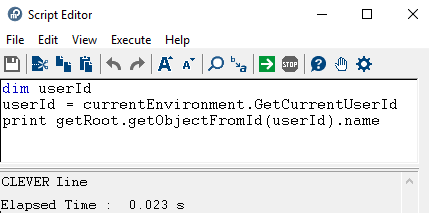
Getting the current snapshot date
Use getCurrentSnapshotDate to retrieve the date corresponding to the current repository snapshot.
When a repository snapshot has been opened, the function returns:
• a date with internal value format
• 0 otherwise (the session is not open on a snapshot).
You can customize the code so that it returns a text, for example “you are not in a snapshot”, instead of 0
|
VB Script
|
Dim oRoot
Set oRoot=GetRoot
Dim date
date = oRoot.currentEnvironment.getCurrentSnapshotDate
if DateDiff("yyyy",0,date) then
print date
else
print "you are not in a snapshot"
end if
|
|
Java
|
Date currentSnapshotDate= MegaRoot().currentEnvironment().getCurrentSnapshotDate()
public Date getCurrentSnapshotDate();
|
Getting the e-mail address
Once the installation options regarding Web applications and SMTP configuration are defined (Installation > Electronic mail) to retrieve the email address:
|
Java
|
myroot.currentEnvironment.getUserOption("Mail","SMTPDefaultSendingAddress");
|
Triggering technical conversions
To access a repository its technical data must be up-to-date.
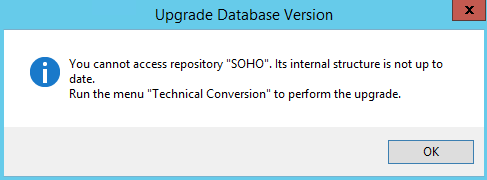
HOPEX Administration enables you to perform Technical conversions needed for example at migration or upgrade. With HOPEX Administration you can launch the technical conversions on a single environment at a time.
If you have many environments, you can use the TechnicalConversionProcess method on the MegaEnvironment object to trigger the technical conversions on all the data repositories and systemdb repositories of your environments.
Example:
|
VB Script
|
Set oMegaApp = CreateObject("Mega.Application")
Set oEnvironment=oMegaApp.Environments.item(1)
MsgBox "Installation: " & oMegaApp.Path & " - Environment: " & vbcrlf & oEnvironment.Path
oEnvironment.TechnicalConversionProcess()
Set oMegaApp = Nothing
|
Managing a semaphore
To create an interprocess semaphore on the current Environment, use:
CreateSemaphore(semId, semName, mode)
Parameter description:
semId: idabs of the semaphore (hexaidabs format, ~cn64 format, or megafield).
semName: name of the semaphore.
Enter an appropriate name, it can be usefull for debugging.
Enter an appropriate name, it can be usefull for debugging.
mode: "try" (default value) or "wait" in order to stop processing until the semaphore is created.
It returns true if the semaphore has been successfully created.
public boolean createSemaphore(final String semId, final String semName, final String mode);
To destroy the interprocess semaphore on the current Environment, use:
DestroySemaphore(semId)
Parameter description:
semId: idabs of the semaphore.
public void destroySemaphore(final String semId);
|
VB Script
|
if getRoot.CurrentEnvironment().CreateSemaphore("~RSqA9jItO100", "sem1", "try") then
‘enter your protected code
getRoot.CurrentEnvironment().DestroySemaphore("~RSqA9jItO100")
end if
|
|
Java
|
if (myRoot.currentEnvironment().createSemaphore("~RSqA9jItO100", "sem1", "try"))
{
// enter your protected code
myRoot.currentEnvironment().destroySemaphore("~RSqA9jItO100");
}
|
MEGA TextStream an alternative string concatenation
Availability: From MEGA 2009 SP1 CP4
This component is based on the Microsoft ITextStream interface, used in particular by the FileSystemObject component.
• MEGA TextStreams can be opened in writing access or reading access; mixed mode however is not supported.
• MEGA TextStreams can correspond to character strings: it is possible to instance a TextStream in reading access using a character string, and to instance a TextSteam in writing access, which will produce a character string output.
• MEGA TextStreams offer the possibility of reading or writing files, natively offering UTF8 and ANSI conversion (writing in UNICODE being possible).
Files opened in read-only can use the following functions of the ITextStream interface:
TextStream.AtEndOfStream As Boolean
indicates that the reader has reached the end of the stream.
TextStream.AtEndOfLine As Boolean
indicates that the reader is positioned at the end of a line.
TextStream.Read(nbChar As Integer) As String
reading the number of requested characters in the stream. If line end markers are encountered during reading, they are not transformed and are therefore returned as-is.
TextStream.ReadLine As String
reading stream to the next line (character CR) OR end of file. Line break characters do not appear in the returned string.
TextStream.ReadAll As String
reading integrality of stream in a string; not to be used if the file is potentially large…
TextStream.Skip(nbChar As Integer)
skip the number of requested characters in the stream and continue reading
TextStream.SkipLine As String
read forward in stream to the next line (character CR) or end of file.
TextStream.Line As Integer
number of lines read (including line to read: value cannot be less than 1)
TextStream.Column As Integer
number of columns read in the last line (including column to read: value cannot be less than 1)
Files opened in read-only can use the following functions of the ITextStream interface:
TextStream.Write(Text As String)
TextStream.Write(Text As String) As Integer 'Script Only
writing string in stream. Use in the form of function does not generate an exception in the case of failure when writing, but returns a not null value in the case of writing failure:
TextStream.WriteLine(Text As String)
TextStream.WriteLine(Text As String) As Integer 'Script Only
TextStream.WriteLine(Text As String) As Integer 'Script Only
this value corresponds to the OLE (HRESULT) code corresponding to the error. Note that this form is not defined in the ITextStream interface and is therefore reserved for Script or Late-Binded VB use.
writing the character string in the stream, and adding a line end marker. Use in the form of function does not generate an exception in the case of failure when writing, but returns a not null value in the case of writing failure: this value corresponds to the OLE (HRESULT) code corresponding to the error.
TextStream.WriteBlankLines(nbLines As Integer)
writing requested line end marker number.
TextStream.Line As Integer
number of lines written (first being number 1).
TextStream.Line As Integer
number of columns of last line written. Systematically equals 1 in the case of use of WriteLine or WriteBlanlLines.
For all TextStreams:
TextStream.Close
TextStream.Close As Integer 'Script Only
TextStream.Close As Integer 'Script Only
The Close function can be used only if the file has been explicitly opened by the component (see function Open described below). Use in the form of function does not generate an exception in the case of failure when writing, but returns a not null value in the case of writing failure: this value corresponds to the OLE (HRESULT) code corresponding to the error.
TextStream creation and opening:
In Script you can create an explicit TextStream with CreateMegaObject function:
Set myStream = MegaToolkit.CreateMegaObject("MegaTextStream")
Then open this TextStream according to its usage.
Opening a Stream corresponding to a file:
Sub MegaTextStream.Open(
Source As Object,
Optional Mode As String,
Optional Format As String)
Source As Object,
Optional Mode As String,
Optional Format As String)
Function MegaTextStream.Open(
Source As String,
Optional Mode As String,
Optional Format As String) As String
Source As String,
Optional Mode As String,
Optional Format As String) As String
Source corresponds to the file name. It can be ignored in specific opening modes detailed above.
Mode: can be "Write", "Write,Create" or "Read".
In "Write,Create" mode, file creation is possible, else the file must correspond to another existing file.
The default mode is "Read" mode.
For files opened in writing access mode, the following keyword can be added: "NoLineFeed", indicating that the line end sequence is represented by a CR character alone, not followed by LF when it is generated by functions WriteLine or WriteBlankLines.
For files open in creation mode, you can add the following key words:
"Temporary": indicates that the file should be created with a "temporary" tag.
"Archive", indicating that the file should be created with the "archive" tag
"WithBOM", indicating that format definition characters (UTF8 or UNICODE) should be written in the file header.
"WithBOM", indicating that format definition characters (UTF8 or UNICODE) should be written in the file header.
Format: by default, format is undefined for reading access files (the reader considers that the format is ANSI, or UNICODE in obvious cases), and ANSI in the current page code for writing access files. It is possible to specify format: In this case, we should also include the mode, the format necessarily being the third parameter of the method.
Format corresponds to the numerical value of LCID in the case of an ANSI file; negative numerical values defined for formats unicode (-1), binary (-3) and utf8 (-4) can also be used, as well as the following keywords: "UNICODE" "BINARY" "UTF8"
When Open is used in the form of a function, it does not produce an exception in the event of failure at file opening: The character string returned is empty if opening is successful; in the case of failure, the character string indicates the reason for the error.
Opening a stream corresponding to a character string in reading access:
This operation invokes a method using a TextStream as entry system when we have a character string available. In this case, we should not initialize the TextStream with the Open method, but with the MapString method.
MegaTextStream.MapString(Input As String)
This function also enables reading MEGA text in the form of a TextStream, and therefore to be able to read a text line-to-line.
|
VB Script
|
myTextStream.MapString myObject.GetProp("Comment", "Display")
Do While Not myTextStream.AtEndOfStream
Print "Line " & myTextStream.Line & " : " & myTextStream.ReadLine
Loop
|
|
Java
|
MegaCOMObject mgobjMyTextStream = (MegaCOMObject) mgobjMegaObject.getRoot().currentEnvironment().toolkit().createMegaObject("MegaTextStream");
mgobjMyTextStream.invokeMethod("MapString", mgobjMegaObject.getProp("Comment", "Display"));
while ((Boolean) mgobjMyTextStream.invokePropertyGet("AtEndOfStream") == false) {
mgRoot.callFunction("~U7afnoxbAPw0[MessageBox]", "Line " + mgobjMyTextStream.invokePropertyGet("line") + " : " + mgobjMyTextStream.invokePropertyGet("ReadLine"));
}
|
Opening a stream corresponding to a character string in writing access:
This function enables creation of a stream managed in live memory and, after writing processing, recovery of its content in the form of a character string.
To do this, we specifically use the Open method in the following way:
myTextStream.Open 0, "BSTRMODE"
The stream is also opened in writing access mode: call on WriteXXX functions enables optimized concatenation of the value written in an allocated character string.
On completion of the writing operation, we can recover the written string using the GetString function.
myOutput = myTextStream.GetString
This function does not duplicate the string; the string used in the stream is transmitted as-is to the variable and the stream is reinitialized with an empty string, in which we can again write.
This function is particularly optimized and adapted to a generation. For example, consider the two following examples:
|
VB Script
|
Function TestBSTRNative
TestBSTRNative = "" For i = 1 To 10000 TestBSTRNative = TestBSTRNative & " Writing of the line number " & i & VbCRLF Next End Function Function TestBSTRStream
Set myTextStream = CurrentEnvironment.Toolkit.CreateMegaObject("MegaTextStream") myTextStream.Open 0, "BSTRMODE" For i = 1 To 10000 myTextStream.WriteLine " Writing of the line number " & i Next TestBSTRStream = myTextStream.GetString End Function
|
|
Java
|
public String TestBSTRNative() {
String strTestBSTRNative = "";
for (int i = 1; i <= 10000; i++) {
strTestBSTRNative = strTestBSTRNative + " Writing of the line number " + i + "\n";
}
return strTestBSTRNative;
}
public String TestBSTRStream(final MegaRoot mgRoot) {
MegaCOMObject mgobjMyTextStream = (MegaCOMObject) mgRoot.currentEnvironment().toolkit().createMegaObject("MegaTextStream");
mgobjMyTextStream.invokeMethod("Open", 0, "BSTRMODE");
for (int i = 1; i <= 10000; i++) {
mgobjMyTextStream.invokeMethod("WriteLine", " Writing of the line number " + i);
}
return (String) mgobjMyTextStream.invokeFunction("GetString");
}
|
The TestBSTRStream function, while restoring an identical text, is much faster (x50 on a developer machine).
Opening a stream on a volatile temporary file.
It is possible to create a serializedstream on a temporary file, automatically destroyed at freeing of the component.
This system enables script processing to handle generations that risk exceeding machine memory capabilities.
Such a stream is used in two steps:
First, we open it in writing access mode; we can then generate data. To do this, we use the Open method in a specific way:
|
VB Script
|
myTextStream.Open "", "Write,Create,Temporary,DeleteOnClose","UNICODE"
|
|
Java
|
mgobjMyTextFile.invokeMethod("Open", "", "Write,Create,Temporary,DeleteOnClose", "UNICODE");
|
On completion of the writing phase, we call the SetReadMode method (reserved for this type of stream) which enables switch to reading mode.
We can then use it as a stream in reading mode; however we can no longer write in it.
Finally the Close function destroys the temporary file. If it is not called, the file is destroyed when the component is freed.
We can write the example above using a stream on temporary file:
|
VB Script
|
Function TestBSTRTempo(mgRoot as MegaRoot)
Set myTextFile = mgRoot.CurrentEnvironment.Toolkit.CreateMegaObject("MegaTextStream") myTextFile.Open "", "Write,Create,Temporary,DeleteOnClose","UNICODE" For i = 1 To 10000 myTextFile.WriteLine "Writing of the line number " & i Next myTextFile.SetReadMode TestBSTRTempo = myTextFile.ReadAll End Function |
|
Java
|
public String TestBSTRTempo(final MegaRoot mgRoot) {
MegaCOMObject mgobjMyTextFile = (MegaCOMObject) mgRoot.currentEnvironment().toolkit().createMegaObject("MegaTextStream");
mgobjMyTextFile.invokeMethod("Open", "", "Write,Create,Temporary,DeleteOnClose", "UNICODE");
for (int i = 1; i <= 10000; i++) {mgobjMyTextFile.invokeMethod("WriteLine", " Writing of the line number " + i);
}
mgobjMyTextFile.invokeMethod("SetReadMode");
return (String) mgobjMyTextFile.invokeFunction("ReadAll");
}
|
This function executes slower than the TestBSTRStream function (around 20%), but in any case much faster than TestBSTRNative.
It should be noted that this implementation is of no great interest in this example, since in any case we must provide allocation of the return character string, here in the ReadAll function: In this context, it is not possible to manage a stream with insufficient memory…