Risk Environment Report
 This report is available for all ERM profiles.
You can choose to display the following elements for a given risk:
• the risk context
• business processes
• organizational processes
• applications
• Org-Units
• business lines
• the strategic objects impacted by the risk:
• objectives
• requirements
• the consequences of the risk
• target risks
• the preventive controls designed to mitigate the risk
 A control is a set of rules and means enabling the assurance that a legal, regulatory, internal or strategic requirement is respected.
• incidents
An incident is an event occurrence, internal or external, that has an impact on the organization. It is the basic element for collection of data concerning operational risk.Access path
Risk properties (Reporting > Risk Environment)
Report parameters
|
Parameters
|
Parameter type
|
Constraints
|
|---|---|---|
|
Risk
|
1 risk
|
Mandatory
|
|
Risk Context
|
Check Box
|
Optional
|
|
Objectives and Requirements
|
Check Box
|
Optional
|
|
Target Risks
|
Check Box
|
Optional
|
|
Controls
|
Check Box
|
Optional
|
|
Incidents
|
Check Box
|
Optional
|
|
Findings
|
Check Box
|
Optional
|
|
Action Plans
|
Check Box
|
Optional
|
|
Actions
|
Check Box
|
Optional
|
Creating a Risk Environment Report
To display a risk environment report:
1. In risk properties, select the Reporting > Risk Environment page.
2. In the Parameters section, select the types of environment objects that you wish to display.
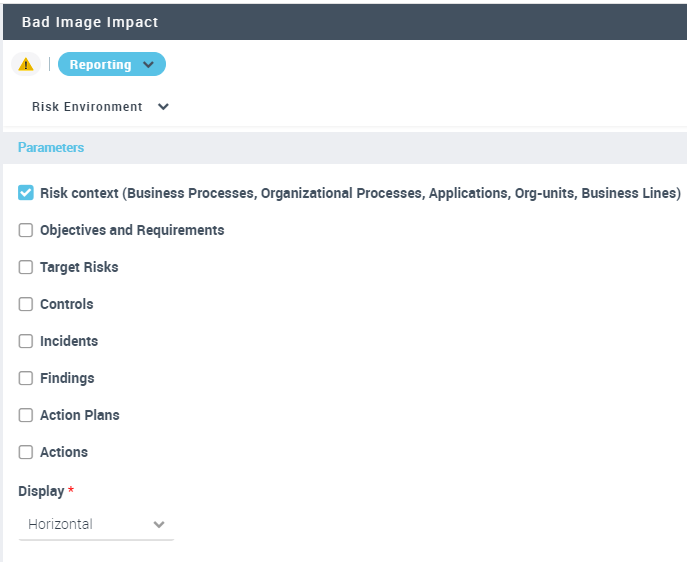
3. In the Display field, specify whether you want to display the risk environment objects:
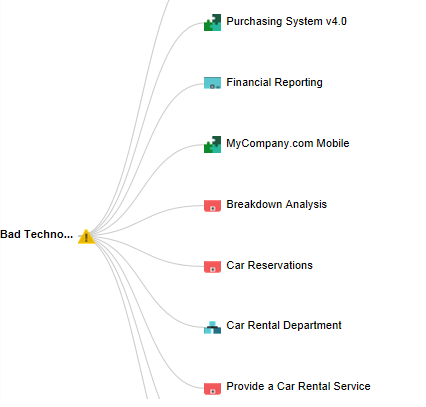
• in a horizontal fashion, or,
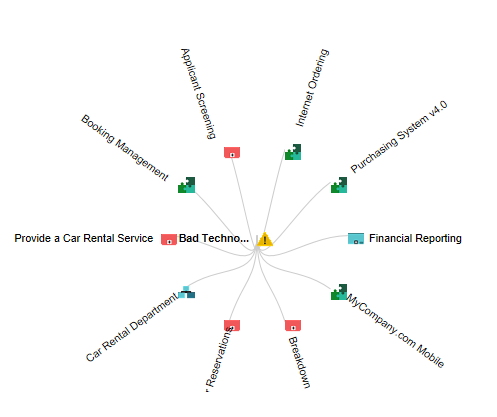
• in a circular fashion (based on the selected risk)
4. Click Refresh.
Using this diagram, you can:
• fold/unfold the branches
• open the properties page of the selected object.