Datatypes
A datatype is used to group characteristics shared by several attributes. Data types are implemented as classes.
A datatype package is a reference package owning all or part of the datatypes used in the enterprise. All the other packages are declared as clients of the reference package of datatypes.
Data type packages
A datatype defines the type of values that a data can have. This can be simple (whole, character, text, Boolean, date, for example) or more elaborate and composite.
To type attributes of an entity, only datatypes defined for the data model that contains this entity are proposed.
When you create a data model, the "Datatype Reference" datatype package is automatically associated with it by default.
This "Datatype Reference" package owns datatypes "Address", "Code", "Date", etc.
Opening the explorer on this datatype package, you can see that is is referenced by several data models.
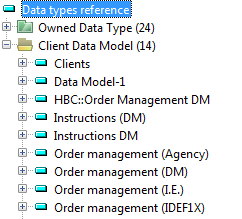
The attributes of entities of these models can therefore be typed using the datatypes “Address”, “Code”, “Date”, etc.
Creating a New Datatype Package
You can define a new reference datatype package owning the datatypes used by the enterprise.
To create your own datatype package:
1. On the HOPEX Information Architecture desktop, click on the Logical data navigation pane.
2. Display the list of Data Model Packages.
3. In the edit area, click New.
4. Enter the package name and click OK.
You can then add types to this package.
Creating a datatype
To create a datatype:
1. Right-click the package name and open its Properties.
The package properties appear.
2. Click the drop-down list then Data Types.
3. Click New.
The datatype creation dialog box opens.
4. Enter the name of the datatype and click OK.
Compound datatype
You can create compound datatypes by adding to them a list of attributes, for example an "Address" type comprising number, street postal code, city and country.
Literal value
You can allocate to a datatype literal values that define the values it can take. Attributes based on such a datatype can take only those values defined by the datatype.
When the new datatype package has been created, it should be referenced on the client data model. See Referencing Datatype Packages.
Referencing Datatype Packages
To connect a datatype package to a data model:
1. On the HOPEX Information Architecture desktop, click the navigation menu, then Logical data.
2. In the logical data navigation pane, click All data models.
The list of data models appears in the edit area.
3. Right-click the model concerned and open its Properties.
4. Click the drop-down list then Data Type Packages Used.
5. Click Connect.
The query dialog box appears.
6. Click Find.
The list of datatype packages appears.
7. Select the desired package and click Connect.
Assigning Types to Attributes
See also: Referencing Datatype Packages.
When the datatype package has been referenced for the data model, the list of types it contains is available on each attribute of entities of the model. All that is required is to select the one that is suitable.
To define the type of an attribute:
1. Right-click the entity that contains the attribute.
2. Select Properties.
The properties dialog box of the attribute opens.
3. Click the drop-down list then Attributes.
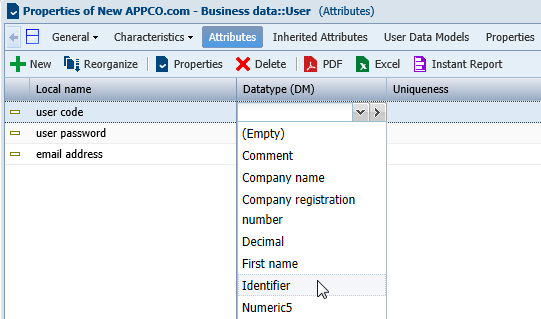
4. In the Datatype (DM) box corresponding to the attribute, select the desired type in the list.
5. Click Apply.