Creating and Consulting Business Terms
A term is the designation of a concept in a given language.
Example: the "Country" concept has the "Pays" in French and "Country" in English.
Consulting Term Definitions
To display a term definition:
1. Click the navigation menu then Business Glossary > Browse Term Definitions.
2. In the edit area click the first arrow located to the right of the Term title to scroll the list of terms or enter the first letter of the term in question to display the list of corresponding terms.
3. Select the term in question from the list.
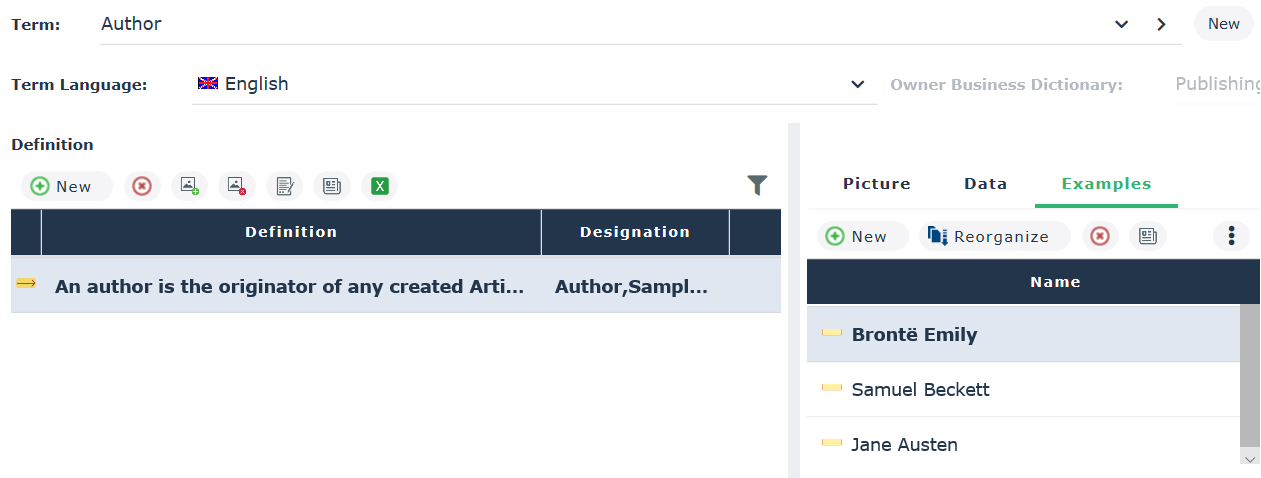
Its definition, if it exists, appears under the Definition section, with the associated object type (concept, concept type, etc.).
Click a definition to display its characteristics. A window presents the following elements:
• the associated image
• Implementation data; these are the objects of the logical or physical architecture that implement the concept that bears the term definition. See "Connecting the Business Concepts to the Logical and Physical architecture".
• examples, which correspond to the occurrences of the concept.
 The occurrences of a concept are individuals (see Describing individuals), those of a concept type are concepts (see also Describing Concept Types).
Creating a Term
To create a term:
1. Click the navigation menu then Business Glossary > Browse Term Definitions.
2. In the edit area, click the New button.
3. In the dialog box that appears, specify:
• the term name
• the holder (optional)
• the language of the term
4. Click OK.
The new term appears in the edit area.
5. In the Definition section, click New.
6. Select:
• the holder dictionary (optional)
• the definition text
7. Click OK.
By default a concept is automatically associated with it.
See also: Concept and Term.