Creating a Business Information Map
A business information map is a business information urbanization tool. It represents the business information areas of a business dictionary and their dependency links.
 A business information area is a sub-set of elements of a business dictionary that reduces the scope of a field.
You can also create a business information map from a project or an enterprise to target the scope studied.
Business information maps can be created with the Business Information Architect profile.
To create the business information map for a business dictionary:
1. Click the navigation menu then Business Glossary > Business Information Assets.
2. In the edit area, click Business Dictionaries then the Hierarchy view.
3. Select the relevant dictionary and open its properties.
4. In the Characteristics page, unfold the Information Group section.
5. Click Business Information Map.
6. Click New.
To create a business information map diagram:
1. Click the icon of the business information map and select New > Diagram.
2. Select Business Information Map and click OK.
The diagram appears in the edit area.
The Components of a Business Information Map
You can add internal and external components to a business information map.
Internal components are business information areas that are part of the scope of the business information map (whether or not they belong to the owner business dictionary).
The external components are those used in the map but that are not part of the scope analyzed.
To add a component to a business information map:
1. Open the properties of the business information map in question.
2. Click the Characteristics > Characteristics page.
3. In the Components section click Internal Components or External Components depending on the type of component to be added, and click New.
A wizard opens. You can create a business information area or link an existing business information area.
See also Defining a Business Information Area.
Example of a Business Information Map
Below is the business information map of an airport. Links between the information areas indicate the dependencies that exist between concepts in these areas.
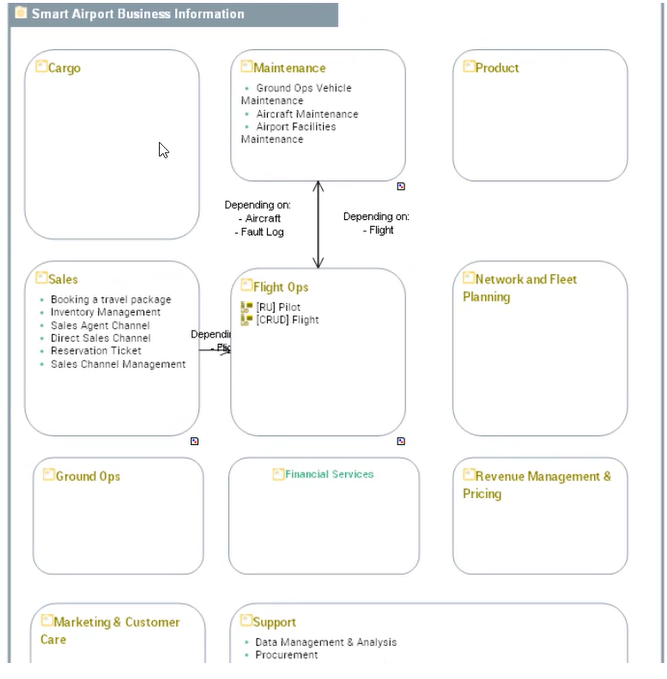
From this map you can access the details of an information area and see the diagram that describes it, if applicable.
You can access the details of an information area:
• using the pie menu in a diagram preview.
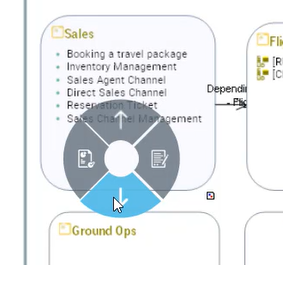
• or the pop-up menu of the area when you are in the edit mode.
Reports Available on a Business Information Map
In the properties of a business information map, reports allow you to visualize :
• The hierarchy of business information areas in a map, and whether these areas use sensitive or reference data. For more details, see Data Domain Map.
• dependencies between business information areas of the map. See Data Domain Dependencies.
• Use of information of a business information map.