Describing Concept Properties (Information Items)
Information items are used to define the characteristics associated with a concept.
For example, a person is associated with a mandatory and unique postal address, possibly an email address and one or more telephone numbers.
An Information Item may itself be connected to other information items.
For example, the postal address is defined using the name of the street and the town.
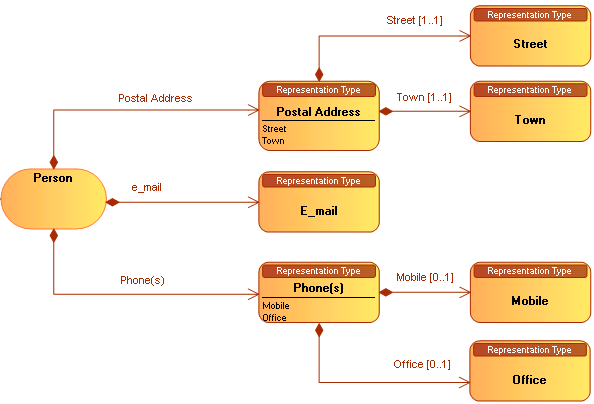
Creating an Information Item
Creating an information item
To create an information item:
1. In the concept graph associated with the business information area, click the Information Item of the insert toolbar.
2. Click in the diagram.
3. Indicate the name of the information item and click Add.
Connecting an information item to a concept
With HOPEX Information Architecture, the link between a concept and an information item is described by a Concept Information Item that can, if necessary, be associated with a term.
 A concept representation is used to specify the relationship between a concept and a representation type.
Connecting two information items
With HOPEX Information Architecture, the link between information items is described by an Information Item Component that can, if necessary, be associated with a term.
A representation type component enables specification of the relationship between two representation types.Creating a Computed Information Item