Variation Inheritance
By default, the variant object inherits elements of the varied object (original object).
Commands available on inherited elements allow you to :
• exclude elements from the variant
• replace these with others.
Let us consider application A including functionalities F1 and F2. By default, the variant Application A v2.0 inherits these functionalities.
Excluding an element from the variant
To exclude functionality F2 from the variant object in the above example:
1. Right-click the inherited functionality.
2. Click Exclude.
The functionality disappears from the properties of Application A v2.0.
 You have the possibility to restore it. For more details, see Restoring elements.
Replacing one element with another: substitution
A substitution indicates that a certain object is used instead of another in a given context. In the case of a variation, you can substitute one of the elements of the varied object with an object of your choice.
Unlike a variation, a substitution does not involve inheritance but a functional conformity.Substitution example
In the case of application versions, substitutions enable expression of the following: in considering an application evolution, a service 2 is replaced by a new service 3.
• The new service 3 must be linked to the variant application
• service 2 is linked to one of the parent applications (it is possible to have several application generations linked in cascade)
Differences between variation and substitution
Variations express a similarity relationship between two models; an application v2.0 is very similar to v1.0. The variation enables concentration on their differences. These are expressed through another object. A variant is linked to only one varied object (to simplify inheritance issues).
A substitution however can be linked to several source elements and to several target elements. This allows indication that a certain set of services is replaced by another set of new services.
If a replacement object is similar to the replaced object (a new version of a service), this can be indicated by adding a variation between them.
The ability to inherit a relationship is a functionality declared at metamodel level, which can be adapted to suit requirements. The same applies concerning the ability to substitute a concept.Replacing an object
Certain elements of a variant can be replaced with others.
For example, in a new application you can replace an inherited application service with any other service.
Other elements such as functionalities cannot be substituted. In this case, the replacement command is grayed out.
To replace an object with another in a variant:
1. In the HOPEX navigator, expand the variant object to see its inherited objects.
2. Select the element you wish to replace.
3. Open its pop-up menu and select Replace.

4. In the dialog box that opens, select the substitution element and click OK.
Viewing inherited elements
To view inherited elements:
1. Open the properties dialog box of the variant application.
2. Select the Architecture tab.
3. In the Application Architecture area, click Inherited Object  .
.
.To view elements excluded or replaced by a substitution:
1. Follow the previous steps.
2. Click Excluded  .
.
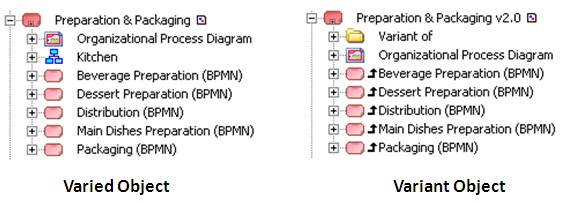
.The point above illustrates inheritance around the application concept.In a diagram, inherited elements are accompanied by an arrow  :
:
:• in the navigation tree
• in the diagrams
Restoring elements
To restore a substituted or excluded element:
1. In the properties dialog box, click Excluded to display the excluded items.
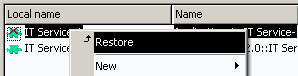
to display the excluded items.2. Open the pop-up menu of the element in question and select Restore.
In the target object properties dialog box, the General > Variations tab presents a report that lists all links obtained directly or by varied applications, with indication of the source as well as reasons for replacement or removal via substitutions.
Viewing variations and substitutions graphically
In model diagrams, such as the application internal architecture diagram, elements shown in the diagram are elements belonging to the described object.
When you click the icon associated with an object, an explanatory message appears.Inherited objects are associated with an inheritance arrow .
.
Elements that have been replaced are indicated by a red cross  .
.
.Diagram objects that are not linked to the described object, not inherited or not replaced are identified by a warning panel  to indicate that their presence in the diagram assumes a link with the described object.
Removal of an inheritance link in a hierarchical diagram
In a hierarchical diagram, such as the application tree, inheritance is characterized by links between described objects.
When you delete an inheritance link between an element of a varied object and the variant object, you delete all possible inheritances and therefore the link between the element and the varied object.
Example: In the following example, Application v2.0 is the variant of Application. Functionality F1 is owned by Application and is inherited by Application v2.0. If you delete the inheritance link between F1 and Application v2.0, you also delete the ownership link between F1 and Application.

Inheritance limits
There is a restriction on the length of sequences of variations. Elements inherited from a varied object cannot be reflected infinitely on all objects derived from the original object. At the end of a certain sub-level of variations (66), inheritance is lost. The limit is indicated by a message.
In the case of a large number of variations, consolidation of the variants history is recommended. See Consolidating variants history below.
Consolidating variants history
Thanks to variations, it is possible to keep track of the different versions of an application. After a certain time however, it can be difficult, even pointless, to manage obsolete versions. You can delete from the repository those versions earlier than a certain version, by consolidating the history of variants.
The consolidation command enables transfer of inherited elements from an object to the new object and destruction of ancestors. The purpose is to reduce the volume of the repository and remove obsolete information.
To consolidate an application:
 Right-click the variant application and select Consolidate.