Managing Business Capabilities with HOPEX IT Architecture V2
 .A business capability is a set of features that can be made available by a system (an enterprise or an automated system).
Describing a business capability
A business capability is described in more detail by the following elements:
• a more detailed granularity capability breakdown;
• the expected effects of the capability;
• The required functionalities, see Defining the functionalities associated with business capabilities;
• the dependencies between capabilities (expected effect of one dependent from the result of the other).
 For more details on managing a business capability, see Describing a business capability.
For example, the business capability grouping operational activities is broken down into several business capabilities: "Customer management”, "Supply", "Sales", "Complaints” and "Order Management".
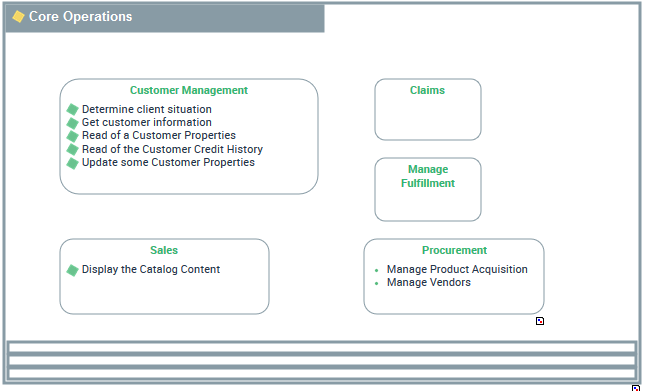
Accessing the list of business capabilities with HOPEX IT Architecture V2
To access the list of capabilities from the Business IT Alignment navigation pane:
1. Select Logical Architecture in the navigation menu.
2. Click on Business Capability tile.
The list of business capabilities appears in the edit area.
Defining the functionalities associated with business capabilities
A functionality is a service required by an org-unit in order to perform its work. This functionality is generally necessary within an activity in order to execute a specific operation. If it is a software functionality, it can be provided by an application.Each business capability is associated with functionalities that it is able to provide as well as skills that it needs to ensure its functionalities.
For example, the “Customer Management” needs the “get customer information” functionality.
For more information on enterprise functionalities, see Describing functionalities with HOPEX IT Architecture V2. To associate a functionality with a business capability:
1. Open the Expected Capabilities properties window of the business capability.
2. In the Expected Functionality section, click New.
An add functionality dialog box appears:
3. You can connect an existing functionality or create a new one by entering the name of the new functionality
4. Click OK.
The expected functionality appears in the list of functionalities associated with the business capability.
The functionalities and the expected effects appear in the diagrams, at the bottom of the frame of the capability described.
For more information on enterprise functionalities, see Describing functionalities with HOPEX IT Architecture V2.