Creating an Application Technical Architecture
 An application technical architecture describes one of the configurations possible for application deployment. It describes how the different technical areas of the application are connected to each other and the technologies and the communication protocols that they use. An application can have a number of possible technical architectures (E.g.: autonomous installation, horizontal or vertical deployment, etc.)
The application technical architecture below presents the technical application areas used by the “Purchase Request Management” application. The technical communication line between the communication port and the “HTMPl Browser” is based on the HTTP communication protocol.
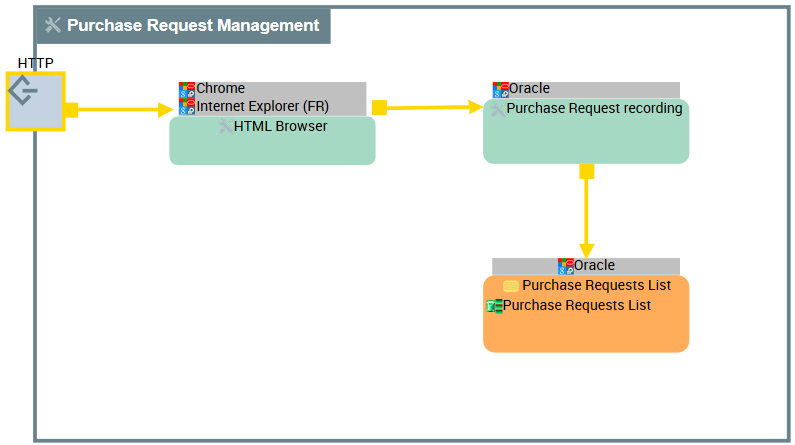
Example of the application technical architecture for "Purchase Request Management".
An application technical architecture is described by an application technical architecture diagram composed of the following elements:
• Application Technical Areas,
An application technical area represents an organizational element of an application according to technical criteria. For example, this can be the user interface or a process. Each application technical area is associated with one or more technologies. The deployment of several application technical areas is necessary for the application to be operation.• Technical Data Areas,
A data technical area represents an organizational element of an application used to access the data necessary for the operation of this application. Each application technical area is associated with one or more technologies (E.g.: Oracle 12, SQL Server 2012, etc.). A data technical area can allow access to one or more data stores.• Technical Server Port and Technical Client Port,
A technical server port is a point used to open communications with a technical architecture or an application technical area in compliance with a particular communication protocol (SMTP, HTTP, etc.).A technical client port is a point used to request the opening of communications from a technical architecture or an application technical area in compliance with a particular communication protocol (SMTP, HTTP, etc.).• Technical Communication Lines.
A technical communication line represents a technical connection between architectures or application technical areas through client and server ports. Client technical port of an architecture or a technical area requires opening the communication line to server technical port of the other area or technical architecture. For more details on technical architecture diagram, see Creating an Application Technical Architecture Diagram.
Accessing the application technical architectures
To access the list of application technical architectures from the Application Architecture navigation pane:
 Select Technical Architecture > Technical Architectures.
The list of technical architectures appears in the edit area.
Properties of an application technical architecture
The complete description of an application technical architecture can be accessed from its property pages.
The Characteristics property page of an application technical architecture provides access to:
• its Name,
• Its Owner, by default the application specified when it was created.
• the text of its description.
With HOPEX IT Architecture V2 an application technical architecture is described by other property pages.
• The Component property page which provides access to the list of components of the described technical architecture.
• List of Technical areas: technical application areas and technical data areas,
• List of Technical ports: Technical Server Port and Technical Client Port.
For more information on the components of a technical architecture diagram, see Creating an Application Technical Architecture Diagram.• the Usage property page provides access to the information relating to the use contexts of the described technical architecture.
• Reports page, used to access the different reports available on the described application technical architecture.
Creating an Application Technical Architecture Diagram
To create an Application Technical Architecture Diagram:
1. Right-click the Application Technical Architecture that interests you and select New > Diagram.
2. In the dialog box, select Application Architecture Structure Diagram.
The diagram opens in the edit area. You are now in the HOPEX graphic editor. The frame of the application technical architecture described appears in the diagram.
Adding an application technical area to an application technical architecture diagram
An application technical area represents an organizational element of an application according to technical criteria. For example, this can be the user interface or a process. Each application technical area is associated with one or more technologies. The deployment of several application technical areas is necessary for the application to be operation.To create an application technical area:
1. In the objects toolbar of the application technical architecture, click Application Technical Area.
2. Click in the described application frame.
An addition window prompts you to choose the Application Technical Area that you wish to use.
3. Select the application technical area and click OK.
The application technical area appears in the diagram.
You can add data technical areas in the same way.
A data technical area represents an organizational element of an application used to access the data necessary for the operation of this application. Each application technical area is associated with one or more technologies (E.g.: Oracle 12, SQL Server 2012, etc.). A data technical area can allow access to one or more data stores.Defining the software technologies used by an application technical area
A software technology is a basic component necessary for operation of business applications. Software technologies include all basic software such as: application server, electronic mail server, software components for presentation, data entry, storage, business information sharing, operating systems, middleware, navigators, etc.To specify the software technologies required for an application technical area:
1. Open the Characteristics property page of the Application Technical Area that interests you.
2. In the Required Software Technologies section, click Connect.
In the selection dialog box, select the Software Technology that you want to use.
The software technologies selected appear in the icon for the application technical area.
Technical ports
Technical ports assure physical transfer of information exchanged between the technical architecture components.
A technical server port is a point used to open communications with a technical architecture or an application technical area in compliance with a particular communication protocol (SMTP, HTTP, etc.).A technical client port is a point used to request the opening of communications from a technical architecture or an application technical area in compliance with a particular communication protocol (SMTP, HTTP, etc.).Communication ports comply with network application protocols.
Network application protocols supported by a communication port must be compatible with the protocols supported by communication ports to which they are connected.To create a technical client port:
1. In the diagram objects toolbar, click the Technical Client Port button
2. Click in the described technical architecture frame.
3. In the technical port creation dialog box, select Network application protocols and the Network application connection.
4. Click Add.
The technical port appears in the diagram. The protocol name appears above the technical port.
Describing technical communications
The communication between the application technical areas and the technical data areas can be described by technical communication lines. A technical communication line supports the network application protocol defined to create the communication.
A technical communication line represents a technical connection between architectures or application technical areas through client and server ports. Client technical port of an architecture or a technical area requires opening the communication line to server technical port of the other area or technical architecture.To create a technical communication line, you must first create the line and then specify network application protocols that are used.
To create a technical communication line:
1. In the diagram objects toolbar, click Technical Communication line .
.
.2. Draw a line between the two communicating objects.
3. In the technical communication line creation dialog box, select Network application protocol and the Network technical connection.
4. Click Add button.
The technical communication line appears in the architecture. The protocol name appears along the line.