Defining Initiatives
An initiative is associated with an enterprise repository object.
 An initiative is a portfolio element corresponding to an investment program identified by the enterprise (or department) to achieve strategic objectives.
Depending on the HOPEX Suite products you have available, this object can be:
• org-unit
• an application
• a resource architecture,
• a business capability,
• a value stream,
• a business process
• an organizational process,
• a project,
• a product,
• an IT service,
• an application system.
Several initiatives can be grouped in an initiative group to simplify portfolio management.
An initiative is associated with an enterprise repository object.
An initiative is a portfolio element corresponding to an investment program identified by the enterprise (or department) to achieve strategic objectives.Creating an Initiative
Creating an initiative from a process portfolio
To add an initiative to a portfolio:
1. Right-click the portfolio and select New > Initiative.
The initiative creation dialog box appears.
2. In the Element with Initiative field, find in the list of objects that from which you want to create an initiative.
3. Click OK.
Adding an organizational process to a portfolio
To add an organizational process to the list of initiatives of a portfolio:
1. Select the Process Design pane:
2. Select Processes > Organizational Processes List > All Organizational Processes.
3. Select the organizational process that interests you and click More > Add to Portfolio.
A connection window opens.
4. Select the process portfolios that interest you.
5. Click Connect.
Creating an Initiative Group
To create an initiative group from a portfolio diagram:
1. Click the Initiative Group  button in the toolbar.
button in the toolbar.2. Position the initiative group in the portfolio frame.
The Create Initiative Group dialog box opens.
3. In the Name field, enter the name of the group.
4. Click OK.
The initiative group appears in the diagram.
To connect an initiative to an initiative group:
 Drag the initiative into the frame representing the group.
Defining Initiative Characteristics
To access information relating to initiatives:
Open the Characteristics property page of the initiative.The object to which the initiative relates appears in the Element with Initiative box.
Decision-making information is specified in the following boxes:
• Decision, which can take values:
• Accept
• Reject
• In progress
• Decision-Maker and Decision-Maker User.
Modeling Initiative Costs
To view costs defined on an initiative:
Open the initiative properties pages and select the Costs page.Assessing Initiatives
Portfolio initiatives are assessed related to different portfolio criteria.
To access initiatives of all portfolio applications:
1. Open the properties pages of the portfolio.
2. Display the Initiatives > Assessment page.
The matrix for assessment of all portfolio initiatives according to different criteria is displayed.
3. To define the value of a criterion, such as a cost, on an initiative, select the initiative concerned and click in the criterion column.
4. Specify values of the different criteria on each initiative.
5. Click OK.
Creating an Initiative Assessment Report
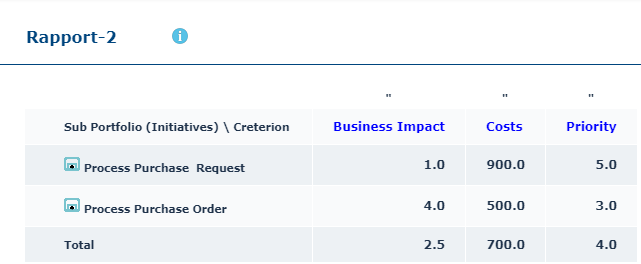
This report is a matrix that presents the value of the criteria presented in columns related to the process portfolio initiatives presented in rows.
To generate this matrix from the Report navigation pane:
1. Select Other Reports then the Reports tile.
2. In the My Reports tab, click New.
The report creation dialog box opens.
3. In the list of report templates, select “Portfolio Initiative Assessment Sheet”, then click Next.
4. Select the process portfolio that interests you and the associated criteria.
You obtain a result like this:
Report parameters
Parameter | Parameter type | Constraints |
|---|---|---|
Portfolio (in line) | Portfolio | One object mandatory. |
List of critera (in column) | Portfolio criteria | At least one mandatory criteria. |