Evaluating Application Criticality
Criticality of an application is assessed related to criteria linked with the business, to functionalities covered and to technologies used. The evaluation of an application therefore involves different user types. For more details on users, see HOPEX IT Portfolio Management Profiles.
Assessment can be done:
• in the properties of the applications in question. See Direct Assessment.
• through an evaluation questionnaire sent to the appropriate recipients: see Assessment By Campaign.
The evaluation is supplemented by result analysis tools.
Application Evaluation Criteria
Evaluation of an application relates to:
• its Business Value enabling evaluation of the nesting level of the application in enterprise production.
• Level 1: operational business processes will be stopped if the application no longer functions and a workaround solution exists.
• Level 4: major production processes will be stopped in the case of application malfunction with no workaround solution.
• its Business Value enabling evaluation of the support level of the application in enterprise process.
• Level 1: low level
• Level 4 the application is critical from a functional viewpoint, since it supports key processes on its own.
 For more details on businesses addressed and functionalities covered, see Defining Application Functional Scope.
• its Technology enabling assessment of evolution possibilities of the application from the techniques that support it.
• Level 1: technology is frozen
• Level 4: corresponds to a flexible and upgradable technological platform.
For more details on technologies, see Specifying the Technologies of an Application.Direct Assessment
You can evaluate an application at precise moments, by creating a new assessment measure each time.
To create an assessment measure:
1. Click the icon of the application to evaluate and select Properties.
2. In the properties drop-down list, click the Assessment page.
3. Click the Evaluate button.
The assessment creation window opens.
4. Indicate the value of each criterion as well as the evaluation end date.
From evaluation data, a report allows you to classify applications of the installation in a matrix and to rapidly identify the applications to be upgraded. See Accessing Embedded Reports in a Portfolio.
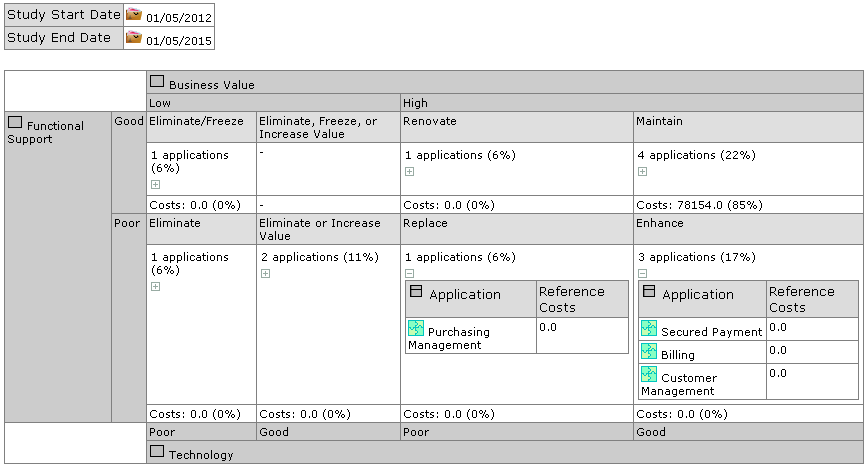
“Application positioning” report on an application portfolio
It is also possible to evaluate a set of applications at the portfolio level. This evaluation is performed by the application portfolio manager. See Evaluating Application Assets.
Assessment By Campaign
The functional administrator can create evaluation campaigns or sessions for data.
On creation of a campaign, questionnaires are sent to designated respondents to obtain qualitative estimations on the objects for which they are responsible.
For more details on campaigns and sessions, see Introduction to Assessment by Campaign .
Prerequisites for data assessment
Before starting a data assessment campaign, you must first prepare the work environment. Ensure that you have defined respondents for the data, and specify for each one the entity to which he/she is attached as well as an email.
Creating assessment campaigns
To create an assessment campaign:
 Click the navigation menu then Assessment > Campaign List.
1. In the edit area, click New.
A new assessment appears.
2. If necessary modify the name of the campaign.
3. In the Assessment template column, select an assessment template.
4. Specify the Begin Date and the End Date.
5. Click Next.
6. In the Scope Selection window, select the objects that define the evaluation context.
The context encompasses the elements of the branch that extends from the object in question up to the root.
If you deselect a node of a branch, only the child elements of this branch are deselected.Next step: Creating an Assessment Session.