Network Quality Test Option (Browser and Connection)
The Web administrator can measure his browser performance in terms of capability to display pages showing lists or trees. These tests enable highlighting the source of slowness issue.
The report displays the following graphics (html format):
• Client-Server connection
• Network latency
• Bandwith
• Rendering behavior measures with the current browser and their corresponding graphics:
• Listview rendering behavior
• Teeview rendering behavior
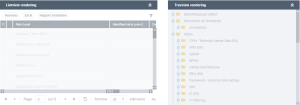
Depending on the result quality, you can for example switch to another browser or change the client machine.
Displaying the network quality test report
To display the network quality test report:
1. In the tool group of your Web Administration desktop, click My account.
 See Toolbar.
2. Select HOPEX System Web Report.
The test page is displayed.
Removing access to the network quality test report
By default the Web administrator can access the test report (html format). You can remove access to this report.
To remove access to the network quality test report:
1. In your Web Administration desktop, access environment options.
2. In the options tree, expand the Installation folder and select Web Application.
3. In the right pane, clear Availabitlity of the system information report from the Web.
The My account > HOPEX System Web Report menu is no longer available.