Creating a Sketching Diagram
HOPEX enables to draw diagrams informally, using shapes without having to select a specific object type from the start.
This feature makes teamwork easier and allows to make a draft of a diagram.
Creating a Sketching Diagram
To create a sketching diagram:
1. Click the navigation menu then select Collaboration > Collaboration Overview > All Sketches.
2. Click Create to create a sketch and in the drop-down menu, click New > Sketching.
A diagram opens.
Creating a Sketching Diagram
Shapes available in sketching diagrams
Sketching diagrams consist of:
• Sketching items
• Rectangle 
• Rombus
• Circle 
• Sketching links 
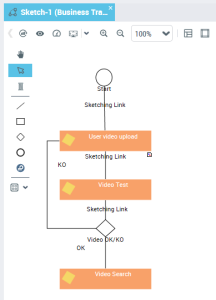
Connecting a sketching item with a repository object
You can connect shapes of a sketching diagram with repository objects representing architecture elements.
To do so:
1. Open the properties of the sketching item.
2. Under Characteristics, from the Enterprise Model Element field, connect a repository object.
The sketching item appears in the form of the object type selected.
 To associate a sketching item with a repository object, you can also drag-and-drop an object from a navigation tree.