Risk and Control Campaign Assessment
Assessment is a mechanism enabling sending of questionnaires to an identified population to obtain assessments (qualitative or quantitative) on identified objects. The assessment is then supplemented by results analysis tools.
The assessment can also be done directly on the objects, outside the assessment campaign.
 For more details on the assessment mechanism, see Introduction to Assessment by Campaign.
Questionnaires are sent via an assessment session, which corresponds to an assessment over a specified period of time.
Before creating a session, you must prepare the work environment and then create a campaign, which includes a set of assessment sessions.
Preparing the Assessment Work Environment
Pre-requisites to control assessment
Before starting a control assessment campaign, you must first prepare the work environment. Check that you have:
• connected controls to processes
• connected processes to organization entities
• defined respondents, and specified for each one the entity to which he/she is attached as well as an email.
Prerequisites to risk assessment
Before starting a risk assessment campaign, check that you have:
• connected risks to at least one entity
• specified a respondent in the Risk Assessor field of the entity properties.
Assessment Campaign Workflow Steps
Below the assessment campaign workflow.
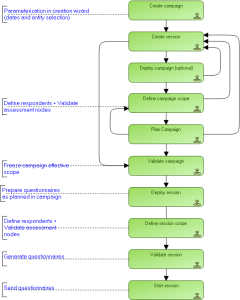
Standard Assessment Workflow