Introduction
Unified Authentication Service Overview
Authentication is a common basic requirement for modern web-based applications as more and more customized and access controlled services move it online.
Cloud applications have become popular among organizations that share content on the Internet.
Most of the organizations have started using a centralized authentication source for their web portal, web and mobile applications.
Most of the web and mobile applications have their own authentication system to provide a better user experience. To support that need, one of our goals is to provide you with a clear framework that allows you to develop secure web based authentication system easily.
We want to provide the most secure and scalable platform on our market.
With the Unified Authentication Service (UAS), you have a centralized service for your login logic and workflows in a single and well secured place.
It allows managing single sign-on (SSO) (and out) over multiple application types like web or mobile, access control for APIs and federation (support for external identity providers like Google and enterprise identity management systems via SAML2.)
We manage two standard authentication protocols: SAML2 and Open ID
What is SAML2 ?
Security Assertion Markup Language 2.0 (SAML 2.0) is a version of the SAML standard for exchanging authentication and authorization data between security domains.
SAML 2.0 is an XML-based protocol that uses security tokens containing assertions to pass information about a principal (usually an end user) between a SAML authority, named an Identity Provider, and a SAML consumer, named a Service Provider.
SAML 2.0 enables web-based, cross-domain single sign-on (SSO), which helps reduce the administrative overhead of distributing multiple authentication tokens to the user.
SAML 2.0 was ratified as an OASIS Standard in March 2005, replacing SAML 1.1.
How SAML Works ?
SAML SSO works by transferring the user's identity from one place (the identity provider) to another (the service provider). This is done through an exchange of digitally signed XML documents.
Consider the following scenario: A user is logged into a system that acts as an identity provider. The user wants to log in to a remote application, such as a support or accounting application (the service provider). The following happens:
- The user accesses the remote application using a link on an intranet, a bookmark, or similar and the application loads.
- The application identifies the user's origin (by application subdomain, user IP address, or similar) and redirects the user back to the identity provider, asking for authentication. This is the authentication request.
- The user either has an existing active browser session with the identity provider or establishes one by logging into the identity provider.
- The identity provider builds the authentication response in the form of an XML-document containing the user's username or email address, signs is using an X.509 certificate, and posts this information to the service provider.
- The service provider, which already knows the identity provider and has a certificate fingerprint, retrieves the authentication response and validates it using the certificate fingerprint.
- The identity of the user is established, and the user is provided with app access.
Profiles
The most common profile, called the "Web Browser SSO", describes, among other things, the steps of authenticating a user and going back and forth between the service provider (SP) and the Identity Provider (IdP).
The user tries to access his protected resource by the SP.
The SP verifies that the user is authenticated and if he is not authenticated, redirects him to his IdP.
The IdP asks the user to authenticate (identifier and password for example) and returns a SAML assertion to the SP containing the identity of the user and the guarantee that it is authenticated. The SP then allows the user to access the resource initially requested.
This authentication mechanism is based on Internet browser redirects. This profile also makes it possible to recover a set of additional attributes related to the identity of the user and requested by the resource.
A second artifact-based profile decorrelates the authentication of the retrieval of the user's identity information. The SP receives from the IdP, through the user's Internet browser, a SAML assertion containing an artifact. The SP must then directly query the IdP for information related to the identity of the user.
Other profiles describe how to implement the DS, the notions of logout and the ability to dispense with the user's browser to transmit SAML assertions between services.
Security
SAML assertions are based on SOAP, XML Encryption, and XML Signature layers.
SOAP is the standard encapsulation protocol for XML messages, used primarily by Web services. XML Encryption is the standard protocol for encrypting XML messages.
It has the distinction of being able to encrypt the whole message or just a specific subset. This makes it possible, for example, to have an XML document in clear with encrypted attribute values. XML Signature is the standard protocol for signing XML messages. Just like XML Encryption it allows to target the element to sign. This allows multiple stakeholders to sign each different part of the XML document.
The SP and the IdP are two entities that are each aware of each other in terms of identifier and certificate. The XML messages that pass through the network are therefore encrypted by the public key of the recipient, only able to decrypt the message with his private key. The issuer signs his assertions with his private key allowing the recipient to verify his provenance.
What is Oauth2 and OpenID?
Today OpenID Connect has been adopted by all major players in the web such as Google, Facebook, Salesforce, or Microsoft, as well as by any organization wishing to implement a centralized identity federation and respond to SSO issues. Let's look in more detail at the principles and concepts on which this protocol is based, how it is implemented, and what technologies are used. OpenID Connect (OIDC) specifies an HTTP Restful authentication interface and relies on the OAuth2 protocol to do delegation authorization, ie in the vast majority of cases, the end user will no longer have need to directly provide credentials to a third-party application. OIDC also uses the JSON Web Token (JWT) exchange formalism to convey user identities to applications, as well as their roles / entitlements. In this article we will focus on how to manage and secure this relationship of trust between users and applications, while ensuring data integrity.
Description of the OAuth2 protocol
OAuth2 specifies an access delegation protocol (https://tools.ietf.org/html/rfc6749 ). Its main purpose is to describe how access to secure APIs of an application or a website (provider) will be delegated to another application (consumer). The protocol distinguishes 4 main roles:
- Resource Owner: the one who holds the resources
- Resource Server: server that hosts protected resources
- Client: client application (front, back or mobile) that requests access to resources
- Authorization Server: A server that generates tokens for the client and will be passed on when queries are made to the resource server.
The notion of token
- Access Token:
Token to validate access to a secure service (an authorization) with a defined lifetime. It is essential.
- Refresh Token:
A long-term "renewal" token to request the creation of a new Access Token if it has expired. It is issued at the same time as the Access Token but is not sent to each request. The Refresh Token must be stored by the client application in a secure manner.
Client registration
It should be noted that as part of the OAuth2 protocol, each client application that wants to access protected resources must first register with the authorization server (usually via a form).
The OAuth2 specification specifies the standard parameters that clients must fill in during the registration process:
- Application Name: name of the application.
- Redirect URI (or Callback URL): The URI (or URL) of the client application to which redirections will be made by the authorization server, once access to the authorized resources (or when access is denied).
- Grant Type (s): Types of authorization that can be used by the client when requesting protected resources.
The authorization server delivers a couple client_id / client_secret
- client_id: randomly generated character string that uniquely identifies a client application.
- client_secret: string representing the secret client key that will be used when calling certain APIs that require an HTTP Authorization header.
The request flow for access to secure resources can therefore be represented in the following generic manner:
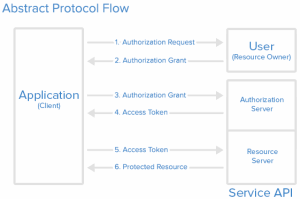
1. The client application sends a request for access to the protected resources of the user, specifying in particular his identity (client_id), the type of authorization and the scopes desired. The scopes are determined by the authorization server beforehand. The more the API is cut into small scopes, the more the profile of each client is accurate (and therefore limited). Each client application knows only the scopes it can use.
2. If the user approves the request, an access right is returned to the client.
3. The client then requests an Access Token from the token server by providing its identity (eg client credentials), as well as its previously received access right.
4. If the identity is validated (the client is authenticated) and the access right is valid, the token server issues an Access Token.
5. The client can then request access to the protected resources to the resource server by presenting its Access Token.
6. If the provided Access Token is valid, the requested resources are returned to the client.
Note that the specification OAuth2 requires that all these exchanges take place in HTTPS.
Depending on the type of authorization specified by the client, this schema will be implemented in different ways. In the OAuth2 specification, there are 4 types of permissions:
Depending on the type of authorization specified by the client, this schema will be implemented in different ways. In the OAuth2 specification, there are 4 types of permissions:
- Authorization Code: Used if the client application is located on the server side. Most implemented case.
- Implicit: used if the client application is located on the client side (eg a Javascript application or a mobile application) and no other type of authorization is available. This mode is less secure because the token does not stay on the server side but is exposed on the client side and can be intercepted.
- Resource Owner Credentials: Login credentials are sent to the client and then to the authorization server. This implies that there is absolute trust between the two. Often used when the client has been developed by the same entity that provides the authorization server (eg access to secure resources of a subdomain), this type of authorization is strongly discouraged because OAuth has been thought just so that the login credentials are no longer transmitted to third-party applications. In addition, there is no verification of the callback URL.
- Client Credentials: Used when the client is the owner of the data. There is therefore no specific authorization to obtain from the user. The exchanges begin directly in step 3. It is important to remember that OAuth2 does not handle authentication or even authorization. At no time is there any user information, roles or entitlements. In order to have a complete identity solution, it is necessary to use the OpenID Connect protocol.
OpenID Connect protocol description
OpenID Connect is a protocol that is gaining popularity because it is an overlay to OAuth2 (it is able to respond to all of its use cases), and adds new features that were missing from OAuth2:
- Support for authentication,
- The notion of Token ID,
- Management of the SSO session (eg the Single Logout),
- A new API to retrieve user information (User Info endpoint),
- Standardization of user information,
- An OpenID server discovery system to allow customers to register on their own.
The notion of Token ID
A Token ID is a self-bearing token that contains the identity of a user. It is conveyed in JWT format and consists mainly of:
- Authentication settings:
o expiration date,
o creation date,
o date of authentication,
o control means for validating the Token ID and the Access Token.
- Accreditations (roles, authorizations) of the user:
o formalism to be determined by the identity provider.
o attributes (claims) of the user.
Attributes are associated with "scopes":
- standard attributes:
o scope profile: name, surname, nickname, date of birth, ...
o scope email: email, verified email
o scope address: address
o scope phone: phone number, verified phone number
- private attributes
o attributes offered by the identity provider. It is necessary to specify them in order to avoid any collision with existing claims.
Sample Token ID:
{
"iss": "http://server.meritis.fr",
"sub": "24400320",
"aud": "s6BhdRkqt3",
"nonce": "n-0S6_WzA2Mj",
"exp": 1515604697,
"iat": 1515593897,
"name": "Matthieu Mabyre",
"given_name": "Matthieu",
"family_name": "Mabyre",
"gender": "male",
"email": "matthieu.mabyre@meritis.fr",
"acr": ["role1","role2", "role3"]
}
The meaning of the different fields can be found on the official documentation (http://openid.net/specs/openid-connect-core-1_0.html#IDToken ).
OpenID Connect offers several interfaces (endpoints):
- authorization: to authenticate a user
- token: to request a token (access / refresh / ID)
- user info: to retrieve information about the user (his identity, his rights)
- revocation: to delete a token (access / refresh)
- introspection: to validate a token (access / refresh).
- Other optional interfaces are available for client registration, discovery of OpenID Connect providers, and more.
The notion of Authorization Flow
OpenID Connect offers three algorithms to determine how to return tokens:
Authorization Code Flow:
The algorithm returns an authorization code and then retrieves tokens:
- tokens are returned only through the token interface,
- the recovery of an access token is done in two steps:
o a code is returned by the authorization interface,
o this code is sent by the client to the token interface.
- The customer must be registered with the OpenID provider (via an identifier and a secret),
- applies very well to mobile, web and back-end applications,
- most implemented algorithm.
Implicit Flow:
The algorithm directly returns the tokens.
- Tokens are returned directly by the authorization interface (the token interface is no longer used),
- There is no customer registration,
- There is no notion of Refresh Token,
- Long life tokens are not allowed,
- Algorithm for Javascript type applications (without back-end).
Hybrid Flow:
Hybrid Flow is a mix between Authorization Code Flow and Implicit Flow.
- the sequencing is identical to the Authorization Code Flow except that the authorization interface can return the code, the Token ID and the Access Token,
- Refresh Token is obtained by a call to the token interface,
- Algorithm very little used.
Focus on JWT
JWT (JSON Web Token) is a standard, secure information exchange format (https://tools.ietf.org/html/rfc7519 ).
A JWT token is broken down into three parts, separated by the character.
The header
(JOSE header) describes the algorithm used to sign or encrypt the token. For example, for a signature using the HS256 algorithm (HMAC with SHA-256), we would have: {"alg": "HS256", "typ": "JWT"} The header must then be encoded in base64.
The Payload
This is the content of the token. For example our Token ID previously described:
{
"jti": "f232b54cb285452db02770c9d16f8f212151",
"iss": "http://server.meritis.fr",
"sub": "24400320",
"aud": "s6BhdRkqt3",
"nonce": "n-0S6_WzA2Mj",
"exp": 1515604697,
"iat": 1515593897,
"name": "Matthieu Mabyre",
"given_name": "Matthieu",
"family_name": "Mabyre",
"gender": "male",
"email": "matthieu.mabyre@meritis.fr",
"acr": ["role1","role2", "role3"]
}
The field jti (JWT id) corresponds to the identifier of the token. For example, a UUID generated randomly. The payload must also be encoded in base64 thereafter.
Token signature
It is performed using the signature algorithm (defined in the header) from:
- the base64 encoded url header
- encoded base64 encoded payload
- the private key of the authorization server.
The signing of the tokens aims to ensure that the self-supporting tokens generated by the authorization server have been generated by this server, and that they have not been tampered with by a third party.
Example:
HMACSHA256(
Base64UrlEncode(header) + "." +
Base64UrlEncode(payload),
Private key
)
In the end, we get a JWS (S for Signed) token encoded in base64 (its size will depend on the size of the payload):
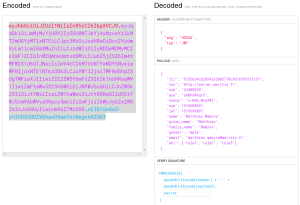
OpenID Connect and OAuth 2 add real value to organizations that want a centralized identity federation. They have become the essential standards when it comes to addressing SSO issues between services and applications of their IS. Indeed the information being normalized, like their formalism of exchange (via JWT), the interoperability between the applications is guaranteed, and the integration is only easier and fast.