Defining Technology Life
The technology life is characterized by:
• Its official life cycle, specified by the vendor
• Its life cycle within the organization; it can differ from the official life cycle.
Official Life Cycle
Dates of the official technology life cycle are automatically defined in the Characteristics tab of the technology properties.
• Release date
• End of Support
• End of Extended Support
These properties are defined automatically when you import a technology from Technopedia.
They can be specified manually if you do not use the Technopedia Connector.
See also:
Technology Life Cycle within the Organization (Gantt Diagram)
An object evolving over time can take different states (preparation, production, retirement, etc.).
The Object life enables viewing of the planning of these different states in the form of a Gantt chart.
To view the Gantt chart representing the different states of a technology:
1. Open properties of the technology.
 See also Accessing Technology Properties.
2. In the properties of the technology, click the drop-down list and select Characteristics.
3. Expand the Gantt section.
For more details on object life, see Viewing Application Life (Gantt Chart).
Analyzing the life cycle of a technology and the applications that use it
A report enables display in the same Gantt diagram of life cycle steps of the technology and those of the applications that use it.
A second report indicates any conflicts between life cycles of these objects.
To access these reports:
1. Open the properties of the technology concerned.
2. Click the Reports page then:
• Gantt Chart to view life cycles of the objects
• Gantt chart with conflicts to view any conflicts.
Support Alert Report
A Support Alert MetaAtribute available on each technology compares the technology life cycle (imported from Technopedia or defined manually) with its life cycle in the organization.
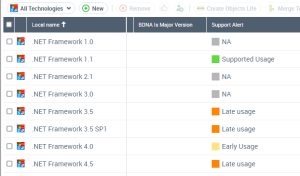
It can have the following values:
• Early life cycle: the technology has a life cycle in the organization which started before the official release date of the software technology.
• Supported usage: the life cycle of the technology begins after the release date of the technology and ends before the end of the support date.
• Delayed use: the life cycle of the technology begins after the release date of the technology and ends before the end of the extended support date.
• Non-supported use: the life cycle of the technology begins after the release date of the technology and ends before the end of the extended support date.
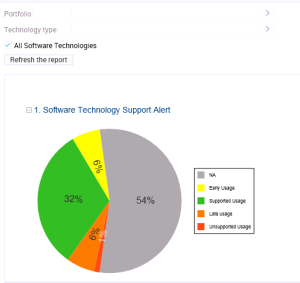
A report uses the Support Alert MetaAttribute to analyze technologies in the HOPEX repository and displays all possible conflicts between the use of these technologies in the organization and their official life cycles.
To generate a Support Alert report:
1. On the IT Portfolio Management desktop, click the navigation menu, then Reports.
This report is also available in the properties of a portfolio.2. Click the Technology navigation pane.
3. In the edit window, click Technology Support Alert.
The report appears in the edit area.
4. Select the technologies you want to analyze:
• Technologies of a Portfolio. You can select an Application or a Technology portfolio. In case of an application portfolio, it analyses the technologies linked to the applications.
• Technologies of a certain Type (Taxonomy).
• All Technologies
5. Click the Refresh the report button.
The report results appear in the edit area.