FAQs
What is the meaning of the actions below?
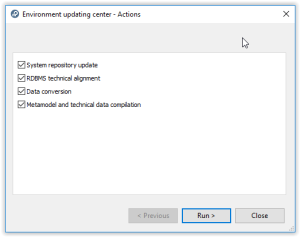
System repository update: update of system repository by import of .MOL files.
RDBMS technical alignment: update of tables at SQL level (RDBMS only).
Data conversion: additional conversion for system repository and data repositories.
Metamodel and technical data compilation: compilation.
What is the procedure for GBMS storage?
It is not recommended at all to use GBMS storage (deprecated)
• It not supported for Web Front-end
• It not supported for large repositories (size larger than 4 GB)
It is possible to upgrade data using the same procedure.
Note that some steps/actions are not applicable:
• Menu Perform SQL conversions on the repository in Administration.exe
• Action 'RDBMS technical alignment in environment upgrade wizard
•
How can I get the MSP file of the Corrective Pack?
Procedure:
• Copy the .EXE of the Corrective Pack file in a temporary folder, ex: C:\tmp\HOPEX_V2R1_U03.02.0.exe
• Open a command prompt window (CMD)
• Run the following command <path of EXE)> /E, Ex: C:\tmp\HOPEX_V2R1_U03.02.0.exe /E
• The installation wizard is loaded. Click 'Cancel' then 'Yes' and 'Finish' to exit the wizard.
• In the temporary folder, a .MSP file has been created, ex: MEGA HOPEX V2R1 Patch 301.msp