Initializing a User Web Account
Prerequisite:
Before initializing the Web account of a user:
• ensure the e-mail of the person is specified.
• check that the following options relating to Web applications are specified:
 These options can be specified at installation, see the HOPEX Web Front-End Installation Guide installation document.
To initialize the Web account of a user:
1. Access the User Management pages.
2. Select the Persons sub-folder.
3. In the Persons list, select the person concerned.
4. Click Initialize the Account.
An e-mail is sent to the person concerned with a limited life link (48 hours by default), allowing the person to define a password and the reply to a security question.
 In the characteristics of the person, if the e-mail address is not specified, the person cannot receive the message.To modify the lifetime of the first connection link, see Modifying the Lifetime of the First Connection Link.
Modifying the Lifetime of the First Connection Link
To modify the lifetime of the first connection link:
1. Access environment options.
2. In the options tree, expand the Installation folder and select User Management.
3. In the right pane, modify the value of the Life of first connection link option.
Modifying Password Management Configuration
To modify configuration linked to password management:
1. Access environment options.
2. In the options tree, expand the Installation folder and select User Management.
3. In the right pane, you can modify default configuration of options:
• Number of tries before password invalidation
Default value: 3• Password expiry
Default value: 40 daysModifying password definition rules
To modify password definition rules:
1. Edit the CheckPasswordFormat macro.
2. Overload the macro CheckPasswordFormat with your definitions.
By default this macro imposes that the password should comprise:
• between 8 and 16 characters
• at least one letter
• at least one figure
• at least one special character
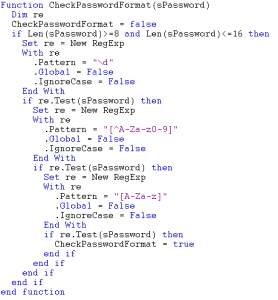
3. In the Password information _CodeTemplate, modify the message, which is displayed in the user's Account activation page after his web account initialization
Reinitializing a User Password
Prerequisite:
Before reinitializing a password, check that the following options relating to Web applications are specified:
These options can be specified at installation, see the HOPEX Web Front-End Installation Guide installation document.To reinitialize the password of a user:
1. Access the user management page.
2. Select a Persons sub-folder.
3. In the edit area, select the person for whom you want to initialize the password.
4. Click Initialize the Account.
An e-mail is sent to the person concerned with a limited life link (48 hours by default), allowing the person to define a password and the reply to a security question.
Defining a Temporary Password to a User
This action is only available to HOPEX Administrator and HOPEX Administrator production profiles.This feature is useful for a user whose e-mail is not set. Without email, a user cannot define his/her password via the e-mail sent at account initialization.
You must define this user a temporary password. At first connection to HOPEX, the user is prompted to change this password.
To define a temporary password to a user:
1. Access the user management page.
2. Select a Persons sub-folder.
3. In the edit area, select the person for whom you want to set a temporary password.
You can select several users. They will all have the same temporary password.4. Click Set Password  .
.
.5. In the Password field, enter the temporary password you want to set for the user.
6. Click OK.
The user's temporary password is saved.
At first connection to HOPEX, the user must enter this temporary password. Once connected he/she is prompted to define a new password.