Using Oracle SQL Developer
Oracle SQL Developer can be downloaded for free from the Oracle web site, on the Oracle software download page.
Using SQL Developer, the first thing to do is to set up a connection to be able to browse the content of the database for the SCHEMA that hosts MEGA data.
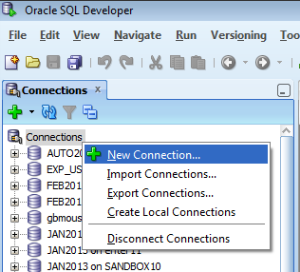
Reminder:
Note that the concepts of Oracle USER and Oracle SCHEMA are very similar but not exactly the same. Refer to Oracle documentation to clarify this point but here is what really needs to be understood:
A schema is a collection of logical structures of data, or schema objects. A schema is owned by a database user and has the same name as that user. Each user owns a single schema.
Fill in the connection parameters according to MEGA Administration settings
Note that you have to enter a port number. Port number 1521 is the default one. If another port was used, you would see it in the connection parameters that were entered in MEGA.
For example: w-ede:1234/EDE2
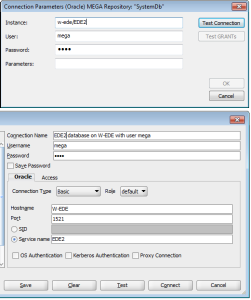
In this example, the connection parameters in MEGA were entered using a method called EASY CONNECT NAMING. They could also be entered in another form, using the CONNECT DESCRIPTOR method. This method is discussed further in this document.