Creating a Repository
You can create:
• an empty repository, then you can transfer data from another repository into it by importing updates or by restoring a backup file.
• (RDBMS specific) a repository already fed with data.
 See Installation and Deployment > RDBMS Repository Installation Guide > HOPEX RDBMS repositories specific administration actions > Restoring a HOPEX environment from formatted data > Restoring a data repository.
To create an empty repository:
1. Connect to HOPEX Administration and select the environment concerned.
2. Right-click the Repositories folder and select New.
The Create Repository dialog box opens.
3. Enter the Name of the repository.
The repository name should start with a letter and not exceed 60 characters. It can contain letters (A-Z), figures (0-9) and certain special characters (_$#).
The name of an Oracle repository should not be an Oracle reserved word (see DBA Oracle).The name of an SQL Server repository is prefixed by the environment name. This prefix is not included in the 60 characters limit.If you use strange characters, you must be in the same system language as these characters so that they will be recognized by HOPEX.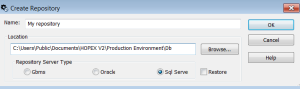
4. (Optional) By default, the repository is created in the Db folder of the selected environment; to modify this, click Browse and define another location.
5. Select the repository server type and click OK.
For more details on repository server type, see RDBMS Repository Installation Guide.The repository folder and its files are created.
 At creation of a repository, a sub-folder carrying the name of your new repository is automatically created in the Db folder of the environment folder to store corresponding repository files.
The repository created is empty. You can transfer data from another repository into it by importing updates or by restoring a backup file.