Requesting connection Information
Activating Connection Information service
By default this web service is not available.
To activate the Connection Information service:
1. Access the HOPEXAPI web.config file.
2. Set the ActivateEnvs_Dbs variable to true.
Authentication
All requests regarding connection information must contain authentication information in the headers part of the http request.
The authorization header must respect one of the following format:
|
Authorization Type
|
Value
|
|
UAS
|
Bearer <uasToken>
|
Authorization type: UAS
Prerequisite: to use a token with UAS integration, you must get it before calling it and pass it in your header as a Bearer token.
1. Call UAS to get a token.
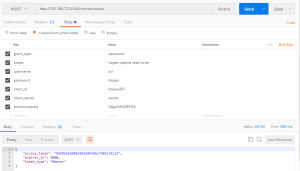
2. Retrieve the token.

3. Call the service with Bearer as Authorization scheme.

Environment list
You can get the list of environments installed on the server.
To fetch the list of environments, you must call the URL:
{WEBSERVICEURL}/environments.
According to your Accept header key value, it returns you:
 an XML message.
The result can be:
 a Json message.
The result can be:

The system returns a list of environments.
|
Property
|
Description
|
|
Id
|
Identity of the environment
|
|
Name
|
Name of the environment
|
Repository list
This method lists the repositories (databases) created for the environment passed in the URL.
The URL format is:
{WEBSERVICEURL}/environments/{env_id}/repositories
Where:
{env_id} is the environment id. The result can be:
in XML: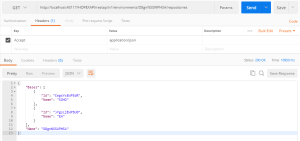 in Json: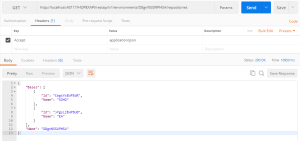
The system returns an environment name with a list of Hopex repositories.
|
Property
|
Description
|
|
Bases
|
The list of Hopex repositories
|
|
Id
|
Identity of the repository
|
|
Name
|
Name of the repository
|
|
Name
|
The name of the environment
|