Specifying Costs Components
Costs on a component can be specified by:
• a user with "Financial Controller" role, who has been declared responsible for the component in question;
• the Application Portfolio Manager:
You can define costs on the following components HOPEX :
• Applications
• Application deployments
• Initiatives
One or several cost lines can be associated with a component.
A cost line is characterized by:
• a type : operating or capital.
• a nature: infrastructure (for a deployment), license (for an application), service, manpower.
• l'state of the life cycle of the component concerned, such as specification or development phases.
Associated with a cost line can be:
• a periodic expense
• one or several fixed expenses
Creating a cost line
To associate costs with an application for example, you must begin by creating a cost line.
You can create cost lines singly, or automatically create three cost lines corresponding to the three cost natures possible for an application: license, service, manpower.
To create a cost line for an application:
1. Open the properties pages of the application.
2. Select the Costs page.
3. In Cost linesection, click the New button.
The Creation of a cost line box opens.
4. To create a single cost line, select option Create only one cost line.
5. Click Next.
6. Specify the Nameof the cost line.
7. Select the Cost Type..
8. Select the Cost Nature.
9. Select the State of the application life cycle.
 The states proposed in the drop-down list are states of the life cycle associated with the object life.
10. Click Next.
The periodic expenses creation dialog box opens.
Fixed expenses, which can be multiple, are separately defined. For more details on fixed expense creation, see Creating a fixed expense.11. Define the periodic cost and click Next.
For more details on fixed expense creation, see Modifying a periodic expense.12. Click OK.
The new cost line appears in the Cost Line.
Creating a fixed expense
Fixed expenses associated with a component are accessible from the component properties pages, in the Costs tab.
To create a new fixed expense on an application from a cost line:
1. Open the properties pages of the application.
2. Select the Costs page.
3. In the Cost Line section, select the cost line that interests you.
4. In the Fixed Expenses section, the list of fixed expenses associated with the cost line appears. In this section, click the New button.
The Creation of Expense dialog box opens.
5. Specify:
• the Name of the expense
• the Date of the expense,
• the Amount of the expense.
6. Click OK.
The new expense appears in the Fixed Expenses section.
Modifying a periodic expense
To modify characteristics of a periodic expense associated with an application:
1. Open the properties pages of the application.
2. Select the Costs page.
3. In the Cost Line section, select the cost line that interests you.
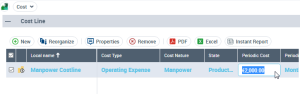
4. Columns specific to the periodic expense are associated with the cost line:
• Periodic cost
• Periodicity
• Up/Down Amount
5. Click the column to be modified and enter the new value.
If you indicate a negative amount, at each time period the amount will be deducted from the periodic cost until this reaches zero.