Calendars
Audits are based on calendars and calendar periods.
Defining a Calendar
A calendar generally covers a period of one year, either a fiscal year or a calendar year.
A calendar is made up of calendar periods: a calendar period can for example correspond to a quarterly period. It can be useful to divide calendars into calendar periods to plan audits.
The calendar is used for information in reports. An audit plan must be connected to a calendar.
To create a calendar:
1. In Audit > Preparation > Audit Plans, select Calendars.
2. In the right pane of the window, click New.
3. Enter the Name of the calendar and its begin and end dates.
4. Click OK.
You can then define calendar periods.
Creating calendar periods
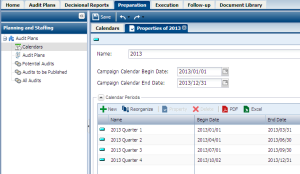
To create calendar periods:
1. Open the Properties of the calendar.
2. Click the Characteristics tab.
3. In the Calendar Period section, click New.
4. Enter the Name of the calendar period and its begin and end dates.
5. Click OK.
6. Create other calendar periods in the same way.
The calendar is created. It can then be connected to an audit plan.
Connecting an Audit Calendar to an Audit Plan
To connect an audit calendar to an audit plan:
1. Open the audit plan properties.
2. Click Characteristics.
3. In the Calendar field, click the arrow and select List to display the list of calendars.
4. Select the calendar to be connected to the audit plan.
5. Click OK.
Audit plan begin and end dates are automatically initialized with those of the calendar.