HOPEX Information Architecture - Physical Layer
HOPEX Information Architecture is used to design and model databases.
A database describes organization of a system in the form of data stored in a structured way.
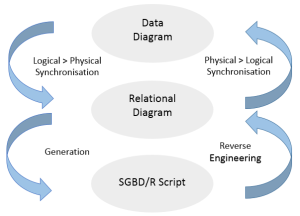
HOPEX Information Architecture integrates by default the logical and physical modeling levels and is used to switch from one model to another. You can therefore:
• Build a data diagram or a class diagram,
• From this diagram, create database tables and their columns, indexes, and keys, as well as the drawings for the corresponding relational diagrams.
• Optimize the resulting relational model and generate SQL commands to define the tables. HOPEX Information Architecture in particular takes account of evolutions of the conceptual model without losing optimizations made to the relational model.
• Reverse generate a database definition using the ODBC protocol to create the corresponding tables and columns in HOPEX Information Architecture, and obtain the corresponding data diagram or class diagram.
Data Modeling Options
Formalisms
You can model logical data using two formalisms:
• the data package, to build class diagrams (UML notation) This formalism is selected by default.
• the data model, for data diagrams (standard notations, IDEF1X, I.E, Merise)
To display one of the formalisms:
1. On the desktop, click Main Menu > Settings > Options.
2. In the navigation tree, expand the Data Modeling folder.
3. Click Data Formalism.
4. In the right part of the window pane select the formalism(s) that you want to display.
5. Click OK.
The folders corresponding to the packages and data models appear in the Logical data navigation pane.
Logical formalism and synchronization
In HOPEX Information Architecture V2R1, the UML formalism is applied by default in the synchronization. It integrates handling of parts. Associations are no longer processed; when you synchronize a data model into a physical model, associations of the model are not taken into account in the synchronization.
For reason of compatibility, you can restore the former treatment, ie. UML formalism and data models, with the processing of associations instead of parts. You can change the formalism in the HOPEX Administration application.
To access the option:
1. Open the Administration tool.
2. Open the options of the environment concerned.
3. In the Options window, in the tree on the left, unfold the Data Modeling folder.
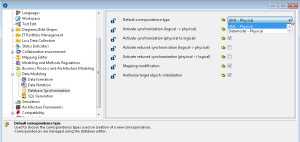
4. Click Database synchronization.
5. In the right pane of the window, in Default correspondence type, select the desired value.
• UML - Physical: default option (with the processing of parts)
• Datamodel - Physical: old option (with the processing of associations)
Notations
You have access to a standard data model notation, selected by default. To display another notation (DEF1X, I.E ou Merise):
1. On the desktop, click Main Menu > Settings > Options.
2. In the navigation tree, expand the Data Modeling folder.
3. Click Data Notation.
4. In the right part of the window, select the notations that you want to display.
5. Click OK.
Repository access
To use the functionalities of HOPEX Information Architecture, you must have "Advanced" repository access:
1. Click Main Menu > Settings > Options.
2. In the left pane of the window, click the Repository folder.
3. In the right pane, check that access to the repository is in "Advanced" mode.