Accessing logical data
In HOPEX Information Architecture, access to logical data in the repository is reserved for the Data architect.
Display the navigation pane of logical data
To access repository logical data:
 On the HOPEX Information Architecture desktop, click the navigation menu, then Logical data.
The navigation pane shows the corresponding object types:
• Data packages
• Data models (if the corresponding option is checked)
• Data areas
• Data views
Basic Elements of the Logical View
UML package
A package is used to represent the static structure of a system, particularly the types of objects handled in the system, their internal structure, and the relationships between them.
The package is an owner element. It provides a namespace for the elements that it consolidates.
The package allows you to classify elements referenced in a project. You can create sub-packages in a package to classify objects in finer detail, for example actors of a project.
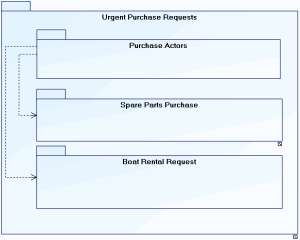
Urgent purchase requests are provided to process purchase of spare parts and boat rental requests. In both of these cases, users are actors of the purchasing domain.
 For more details on the use of packages, see the HOPEX UML guide.
Class diagrams are used to graphically represent elements in a class diagram.
See:
 The notation UML notation: "The Class Diagram", page 21.
Data model
Like a package, a data model is used to represent the static structure of a system, particularly the types of objects handled in the system, their internal structure, and the relationships between them.
Data diagrams are used to graphically represent the elements in a class diagram.
For more details on creating and updating a data model, see "The data model", page 25.
Example
The data model of the "Purchase Request Automation" project is presented below.
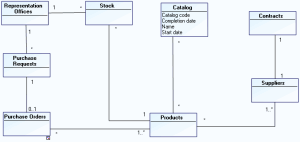
The application manages purchase requests, orders and product stock levels in each of the representation offices.
A centralized catalog of products and suppliers is installed.
Contracts with referenced suppliers are also accessible from the application.
For more details on creating and updating a data model, see "Modeling data". Data area
A data area represents a restricted data structure dedicated to the description of a software Data Store. It is made of classes and/or data views and can be described in a Data Area Diagram.
For more details, see Logical data areas.
Example
The following data area diagram represents a data structure relating to Orders; it describes classes and their relationships in a Whole/Part formalism.
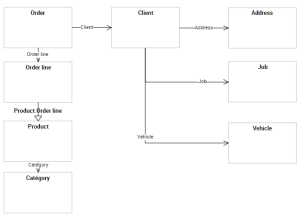
To address these specific use cases, you can create Data Views in which you can see and modify the scope covered by the classes.
See Logical data areas.
Logical data view
A data view represents the scope covered by an element of a data model or a data area. A data view is based on the selection of several classes connected in the specific context of the view. See Data views.