Defining Subject Areas
A business information area is a sub-set of elements of a subject area that reduces the scope of a field.
The subject area is the essential element in creating your information architecture.
Subject areas can be created with the Business Information Architect profile.
Subject Area Elements
HOPEX Information Architecture allows you to easily update your subject areas from already existing dictionary elements: Term, Concept, State Concept, Event Concept or Concept View.
 The list of elements from a subject area is accessible from its properties dialog box in the Characteristics, Scope and Scope instance sections.
A subject area is used to describe all the elements defining your information architecture:
• Concepts
 An event concept represents an event occurring during concept life, for example a change of season. An event concept marks the impact on a concept of a phenomenon internal or external to the concept. Concept events can be distinguished as concept start events, end events and intermediate events.For more details, see Describing Concepts.
• Concept variations
A variation describes how a concept can be varied under another form. The variant is an object similar to the varied object, but with properties or relationships that may differ.For more details, see Describing Concept Structural Components.• Concept types
A concept type enables classification of concepts. Relationships between concept types are represented by concept type components.For more details, see Describing Concept Types.• State concepts
A state concept is a situation in a concept life cycle during which it satisfies certain conditions, executes a certain activity or waits for a concept event. A state concept represents a time interval of which limits are two concept events. A state concept is a phase through which the concept passes during its life cycle.For more details, see Describing Concept or Individual States.• Event concepts
An event concept represents an event occurring during concept life, for example a change of season. An event concept marks the impact on a concept of a phenomenon internal or external to the concept. Concept events can be distinguished as concept start events, end events and intermediate events.For more details, see Describing Event Concepts.• Individuals
An individual represents the occurrence of a concept.For more details, see Describing individuals.• Individual states
An individual state is an instance of a concept state to which the dictionary state is connected. It represents an individual state during its life cycle.For more details, see Describing Concept or Individual States.A subject area can be completely or partially described by a concept diagram.
For more details on environment components, see Defining a Business Information Area.Creating Subject Areas
To create a subject area with HOPEX Web Front-End :
1. Click the navigation menu then Business Information.
2. In the edit area, click All Subject Areas.
3. Click New.
The Create Subject Area dialog box appears.
4. Enter the Name of your new subject area and click OK.
The new subject area appears in the list.
To create a subject area with HOPEX Windows Front-End, in the Information Architecture desktop, click on the IA Library tab, then on the Information Architecture navigation pane and expand the Subject areas folder to obtain the list of existing subject areas in the repository.Accessing subject area concepts
To access subject area concepts in HOPEX Web Front-End :
1. Click the navigation menu then Business Information.
2. In the Business information pane, click Subject Areas then Architecture Information Hierarchy.
The list of existing subject areas in the repository appears.
3. Expand the folder that corresponds to the subject area that interests you.
4. Expand the Concepts folder.
The list of subject area concepts appears.
Concepts carry the name of the term associated with the concept in the data language. For more details, see Using the Glossary in a Multilingual Context.If you expand the folder associated with a concept, the terms and synonyms are accessible in all languages available in your environment HOPEX.
The number of languages proposed from folders depends on your HOPEX environment. To configure the list of languages, see the HOPEX Power Supervisor guide, chapter "Managing Options", "Managing Languages", "Installing Additional Languages".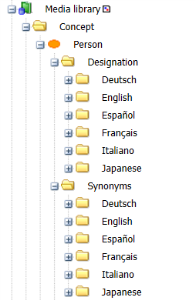
Accessing subject area terms
To access subject area terms:
1. Expand the folder that corresponds to the subject area that interests you.
2. Expand the Terms folder.
All subject area terms appear without distinction of language.