Environment Management
The functional administrator is authorized to update all organizational information.
To access information concerning the environment of the enterprise:
 At top left in the application, click the button corresponding to the Environment desktop.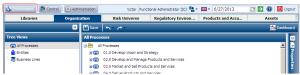
 For a complete description of the solutions environment, see “Defining the Environment for Solutions", page 695
Accessing Organization Information
To access information concerning the organization:
1. In the Environment desktop, select Organization > Tree View.
Trees enable access to all organization entities and processes.
2. Select an object in the tree that interests you.
The properties dialog box of the object appears on the right.
3. Specify properties or connect context objects.
Connecting Environment Objects
To be able to use functionalities of the HOPEX Internal Control solution:
• Processes (organizational or business) should be connected to entities of the organization.
• Controls should be connected to these processes.
For example, to connect processes to an entity:
1. In the Environment desktop, click Organization > Hierarchical View > Entities and select an entity.
2. In the properties of the entity, expand the Scope section.
3. In the subtab corresponding to organizational or business processes, click Connect.
4. In the query dialog box that appears, click the Find button, select the required process and click Connect.
To connect controls to processes, you can proceed as described above but from a process. HOPEX Internal Control enables simpler control scope definition. For more details, see Scoping Controls.