The actions on an object in a diagram
The actions available on an object in a diagram depend on the display mode of the diagram in which you are working (edit mode or preview mode).
When you click an object in a diagram:
• in preview mode, you access the pie menu of the object.
•  : access the object properties
: access the object properties •  : generate a report on the object
: generate a report on the object •  : access the diagram describing the object.
: access the diagram describing the object. •  : access the diagrams containing the object
: access the diagrams containing the object 
• in edit mode, you access:
• the object pop-up menu
• the specific actions for the object
In a relational diagram in edit mode, using a table, a key, a column, an index, a physical view.
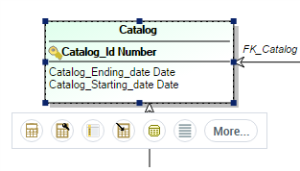
For more details on opening diagrams, see:
See also: "Handling Objects in Diagrams", page 92.