Naming Objects
Certain types of objects in HOPEX have a local name, specific to a given context. This mechanism allows another object to use the same name, but in a different context.
It is possible for example to use:
• different conditions with the same name in different organizational processes.
• different "Enter Order" operations with the same name in different organizational processes. You can for example have operations:
• "Enter Order" in the "Normal Order Delivery" organizational process
• "Enter Order" in the "Urgent Order Delivery" organizational process
The operations have the same local name though being different. They can have different comments or send different messages.
 Examples of object types with local names are: Application, Diagram, Operation, Service, Message, Collaboration, Package, Class.
Local Name and "Long" Name
When an object has a local name, two names are presented:
• the local name,
• the "long" name which includes the local name, preceded by the name of the object owner (the owner being the context in which the object is defined).
The long name is available in the enterprise architecture desktop.In the properties dialog box:
• the Characteristics tab presents the Local Name of the object.
Example: The Local Name of the operation below is "Enter Order".
• The General tab, Administration subtab presents the long name of the object. The first part of this long name refers to the object owner.
Example: The long name of the following operation is: "Urgent Order Delivery::Enter Order". The first part of this long name refers to the owner of the operation, the "Urgent Order Delivery" organizational process.
To change the object owner:
 In the Properties dialog box of the object, Characteristics tab, use the Owner field drop-down menus.
Querying Object Types with Local Name
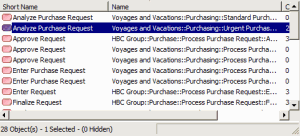
When you query an object type with a local name, the result dialog box presents the object Short Name opposite its "long" name. For example, when several operations have the same short name, you can select the operation corresponding to the context.