Configuring the objects shape
HOPEX objects are represented in a diagram by graphical shapes. Each object is represented by a default shape. Several shapes are available for each object.
You can modify:
• the object shape
• the object default shape
Modifying object shape
To modify, for example, the shape representing an org-unit in a diagram:
1. In the diagram, right-click the org-unit and select Shapes and Details.
The Shapes and Details window appears.
2. 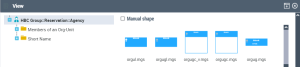 In the Shape frame, select the desired shape.
In the Shape frame, select the desired shape.Note that Manual shape box is checked automatically.
3. Click OK.
Modifying object default shape (HOPEX Windows Front-End)
To modify the default shape of objects of type Org-Unit, for example:
1. Right-click the object and select Shapes and Details.
The Display dialog box opens.
2. In the Shape frame, clear the Manual Shape check box to display the default shape of the object.
In the grayed File box, the name of the default shape is displayed.
3. Note the name of the default shape of the object.
ORGU.MGS (for Org-Unit)
4. In the Shape frame, select the shape you wish to display by default.
orguc.mgs for example
5. In the File box, note the path of the new shape.
...\Mega_Std\Pictures.7220\Method\orguc.mgs
6. Under the path indicated, select the file orguc.mgs and copy this in the ...\Mega_Usr folder.
7. Change the name of the copied file to the default name.
orguc.mgs by ORGU.MGS
The default shape of the object (eg: org-unit) is modified.
 For more details on managing shapes available, see Changing Shape Sets.
Changing Shape Sets
As standard, you have several sets of shapes which correspond to:
• version 2009,
• Version HOPEX V1R3 and higher
To modify the shapes version used in a diagram:
1. Open the Characteristics property page of the diagram.
2. Select a value in the Shapes Version field.
• “From MEGA 2009”
• “From HOPEX V1R3”
3. Open the diagram.
4. (HOPEX Windows Front-End) Click Drawing > Initialize Shapes.
The appropriate shapes are then loaded.
If you are using a version of HOPEX later than 5.2:
• New diagrams will use the new shapes by default.
If you want to use the old shapes, you must select the value "Before HOPEX 5.2" or "After MEGA 5.2" in the Shapes Version list box.• For compatibility, old diagrams always use the old shapes.
If you want to use the more recent shapes, you must select the value "After HOPEX 2005" in the Shapes Version list box.Shapes storage folder
Version | Shapes storage folder |
|---|---|
Version 2009 | MEGA_STD\Pictures.7220 |
HOPEX V1 and higher | MEGA_STD\Pictures.7600 |