Launching the Excel Import Wizard
Excel import enables creation of new objects and modification of existing objects.
Excel data to be imported in HOPEX should be structured. You can use an Excel file previously exported with HOPEX to define file parameters and content. See Example of generated files.
To import Excel data in HOPEX:
To import Excel data in HOPEX:
1. From:
• HOPEX Windows Front-End, click File > Import > Excel (*.xls ; *xlsx).
• HOPEX Web Front-End, click Main Menu > Import > Excel.
• the Administration desktop (Web Front-End): in the Tools pane, select the Excel > Import sub-folder.
The import wizard opens.
2. To the right of the Excel Import File field, click Browse  .
.
.3. Indicate the file type and file to be imported.
4. Click Next.
The wizard displays the worksheets and columns detected in the file.
If the file parameters have not been recognized by the wizard, you can enter them in this dialog box.
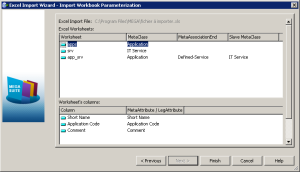
5. Click Next.
The wizard provides a report of import results in an Excel file. This file opens automatically, indicating in red any data that poses a problem. In the following example, the file has identified an application that exists in HOPEX but of which the identifier has been modified in the import file.
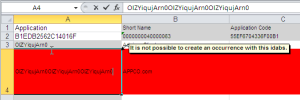
 The first two lines of an Excel worksheet are reserved for file configuration. Ensure that the first two lines of the imported file remain identical to those obtained after an export.
6. Click the Open Report button of the import wizard to access the detailed report of import errors.
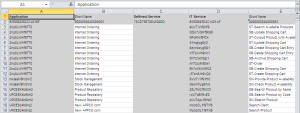
7. Click:
• Finish so that imported data will be visible in HOPEX.
• Previous to modify import parameters.
• Cancel to discard the report.
Technical limitation of the import
When you want to import Enumeration type attribute values (values available in a drop-down list), you must ensure that the data language in HOPEX and the language of the Excel file are identical.
If for example your Excel file is in French and the data language in HOPEX is English, on import you receive a message of the type: ""value name" outside table".
 The data language and the interface language are two different concepts.