Exporting an Object List in Excel Format
You can export an object list in Excel format. The Excel file includes the objects and its attributes (columns).
You can:
• select the objects to be exported (by default all of the objects are included)
• define the attributes (columns) of the objects that you want to include
To create an Excel table from a list of objects:
1. Access the list of objects
For example, using the "All applications" tile of the home page of your desktop, you can display the list of all the applications.
2. By default all of the objects are included, if needed select in each page the objects (rows) you want to export.
3. If needed:
• Select the attributes (column) you want to export.

• Modify the column (order).
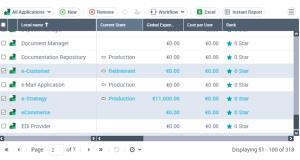
4. In the menu bar of the list, click Excel  .
.
.The Excel file created contains the objects selected and their attributes in column.