Breakdown map of business capabilities
You can use this report to display the realization coverage of business capability elements by operational elements such as logical and physical applications, application systems, etc.
Report examples
The example below enables viewing of the coverage rate of the capability map specified as parameters.
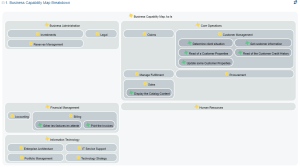
 For more details on how to associate a business capability with a functionality, see Defining the functionalities associated with business capabilities.
The example below shows how the functionalities associated with capabilities are implemented by application components.
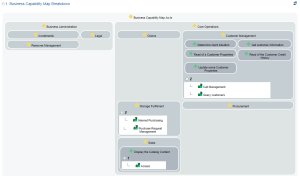 For more details on how to associate a business capability with an application, see Creating a business capability realization.
Report parameters
This consists of defining report input data.
Parameters | Parameter type | Constraints |
|---|---|---|
Root object | Capability map, Capability | One object mandatory. |
Depth level | Short | Defines the breakdown level of the business capability map or the capability entered as a parameter. |
Number of columns | Short | Defines the number of columns displayed by breakdown level (for eg. 2 or 3) |
Color palette | HOPEX palette | Mandatory. The palette delivered by default is "BoxInBox Report Monochrome Grey" |
EA Level | Multiple choice: - business function level, - organizational level, - application level, - technical level. | Define which objects of which type of architecture level are displayed for capability realizations; For example, activation of the "applications level" displays the business capability realizations for the Application System Environment, the Application Systems or the Applications |
EA dimension | Multiple choice: - capability models, - agent models, - process model, - information models, - performance models, - results models | Define which types of objects are examined within the framework of the breakdown analysis For example, activation of "capability models" will display the business skills or functionalities required by the capabilities that are broken down |