Description of the HOPEX Explorer Desktop
All HOPEX Explorer desktops appear as follows:

1: Toolbar, 2: Navigation tabs, 3: Breadcrumb, 4: Navigation zone (viewing or editing).
The HOPEX Explorer desktop includes:
• a toolbar
• navigation tabs to display the lists and trees of available objects in the navigation zone.
• a breadcrumb to access the last pages already viewed (in the same context).
• a navigation area to view objects.
By default, you are working in browse mode. If required, and depending on your profile, a button is available to switch to edit mode as necessary.
Toolbar
The toolbar is common to all HOPEX Explorer desktops and available in all pages of the HOPEX Explorer desktop.
•  enables full-text search (the repository must be indexed) and object type search.
enables full-text search (the repository must be indexed) and object type search.•  indicates the connexion profile and enables to switch to another profile without exiting HOPEX.
indicates the connexion profile and enables to switch to another profile without exiting HOPEX.•  displays the name of the HOPEX user used for mapping and its connection characteristics (profile, repository, environment).
displays the name of the HOPEX user used for mapping and its connection characteristics (profile, repository, environment).•  indicates the number of unread notifications and provides access to notifications.
indicates the number of unread notifications and provides access to notifications.•  is used to modify the data display language.
is used to modify the data display language.•  Disconnection is used to disconnect from the HOPEX Explorer desktop.
Disconnection is used to disconnect from the HOPEX Explorer desktop.Navigation Tabs

The following tabs are common to all HOPEX Explorer desktops:
• Home, which provides quick access to objects (via tiles), to the Documentation, and to Notification Management.
 See "Home Page", page 37.
• Dashboard, which provides access to your widgets.
The other navigation tabs are specific to the profile used for connection to HOPEX Explorer.
• Each navigation tab has a drop-down list; each menu thus provides access to a page with its associated tiles.
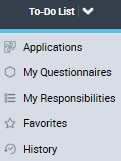
When you click the tab itself, it displays one of these pages.
Example: The To-Do-List tab displays My Responsibilities page.
• Each menu is used to display the tiles that give access to the lists and trees of objects available with your connection profile.

To the far right of the navigation menus, the Collaboration  menu enables to display the collaboration tabs.
menu enables to display the collaboration tabs.Breadcrumb

The breadcrumb is available on all HOPEX Explorer desktops. It keeps the last pages (in the same context) that you viewed so you can reopen them easily if needed.
Only the last three pages viewed are displayed.
To access an older page:
 Click the ... and select the page you want to access.
The breadcrumb trail is reset when you change context.
Navigation Zone
By default, on connection to HOPEX Explorer, the desktop opens in browse mode and displays the Home page with:
• connection profile specific tiles, which give direct access to a list of objects.
Example: the list of all your applications.
• quick access generic tiles.
Eg.: the Help tile to access the documentation.
See "Home Page", page 37.• an add tile button  .
.
.To customize your Home page, see "Customizing the Home Page of your Desktop", page 61.